Zendesk is constantly evolving, with new features and updates released on a regular basis. Keeping up can be a challenge, but our experts are here to break down what matters. Here’s our analysis of the latest announcement from August 2026.
The End of Phone Numbers? Unpacking Zendesk’s Critical WhatsApp BSUID Update
What We Think: This is a critical, under-the-radar update from Zendesk. While it seems like a minor technical change, the shift to support the Zendesk WhatsApp BSUID (Business-Scoped User ID) has significant implications for anyone with custom integrations. For businesses using the standard, out-of-the-box WhatsApp integration, it’s a seamless background update ensuring future compatibility. For everyone else, it’s a clear call to action. Ignoring this could break your automations, reporting, and customer recognition workflows when Meta fully rolls out WhatsApp usernames.
The Reality Check
Let’s cut through the jargon. Meta, the parent company of WhatsApp, is in the process of rolling out WhatsApp usernames. This means that soon, users might be able to initiate a conversation with your business without ever revealing their phone number. For years, the phone number has been the primary, unique identifier for a WhatsApp user within Zendesk. This entire system is about to change.
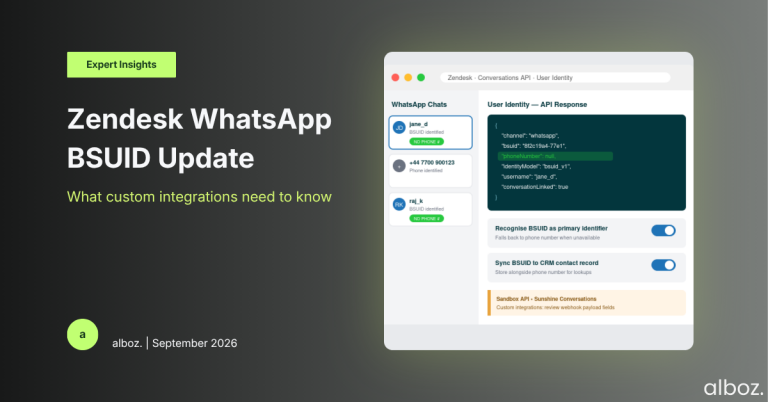
To solve this, Meta has introduced the Business-Scoped User ID, or BSUID. Think of it as a new, permanent serial number that WhatsApp assigns to each user specifically for their interaction with your business. It’s unique to that user and your business profile. Zendesk’s announcement confirms that their platform, particularly the Sunshine Conversations API that powers the integration, is now ready to recognise and process these BSUIDs. This ensures that even if a user contacts you via their username, Zendesk can still create a unified profile and keep their conversation history intact.
Our Expert Opinion (Deep Dive)
For many, the reaction to this is, “so what?” If you’re using the standard WhatsApp channel with no customisations, you genuinely don’t need to do anything. Zendesk will handle the transition automatically, and your agents won’t notice a difference. However, for a significant portion of our clients who leverage the full power of Zendesk, this is a major event.
The real impact is felt by anyone with custom code or integrations. We’re talking about:
- Custom APIs and Webhooks: If you have any custom-built systems that listen for Zendesk events or pull data from the Sunshine Conversations API, they are almost certainly programmed to look for a `phoneNumber`. When a user identified by a BSUID sends a message, that phone number field may be empty. Your code needs to be updated to recognise the new Zendesk WhatsApp BSUID as the primary identifier.
- CRM Integrations: Many businesses use the incoming WhatsApp phone number to look up a contact in their CRM (like Salesforce or HubSpot) to provide agents with more context. These lookup workflows must be adapted. The new process should first check for a BSUID and, if that fails, then look for a phone number. Storing the BSUID in your CRM against the contact record will be the new best practice.
- Marketplace Apps: While most app developers will update their products, it’s not guaranteed. If you use any apps that interact with WhatsApp users, you must verify that they are compatible with BSUIDs. An app that relies on a phone number for its logic could simply stop working for a growing number of your customers. For a deeper understanding of how these integrations work, our Sunshine Conversations API integration guide provides foundational knowledge.
Our take is that while this change presents a short-term migration challenge, it’s a positive step forward. A BSUID is a more stable and private identifier than a phone number. It’s permanent and tied to your business, which improves data integrity for long-term customer relationship tracking.
How We’d Handle the Rollout
Here is what we’re advising our clients to do. If your setup involves any custom work, you cannot afford to be passive. A proactive audit is essential. We recommend a structured approach to ensure nothing is missed and your customer experience remains seamless during this transition.
| Phase | Key Actions | Primary Goal |
|---|---|---|
| 1. Audit & Discovery |
| Create a comprehensive list of all potentially affected systems. |
| 2. Technical Review |
| Understand the precise code-level changes required for your Zendesk WhatsApp BSUID migration. |
| 3. Update & Test |
| Ensure your updated systems are robust and handle both BSUID and phone-number-identified users correctly. |
| 4. Deploy & Monitor |
| Confirm a successful transition with zero negative impact on your CX operations. |
In conclusion, this announcement is a perfect example of how a change in the wider technology ecosystem, driven by Meta, requires a direct and considered response within your Zendesk instance. While Zendesk has done its part to make the platform compatible, the onus is on businesses with customised solutions to adapt their own code. If you’re unsure where to start or need an expert eye to review your setup, your alboz. Solution Consultant is ready to help you navigate the Zendesk WhatsApp BSUID transition smoothly.