Zendesk’s platform evolves constantly, with updates and new features being announced almost every week. We’re here to analyse these changes and give you our expert take on what they really mean for your operations.
Beyond the Press Release: Our Take on the New Zendesk Hubspot Integration
What We Think: The new Zendesk Hubspot Integration is a significant and practical step towards creating a truly unified knowledge base for your customers and agents. While connecting another content source might seem like a minor update, its real power lies in supercharging Zendesk’s AI tools—like Copilot and advanced AI agents—with the rich, customer-facing content that often lives exclusively in Hubspot. This is more than a federated search feature; it’s about empowering your automated support channels with valuable marketing and sales knowledge. It’s a fantastic move by Zendesk, but it requires careful planning to avoid content chaos and maximise its potential.
The Reality Check: What’s Actually Changing?
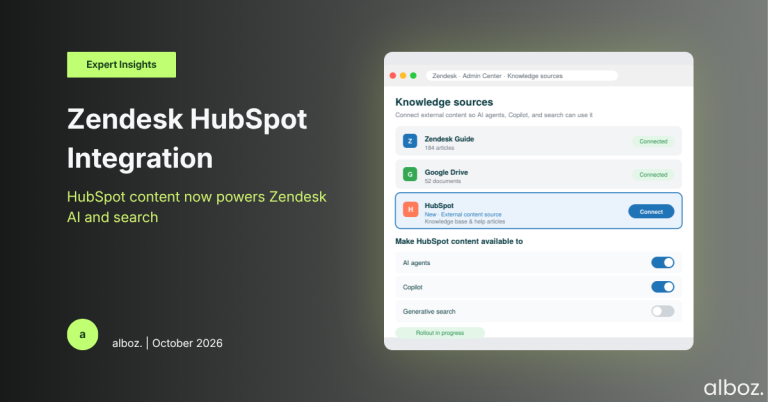
Let’s cut through the marketing language. In simple terms, Zendesk now allows you to plug your Hubspot knowledge base directly into your Zendesk account. Any content you’ve created and stored in Hubspot—be it blog posts, FAQs, or detailed guides—can now be indexed and used across your Zendesk instance.
This means the content will appear in search results within your help centre and, more importantly, will be accessible to your AI-powered tools. Your AI agents and Copilot can now draw from this Hubspot content to formulate answers and assist customers and agents. The goal is to eliminate information silos and stop the tedious process of manually duplicating content between your marketing platform and your support platform.
Our Expert Opinion: The AI-Enablement Engine
From our perspective, the most critical aspect of this announcement is its impact on AI. Zendesk explicitly states that the goal is to let “your AI agents, Copilot, search, and generative search tap into your Hubspot knowledge.” This is the real game-changer.
Many organisations we work with use Hubspot for marketing-led content that is incredibly valuable for support but is rarely migrated into a formal support-owned knowledge base like Zendesk Guide. Think about top-of-funnel educational articles, detailed feature comparisons, or “why choose us” blog posts. This content often answers the “why” questions that precede the “how-to” questions typically found in a support centre.
By connecting Hubspot, you’re not just adding more articles to a search index; you’re feeding your AI a much broader and richer dataset. An AI agent can now answer a pre-sales query about a product’s value proposition and seamlessly transition to a support query about setting it up, all by drawing from two different, now-connected sources. This is a foundational piece for building a more intelligent, holistic self-service experience that spans the entire customer journey.
This Zendesk Hubspot Integration is a clear signal of Zendesk’s strategy to position its platform as the central nervous system for customer knowledge, regardless of where that knowledge is originally authored. It’s about centralising access, not forcing a content migration.
How We’d Handle the Rollout: A Phased Approach
Simply turning on the connection without a plan can lead to confusing or conflicting information for your customers and AI. Here is what we’re advising our clients to do to ensure a smooth and successful implementation.
A disciplined approach is crucial. While this is a native connector, the principles of a successful data sync are the same as with any custom project, something we specialise in with our Zendesk API integration services. Careful planning prevents future headaches.
| Phase | Key Actions | Our Advice |
|---|---|---|
| 1. Content Audit & Strategy |
| Do not skip this step. The “garbage in, garbage out” rule applies doubly for AI. Decide what you want to sync before you sync it. |
| 2. Technical Setup |
| The technical part is straightforward, but ensure the user account you use for the connection has the correct, long-term permissions in Hubspot. |
| 3. AI Agent Integration & Testing |
| Focus on how the AI combines information. Does it correctly prioritise Hubspot content versus Guide content? Tweak your agent’s instructions if needed. |
| 4. Monitor, Refine & Govern |
| Set a recurring calendar reminder (e.g., quarterly) to review the integration’s performance and the health of your unified knowledge base. |
In conclusion, the new Zendesk Hubspot Integration is a powerful enabler for more intelligent, AI-driven support. It effectively breaks down the wall between marketing and support knowledge, creating a more seamless information experience for your customers. By implementing it thoughtfully, you can significantly enhance your self-service capabilities and make your AI tools much smarter. If you need guidance on how to best leverage this for your specific setup, our alboz. Solution Consultants are here to help.