Zendesk’s feature factory is always humming, and this week’s drop from late August is a small but mighty one for automation fans. Let’s break it down.
Zendesk Workflow Scheduling Gets an Hourly Upgrade: Our Expert Take
What We Think:
This is a fantastic, if overdue, quality-of-life improvement for any team serious about automation. Moving Zendesk workflow scheduling from a daily to an hourly cadence in Action Builder unlocks a whole new level of proactive, time-based automation. While it might seem like a minor tweak, it addresses a significant gap for recurring operational tasks that don’t fit the event-driven model of triggers and automations. Our verdict: A solid step forward that makes Action Builder significantly more powerful for real-world business processes.
The Reality Check: What’s Actually Changing?
Let’s cut through the jargon. Until now, if you wanted to build a process using Zendesk’s Action Builder that ran on a schedule, your only option was “daily”. This was fine for end-of-day reports or nightly cleanups, but pretty useless for anything more time-sensitive.
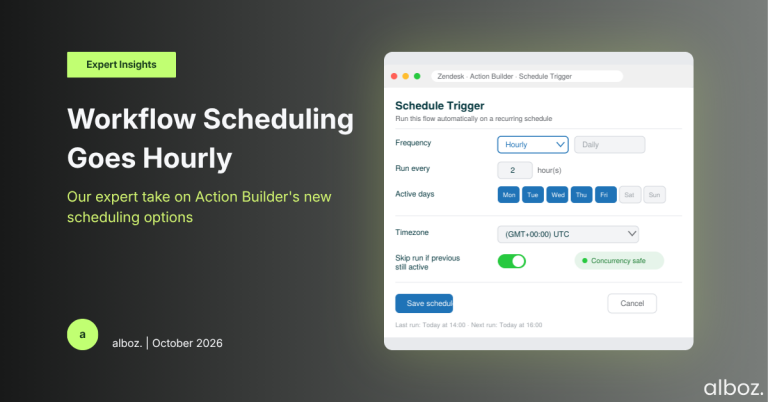
With this update, Zendesk has enhanced the “schedule” trigger for action flows. You can now configure your workflows to run not just daily, but hourly. This includes a few crucial customisation options:
- Frequency: You can specify the number of hours that should pass between each run.
- Timezone Control: You can set a specific timezone for the schedule, which is critical for global teams.
- Concurrency Management: A key new option lets you decide whether the workflow should run as scheduled even if a previous instance is still running. This helps prevent overlapping jobs and potential data conflicts.
- Day-of-Week Specificity: You can also select which days of the week the hourly schedule should apply to.
In short, Zendesk is giving admins much more granular control over when and how their scheduled, non-ticket-event-based automations run.
Our Expert Opinion: The Real-World Impact
This is where things get interesting. The shift to hourly scheduling bridges a critical gap between event-based triggers (which react to ticket updates) and the rigid daily automations. Many crucial business processes aren’t triggered by a customer action; they’re operational routines that need to run consistently throughout the day.
Zendesk’s own example is a perfect illustration: create an action flow that checks every hour for open tickets that haven’t been touched in five hours, tags them for follow-up, and notifies the assigned agent. This is proactive customer service at its best, and it simply wasn’t possible with the old daily scheduler.
We see this feature having a major impact in a few key areas:
- Proactive SLA Management: Instead of waiting for an SLA to breach, you can now build a workflow that runs every hour to identify tickets that are *approaching* a breach and flag them for immediate attention. This is a game-changer for maintaining service levels.
- Incident Synchronisation: For teams using external systems for incident management, this allows for more frequent, near-real-time synchronisation of incident status, comments, and priority levels between Zendesk and tools like Jira or PagerDuty. This is a core part of effective Zendesk API integration strategy.
- Data Hygiene & Cleanup: Run hourly checks for tickets with missing required fields, unassigned tickets sitting in a queue for too long, or tickets that need to be auto-closed after a certain period of inactivity. This keeps your Zendesk instance clean and your reporting accurate.
The key takeaway is that effective Zendesk workflow scheduling is not just about reacting to events, but also about creating proactive, time-based operational rhythms. This update makes that a reality within the native toolset.
How We’d Handle the Rollout: A Phased Approach
Here is what we’re advising our clients to do to adopt this new Zendesk workflow scheduling feature safely and effectively. Don’t just switch everything on at once. A measured approach will prevent unintended consequences.
| Phase | Action Item | Our Expert Tip |
|---|---|---|
| 1. Identify & Prioritise | Brainstorm recurring manual tasks that happen throughout the day. Which ones are most time-consuming or error-prone? | Start with a “read-only” workflow. For example, a workflow that identifies tickets and adds a tag, rather than one that changes the assignee or sends a public comment. |
| 2. Build & Test in Sandbox | Build your first hourly action flow in your Zendesk Sandbox. Pay close attention to the entry conditions to ensure it only targets the correct tickets. | Carefully test the “run as scheduled if a previous run is still going” setting. For most cleanup/follow-up tasks, you’ll want to leave this unchecked to prevent overlaps. |
| 3. Deploy & Monitor | Deploy the new action flow to your production environment. For the first 24 hours, closely monitor its run history. | Check the “Runs” tab for the action flow to confirm it’s executing as expected and not failing or timing out. Verify that the actions on the target tickets are correct. |
| 4. Iterate & Expand | Once you’ve confirmed the first workflow is stable and valuable, move on to your next prioritised use case. | Document each scheduled workflow clearly. As your use of Zendesk workflow scheduling grows, good documentation is essential for maintenance and troubleshooting. |
In conclusion, the introduction of hourly scheduling for action flows is a significant enhancement for any Zendesk admin looking to automate operational tasks. It provides the granularity and control needed to build proactive, efficient workflows that were previously difficult or impossible to implement natively. If you need help identifying the best use cases or implementing them safely, don’t hesitate to contact your alboz. Solution Consultant.