Zendesk is constantly evolving, rolling out updates and new features that can significantly impact your support operations. Here’s our expert take on the latest changes announced in August 2026.
Zendesk Custom Redaction with RegEx: A Powerful but Precise Tool for Serious Data Protection
What We Think: This is a huge step forward for data privacy within Zendesk, but it’s not for everyone. The ability to use RegEx for Zendesk custom redaction of unique PII like medical record numbers or internal IDs is a game-changer for compliance in regulated industries. However, its power is locked behind the pricey Advanced Data Privacy and Protection (ADPP) add-on and requires technical expertise to implement correctly. For the right company, it’s an essential upgrade; for others, it’s a feature they’ll never touch.
The Reality Check
Let’s cut through the jargon. Zendesk has always been able to spot and help you redact common sensitive information like credit card numbers. The problem was, what if your business uses something unique, like an `MRN-987654` or `WALLET_ID_ABC123`? Previously, your agents had to find and redact these manually. It was a slow process, and it was far too easy to miss something, creating a significant compliance risk.
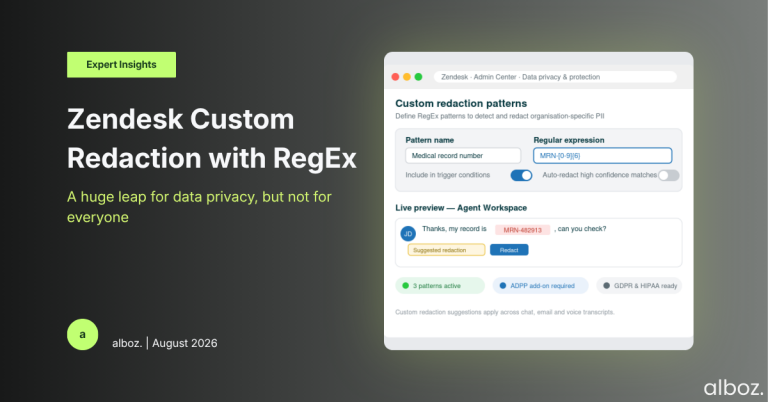
This update changes that. It lets your administrator teach Zendesk what your specific sensitive data looks like using a powerful pattern-matching language called Regular Expressions (RegEx). Once configured, Zendesk will automatically highlight these custom data patterns for your agents right within the Agent Workspace. This moves the process from a manual, error-prone search to an automated, reliable suggestion.
Our Expert Opinion (The Deep Dive)
The real story here is the introduction of Regular Expressions (RegEx). This isn’t a simple keyword finder; it’s a highly sophisticated way for you to define specific patterns. For example, you can tell Zendesk to find any string that starts with “EMP-“, is followed by exactly five numbers, and ends with the letter “Z”. That level of precision is incredible for data privacy and something we’ve been waiting for.
The primary benefit is a massive reduction in human error. Manual redaction is a ticking time bomb for compliance with regulations like GDPR. One missed Employee ID in a ticket could lead to a data breach. Automating the detection of this PII with a custom RegEx pattern drastically lowers that risk. Furthermore, the announcement highlights that you can include these custom redaction suggestions in trigger conditions. This is the holy grail for efficiency—allowing high-confidence patterns to be fully auto-redacted without agent intervention, saving countless hours.
However, let’s be realistic about the caveats. Firstly, this feature is exclusively part of the Advanced Data Privacy and Protection (ADPP) add-on. This is a premium licence, so the first hurdle is budget. Secondly, writing effective RegEx is a bit of an art form. A poorly constructed pattern could either fail to find sensitive data or, just as frustratingly, create “false positives” by flagging harmless text. This can lead to agent confusion and wasted time correcting the system. This isn’t a feature you can just “turn on” without a solid plan and the right technical skills.
How We’d Handle the Rollout
A feature this powerful requires a careful, phased approach. Rushing into it can cause more problems than it solves. Here is what we’re advising our clients to do:
| Phase | Action Item | Key Consideration |
|---|---|---|
| 1. Discovery & Planning | Audit your ticket data to identify all unique, recurring PII patterns (e.g., membership IDs, internal case numbers, medical record numbers). | Involve your legal and compliance teams early. They must confirm what legally constitutes PII for your organisation and regions. |
| 2. Technical Preparation | Confirm you have the ADPP add-on licence. If not, build the business case. Assign a technical resource to write and test the RegEx patterns for the identified PII. | Do not build RegEx inside Zendesk. Use an external testing tool to validate your patterns against real-world data samples before you implement them. |
| 3. Configuration & Training | An admin navigates to Admin Center to configure the new RegEx patterns as redaction suggestions. Simultaneously, develop and deliver training to agents on the new workflow. | Emphasise that these are suggestions. Agents are the final line of defence and must review the highlighted text before clicking to redact. |
| 4. Optimisation & Automation | Monitor the performance of the suggestions for a few weeks. Once confident in the accuracy of a pattern, consider creating a trigger to fully automate the redaction process. | Start with suggestions first. Rushing to full automation without validation can lead to accidentally redacting important, non-sensitive information from tickets. |
Ultimately, the new Zendesk custom redaction feature is a potent and necessary evolution of the platform’s security capabilities. It directly addresses a critical gap for organisations in finance, healthcare, and other regulated sectors. While the paywall and technical requirements mean it’s not a universal solution, for those who need it, it transforms data protection from a manual chore into an automated, reliable process.