Zendesk is constantly evolving its platform, dropping new features and enhancements. Our experts are here to cut through the noise and tell you what these changes really mean for your day-to-day operations.
Zendesk Resolution Dashboards Get a Much-Needed Upgrade for Multi-Brand and Finance Teams
What We Think:
Zendesk has added brand and tier filtering, plus a crucial data export option, to its Resolution usage and allowance dashboards. For clients on the resolution allowance pricing model, especially those managing multiple brands, this is a significant and long-awaited improvement. It transforms the dashboard from a high-level curiosity into a vital tool for operational management and financial reconciliation. Our verdict: This is a fantastic, practical update that adds a necessary layer of granularity and auditability.
The Reality Check: What’s Actually Changing?
Let’s cut through the announcement-speak. If your account uses Zendesk’s resolution-based pricing model, your admin centre is getting a serious upgrade. Previously, the Zendesk Resolution Dashboards gave you a single, high-level view of your usage. While useful, it was a blunt instrument, especially for complex organisations.
Now, two key capabilities have been added:
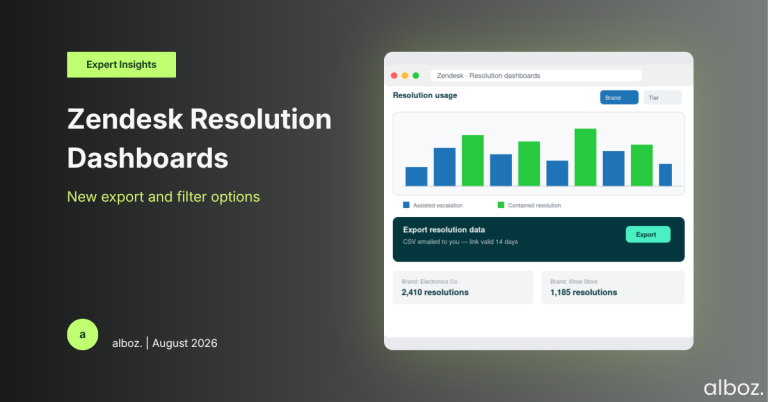
- Granular Filtering: You can now slice and dice your resolution data by Brand or by Tier (Assisted escalation, Contained resolution, or Verified resolution). This means you can finally see exactly which of your brands are driving resolution usage and what kind of resolutions are most common.
- Data Export: A new ‘Export’ button on the Resolution usage dashboard allows you to download the raw data for any date range you select. You’ll receive an email with a download link (valid for 14 days), making it simple to pull the information into a spreadsheet for offline analysis.
Crucially, you don’t need to do anything to get this. If you have the resolution dashboards, these features are now live. If you’re not on this pricing model, you won’t see these dashboards at all.
Our Expert Opinion: Why This Is a Game-Changer for Ops and Finance
While this update might seem minor on the surface, its operational impact is huge. Our team immediately recognised two areas where these new features will solve major headaches for our clients.
First, the multi-brand filtering is a lifesaver. We work with many businesses that run distinct customer service operations for different brands under one Zendesk instance. Before this update, attributing resolution costs across those brands was a nightmare of manual data reconciliation. Answering a simple question like, “How much is Brand X’s bot costing us in resolutions this month?” was difficult. Now, it’s a two-click process. This empowers brand managers to take ownership of their automation performance and allows for accurate internal cost allocation.
Second, and perhaps more importantly, the export function closes a critical auditability gap. The “Finance team” is explicitly mentioned in Zendesk’s reasoning, and for good reason. Any consumption-based pricing model needs a clear, auditable data trail. Without an export function, finance departments are often (and rightly) sceptical of platform-generated numbers. Providing a straightforward way to export contributing resolutions into a CSV file is the standard for enterprise software. This allows for proper auditing, offline analysis, and easy integration into larger financial reports. It builds trust and makes justifying the spend on automation much, much easier.
The ability to filter by resolution tier is also more powerful than it looks. It helps you analyse the effectiveness of your automation strategy. Are you seeing a high number of “Assisted escalations”? That might mean your bot is good at gathering context but not at fully solving issues. A high number of “Contained resolutions”? Your self-service is working beautifully. This data is key to refining your bot and automation strategies for better ROI.
How We’d Handle the Rollout: A 5-Step Action Plan
Since this is an automatic update, there’s no technical rollout. The real work is in operationalising the new capabilities. Here is what we’re advising our clients to do to get the most out of the enhanced Zendesk Resolution Dashboards.
| Step | Action Item | Primary Owner |
|---|---|---|
| 1. Verify and Communicate | Confirm the new filters and export button are visible in your Admin Center. Announce the new capabilities to brand managers, operations leads, and your finance partners. | Zendesk Admin / CX Manager |
| 2. Establish a Baseline | Use the export function to pull resolution data for the last 3-6 months. This will be your historical benchmark for future analysis. | Data Analyst / Ops Lead |
| 3. Conduct a Brand Audit | Use the ‘Brand’ filter to review the resolution usage for each of your brands. Identify any outliers or unexpected patterns that warrant a deeper investigation. | Brand Manager / CX Lead |
| 4. Analyse Your Resolution Mix | Use the ‘Tier’ filter to understand the breakdown of your resolutions (Contained, Assisted, etc.). Does the mix align with your automation goals for each brand? | Automation Specialist / Bot Manager |
| 5. Set a Reporting Cadence | Schedule a recurring monthly or quarterly meeting with stakeholders. Use exported data and filtered dashboard views to report on resolution usage, costs, and automation effectiveness. | CX Manager / Ops Lead |
A Small Change with a Big Impact
In summary, this update to the Zendesk Resolution Dashboards is a prime example of a targeted enhancement that delivers significant value. It provides the visibility multi-brand organisations need and the auditability that finance teams require. By enabling deeper analysis of resolution types, it also gives CX leaders the data they need to build a stronger business case for their automation and self-service investments. This is a solid step forward.