
Zendesk’s platform is in constant motion, with updates rolling out almost daily. Staying on top of these changes is key to optimising your customer service, and we’re here to give you the expert take.
Balancing Convenience and Security: Zendesk Secure Attachments Get a Smart Update
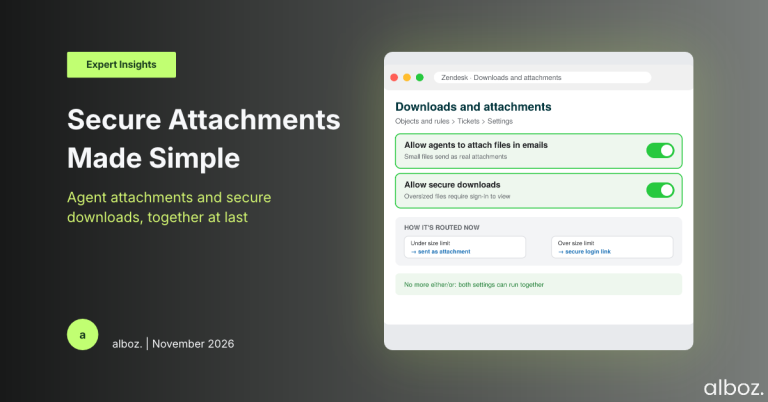
What We Think: Zendesk has finally resolved a frustrating ‘either/or’ situation with email attachments. You can now enable agent file attachments and require secure downloads simultaneously, giving you the best of both worlds. This is a small but mighty change for security-conscious organisations who also need to maintain user-friendly workflows. We see this as a solid quality-of-life improvement that removes an unnecessary and frankly, risky, trade-off.
The Reality Check: What’s Actually Changing?
For a long time, there was a fundamental conflict in Zendesk’s settings between sending attachments as actual files and securing them. You had to make a choice:
- Option A (Convenience): You could “Allow agents to attach files in emails.” This meant small files were sent as real attachments, which is great for customer experience. However, if this was enabled, you couldn’t also enable “Allow secure downloads,” meaning any attachment that exceeded email size limits would be sent as an insecure, publicly accessible link.
- Option B (Security): You could enable “Allow secure downloads.” This protected all Zendesk-hosted attachment links by requiring users to sign in to view them. The major downside was that it overrode the agent setting, turning all agent attachments—no matter how small—into links. This was secure, but often frustrating for customers who just wanted a simple PDF.
This latest update gets rid of that conflict. You can now have both settings turned on at the same time. The new logic is simple and smart: when an agent attaches a file, Zendesk checks its size. If it’s within your email provider’s limits, it goes as a standard, real attachment. If it’s too big, it’s uploaded to Zendesk and sent as a link that requires the user to log in to access it. This is precisely how most of us assumed it should have worked all along.
Our Expert Opinion: Why This Is a Bigger Deal Than It Looks
On the surface, this seems like a minor tweak, but from a risk management perspective, it’s a significant step forward. The old system forced a difficult choice between a seamless customer experience and a secure posture. Forcing every attachment to be a link created unnecessary friction for your customers, while allowing potentially sensitive large files to be sent as public links was a non-starter for any organisation with a robust security policy.
This change allows for a more nuanced and practical approach to Zendesk secure attachments. It acknowledges that not all files carry the same level of risk. A small, non-sensitive document like an invoice or a return label is perfectly fine as a standard email attachment. A large dataset or a detailed technical document, however, benefits from the protection of an authenticated download. This update enables you to create a policy that automatically differentiates between these use cases without any extra work for your agents.
We see this as a critical piece of a wider security strategy. It aligns perfectly with the principles of Zendesk Security Hardening, where small, intelligent configuration changes can significantly reduce your organisation’s attack surface. By ensuring that large, hosted files are automatically protected, you close a potential data leak vector. It’s a classic win-win: improved security with zero negative impact on the most common agent and customer workflows.
How We’d Handle the Rollout: An Implementation Checklist
Switching this on is simple, but we always advise a measured approach. Hurried changes can have unintended consequences. Here is what we’re advising our clients to do before enabling this new combined functionality for their Zendesk secure attachments.
| Step | Action | Key Consideration |
|---|---|---|
| 1. Audit & Discuss | Review your current settings under Admin Center > Objects and rules > Tickets > Settings > Downloads and attachments. | Understand which path you chose previously (convenience or security). Discuss with your security and support leadership if the new combined behaviour aligns with your company policies. |
| 2. Know Your Limits | Re-familiarise yourself with your outbound email attachment size limits. This is what determines the threshold for when a file becomes a link. | This limit is often around 7MB for Zendesk’s native email, but can be higher (up to 50MB) depending on your configuration and external email provider. This threshold is now a critical part of your security model. |
| 3. Test in a Sandbox | Before changing anything in your live environment, enable both “Allow agents to attach files in emails” and “Allow secure downloads” in your sandbox. | Test sending attachments that are both smaller and larger than your size limit. Confirm that small files arrive as attachments and large ones become secure links. This is a non-negotiable step. |
| 4. Update Agent Documentation | Prepare a brief communication for your support team explaining the change. | Agents need to understand when a customer will receive a file directly versus a link requiring login. This helps them manage customer expectations and answer questions confidently. |
| 5. Go Live & Monitor | Once you’ve completed testing and communication, enable both settings in your production environment. | Keep an eye on ticket feedback for a few days to catch any customer confusion around the new behaviour. If you need assistance with this process, your alboz. Solution Consultant is here to help. |
In conclusion, this update from Zendesk is a welcome and logical refinement, closing a long-standing gap between usability and security. It empowers administrators to implement a more intelligent and context-aware policy for Zendesk secure attachments, removing a frustrating trade-off. While it won’t revolutionise your instance, it’s a practical improvement that we recommend all security-conscious clients review and implement.


