
Finally, Control Over Your Zendesk IVR Greeting Repeat Count
Zendesk is constantly refining its platform, and on 18 June 2026, a subtle but significant change to Zendesk Voice was announced. It’s a small update that many have been waiting for, giving administrators more control over the Zendesk IVR greeting repeat count. Here is our expert take on what this means for your customer experience.
What We Think:
This is a small but long-overdue update. Giving admins control over the Zendesk IVR greeting repeat count finally allows for more streamlined caller journeys, preventing frustration for callers who already know where they need to go. It moves Zendesk Voice away from a rigid, hardcoded behaviour towards a more flexible, customer-centric tool. It’s a clear, simple win for caller experience.
The Reality Check
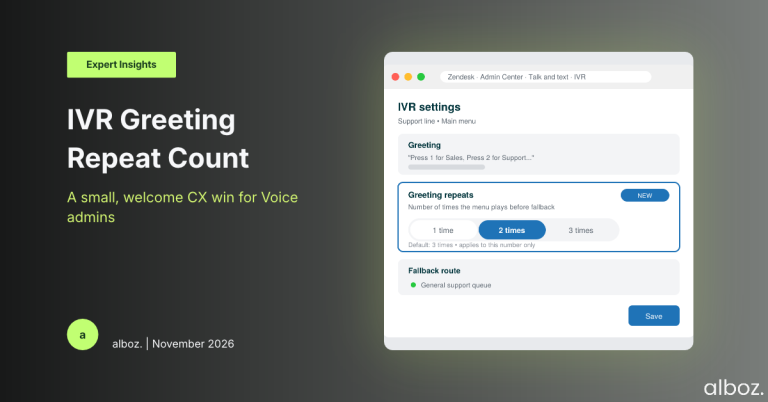
Let’s cut through the jargon. For years, the Interactive Voice Response (IVR) menu in Zendesk Voice was set in stone. When a customer called and was presented with options (“Press 1 for Sales, Press 2 for Support…”), the greeting would play three times before the call was routed to the default option you had configured (like a general queue or voicemail).
This three-repeat loop was hardcoded. You couldn’t change it, even if it didn’t suit your customers or your call flow design.
With this update, that rigidity is gone. You can now choose whether the IVR greeting and menu options repeat once, twice, or three times before the fallback action is triggered. To ensure no disruption to existing setups, the default setting remains at three repeats. So, if you do nothing, nothing will change.
As a minor bonus, Zendesk has also refreshed the IVR settings page with a more modern interface, bringing it in line with the rest of the platform’s look and feel.
Our Expert Opinion (Deep Dive)
At first glance, this seems like a trivial change. A dropdown menu with three options? It’s hardly groundbreaking. However, from a CX perspective, this is a crucial piece of functionality that gives organisations a powerful lever to pull.
Our take is that the “one-size-fits-all” approach of the three-repeat rule was a persistent source of low-level customer friction. Think about your repeat callers. These are often your most valuable customers, and they know your phone system. They know they need to press ‘2’ for technical support. Forcing them to listen to the same menu three times before they can be routed is inefficient and, frankly, annoying. It artificially inflates time spent in the IVR and can lead to call abandonment before an agent is ever reached.
This update allows you to design a more intelligent and respectful caller journey. By reducing the Zendesk IVR greeting repeat count to one, you can create a much faster path for those “expert” callers. They hear the menu once, make their selection, and are on their way. This small adjustment shows you value their time.
Conversely, for more complex IVRs with multiple levels or for an organisation that deals primarily with first-time callers, keeping the repeat count at two or three might still be the right choice. It gives people who are confused or distracted a second chance to make the right selection without having to hang up and call back. The key here is choice.
You are no longer bound by a system default that may not fit your specific customer profile. This is a core principle of good CX design, and it’s a welcome addition to Zendesk Voice. If you’re looking to refine your customer journeys further, a comprehensive Zendesk optimisation project can help you analyse and improve every touchpoint, including your IVR flows.
How We’d Handle the Rollout
While this is a simple change to implement, we advise a structured approach. Simply switching the setting without thought could have unintended consequences. Here is what we advise our clients to do:
| Phase | Action | Our Expert Tip |
|---|---|---|
| 1. Analyse & Audit | Review your current IVR setup for each phone number. Analyse your Zendesk Talk data: What is the average time callers spend in the IVR? What is your call abandonment rate within the IVR? | Segment your callers. Do you have many repeat callers who know the system, or are most of them new? The answer will guide your decision. |
| 2. Decide on the Count | Based on your analysis, decide on the optimal repeat count. For simple menus or high-volume lines with experienced callers, one repeat is likely best. For complex, multi-level menus, two might be a safer choice. | Don’t feel you have to use the same setting for all numbers. A VIP support line could have a different repeat count to a general enquiries line. |
| 3. Implement the Change | Navigate to your IVR settings in the Zendesk Talk admin center. For each relevant IVR, adjust the “Greeting repeats” setting from the default of 3 to your chosen value (1 or 2). | Make the change during a low-traffic period to minimise any potential disruption, just in case. It’s a simple toggle, but caution is always wise. |
| 4. Monitor & Measure | After implementing the change, closely monitor the same metrics you audited earlier. Has the average IVR time decreased? Has the abandonment rate changed? Listen to call recordings to gauge caller behaviour. | If you see a sudden increase in misrouted calls, it might mean the new, shorter repeat count is too aggressive for your user base. Be prepared to adjust. |
Need help with this?
If you’re unsure how to analyse your call data or want expert advice on designing the optimal IVR flow, just contact us. Your alboz. Solution Consultant can guide you through the process.
A Small Step for a Better Voice Experience
While a configurable Zendesk IVR greeting repeat count might not make the headlines, it represents a meaningful improvement in an admin’s ability to customise the voice channel. It’s these incremental, thoughtful enhancements that empower organisations to remove friction and build a truly customer-centric support operation. We’re glad to see Zendesk delivering on this front.


