Zendesk consistently rolls out new features and enhancements, sometimes several in a single week. Keeping up can be a challenge, but we’re here to provide the expert insight you need.
Zendesk Overhauls API Security: A Guide to the New, Granular Zendesk OAuth Scopes
What We Think: Zendesk’s introduction of more granular Zendesk OAuth Scopes and the ability for admins to configure them is a massive, long-overdue security enhancement. This finally gives you the tools to enforce the principle of least privilege, drastically reducing the risk associated with third-party integrations. It’s a game-changer for any security-conscious organisation, and we’re thrilled to see it.
The Reality Check: What’s Really Changing?
Let’s cut through the technical jargon. For years, giving an application access to your Zendesk via the API has been a bit of a blunt instrument. You primarily used broad scopes like `read` and `write`, which granted sweeping access to all sorts of data. If an app just needed to read ticket comments, it might also get the ability to read all your user data, whether it needed to or not.
Zendesk is fixing this in two major ways:
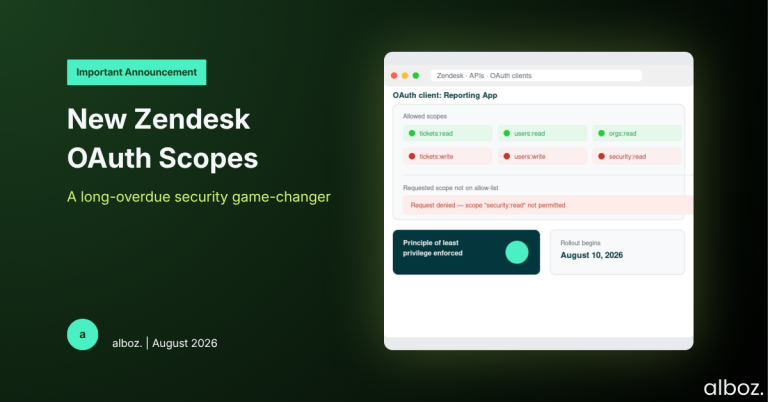
- Granular Scopes: They have massively expanded the list of available permissions. Instead of just `read`, you now have highly specific scopes like `tickets:read`, `users:read`, `auditlogs:read`, and so on. This allows you to grant access to *only* the specific data an application requires.
- Admin Configuration: This is the most critical part of the update. You, as a Zendesk admin, can now define an “allow list” of scopes for each individual OAuth client (i.e., each connected application). When that application tries to authenticate, it can only request permissions from the list you’ve approved. If it asks for a scope that isn’t on its list, Zendesk will deny the request flat out.
It’s important to note the timeline: Zendesk has announced this change will start rolling out on August 10, 2026. This gives everyone—Zendesk, app developers, and you—plenty of time to prepare. Existing OAuth clients will continue to work as they do now, but you can start applying these new restrictions to them whenever you’re ready.
Our Expert Opinion: Why This Is a Security Game-Changer
Our take is simple: this is one of the most significant security improvements Zendesk has made for API integrations in years. It directly addresses a core security concept known as the “principle of least privilege.” This principle dictates that an application or user should only have the absolute minimum permissions necessary to perform its function.
Previously, adhering to this principle was difficult. You were often forced to grant overly broad permissions, creating unnecessary risk. Imagine an app designed only to sync your Help Centre articles to another system. To do this, you might have had to give it the `read` scope, which also gave it access to sensitive ticket and user information. If that third-party app’s credentials were ever compromised, the attacker would have access to far more data than necessary.
With these new Zendesk OAuth Scopes, you can restrict that same app to `hc:read` (view help center content) and nothing else. The potential “blast radius” of a security breach is now dramatically smaller. This puts the power squarely back in the hands of Zendesk administrators to properly vet and secure their ecosystem of integrations.
The sheer number of new scopes is impressive, covering everything from triggers and automations (`triggers:read`, `triggers:write`) to custom objects (`custom_objects:read`, `custom_objects:write`) and even security settings (`security:read`). This granularity shows a deep understanding of how diverse the Zendesk API ecosystem has become and provides the tools needed to manage it safely.
How We’d Handle the Rollout: An Action Plan
While 2026 seems far away, the time to prepare is now. Proactively managing this change will prevent future disruptions and immediately improve your security posture. Here is what we’re advising our clients to do:
| Step | Key Action & Rationale |
|---|---|
| 1. Audit Existing Integrations | Go to Admin Center > Apps and integrations > APIs > OAuth clients. Create a definitive list of every application connected to your Zendesk instance. If you don’t recognise an app, investigate its purpose and whether it’s still needed. |
| 2. Analyse Required Scopes | For each application, determine its core function. What data does it actually need to read or write? Map this function to the new granular scopes. For example, a ticket reporting app likely only needs `tickets:read`, `users:read`, and `organizations:read`. |
| 3. Communicate with Vendors | Reach out to the developers of your third-party applications. Ask them about their plans to support these more granular scopes. This puts the onus on them to update their apps to be more secure. |
| 4. Configure and Test | Once you have a clear understanding of the necessary scopes, start configuring them on your existing OAuth clients. We strongly recommend testing these changes in a sandbox environment first to ensure no critical workflows are broken when a scope is restricted. |
| 5. Document Everything | Keep an internal record of each OAuth client, its purpose, its owner, and the specific scopes it has been granted, along with the justification. This documentation is invaluable for security audits and future administration. |
This update from Zendesk is a powerful step forward for platform security. It provides the necessary controls for administrators to confidently integrate third-party applications while minimising risk. By taking a proactive approach and auditing your integrations now, you can ensure a smooth transition and a more secure Zendesk environment long before the 2026 rollout date.