
Zendesk continues its rapid pace of innovation, releasing new features and enhancements almost daily. Keeping up can be a challenge, but that’s where we come in. Here’s our expert opinion on the latest updates.
Game-Changer: Zendesk Business Metadata Now Powers Proactive Messaging
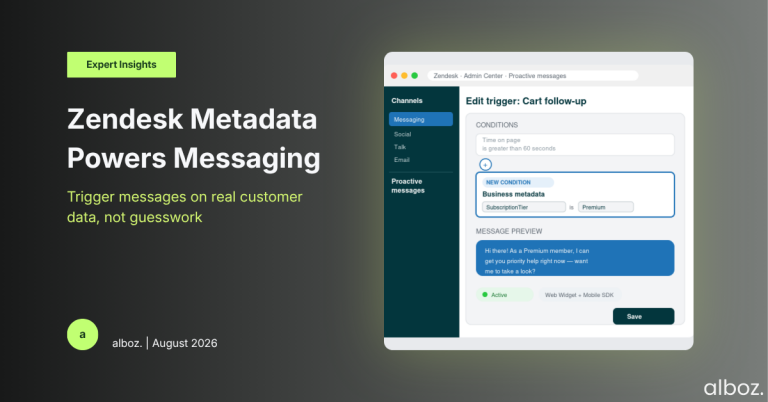
What We Think: Zendesk has finally unlocked a feature we’ve been waiting for: using business metadata to trigger proactive messages. This is a massive step up from generic triggers like ‘time on page’. It allows for truly personalised, context-aware engagement based on data you already have about your users—like their subscription tier or what’s in their shopping cart. Our verdict? This is a huge win for any business serious about creating intelligent, timely customer experiences. It’s time to move beyond guesswork and start using real data to drive your proactive support strategy.
The Reality Check: What’s Actually Changing?
In simple terms, Zendesk has added a powerful new tool to its proactive messaging triggers. Previously, you could start a conversation with a visitor based on fairly generic conditions like the page they were on or how long they’d been there. While useful, it was a bit of a blunt instrument.
Now, you can use Zendesk Business Metadata as a trigger condition. This means you can tap into the rich, specific first-party data you’re already passing to Zendesk about your users. Think of specific attributes like:
- ItemInCart: Target users with a specific high-value item in their basket.
- SubscriptionTier: Offer a priority support channel to your ‘Premium’ members.
- LoyaltyStatus: Greet your ‘Gold’ level customers with an exclusive offer.
This update allows you to create hyper-targeted rules that fire messages at the perfect moment, using information the customer hasn’t even had to type into the chat. It transforms proactive messaging from a simple “Hello, can I help?” into a surgical, context-aware intervention.
Our Expert Opinion: Why This Matters So Much
Our team sees this as more than just a minor feature update; it represents a strategic shift in how businesses can approach customer engagement within Zendesk. The announcement states this lets you “act on the first-party context they already know about a visitor…without waiting for the customer to volunteer it in the conversation.” This is the crucial point.
In an era where personalisation is paramount and third-party data is becoming less reliable, leveraging your own first-party data is critical. This feature directly connects your business intelligence to your frontline support tool. You no longer have to hope a customer mentions they are a VIP or are struggling with a specific product in their cart; you can know it instantly and act on it.
The real operational impact is the ability to pre-empt problems and create opportunities. Imagine a customer with a full shopping cart hesitating on the payment page for over a minute. Instead of a generic pop-up, you can now send a message like, “Hi there! Having any trouble with checkout? I’m here to help you complete your order.” This level of targeted assistance can be the difference between a lost sale and a loyal customer. Using Zendesk Business Metadata this way builds a truly robust, data-driven targeting system for all your engagement campaigns.
How We’d Handle the Rollout: A Practical Action Plan
Here is what we’re advising our clients to do to implement this change safely and effectively. This isn’t a feature to just switch on; it requires a thoughtful strategy to maximise its potential without overwhelming your customers or agents.
| Phase | Key Actions |
|---|---|
| 1. Audit & Identify |
|
| 2. Strategise & Design |
|
| 3. Implement & Test |
|
| 4. Measure & Refine |
|
In conclusion, the addition of business metadata as a condition for proactive messaging is a powerful enhancement to the Zendesk platform. It empowers businesses to move from generic interactions to highly personalised, context-driven conversations. By following a structured approach to implementation, you can leverage this feature to significantly improve key metrics and build stronger relationships with your customers.


