Zendesk consistently enhances its platform with new features and integrations. Get our expert analysis on the latest updates right here.
Unlocking Your Dev Knowledge: Our Take on the New Zendesk Jira Integration
What We Think:
Zendesk’s announcement to add Jira as a native external knowledge source is a genuinely significant step forward. This isn’t just another minor tweak; it’s a powerful move to bridge the long-standing gap between technical/development teams and customer-facing support agents. By allowing Zendesk’s AI and search capabilities to tap directly into Jira, organisations can stop the inefficient practice of copying and pasting technical information into support articles. Our verdict is that this is a must-evaluate feature for any tech company that uses both platforms, promising major gains in efficiency and faster, more accurate resolutions.
The Reality Check: What’s Actually Changing?
Let’s cut through the official announcement language. For years, the knowledge your engineering team meticulously documented in Jira—bug reports, feature specifications, project updates—has been siloed away from your support team’s primary tool, Zendesk. Getting that information to an agent or a customer often meant a developer had to be pulled into a ticket, or a support manager had to manually create a new knowledge base article summarising the technical details.
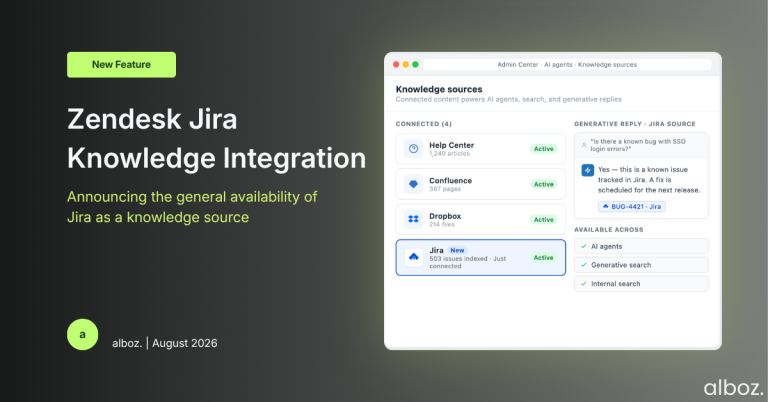
This update changes that dynamic fundamentally. By setting up Jira as an “external content source,” you are essentially giving Zendesk a key to your Jira library. It doesn’t move the content, but it allows Zendesk’s own tools to read and surface it in real-time. This means when an AI agent or a human agent searches for an answer, Zendesk will now look in both your official Help Centre and your connected Jira projects simultaneously. It’s about centralising access to information, not centralising the information itself.
Our Expert Opinion: The AI Impact is the Real Story
While improved agent search is a great benefit, the true game-changer here is the impact on automation and AI. An AI agent is only as intelligent as the data it can access. Previously, if you wanted your Zendesk AI agent to answer technical questions, you had to duplicate that knowledge from Jira into Zendesk Guide articles, which is a maintenance nightmare.
Now, with this direct Zendesk Jira integration, you can empower your AI agent with a wealth of technical knowledge. Imagine a customer asking your bot, “What is the status of the fix for bug #PROJ-1234?” Instead of responding with “I’ll create a ticket for you,” the bot can now potentially query the Jira source, interpret the ticket status, and provide a direct, accurate answer. This has the potential to:
- Dramatically increase self-service resolution rates for technical queries.
- Reduce the number of escalations from support to engineering, freeing up valuable developer time.
- Provide more transparent communication to customers about ongoing issues and development progress.
This is a strategic move by Zendesk to leverage the expert knowledge that already exists within an organisation, rather than forcing teams to create and maintain redundant content. It makes your entire knowledge ecosystem smarter and more connected.
How We’d Handle the Rollout: A Phased Approach
Connecting your entire Jira instance on day one would be a mistake. Not all Jira content is suitable for customers or even front-line support agents. Here is what we’re advising our clients to do for a safe and effective rollout of the new Zendesk Jira integration.
| Phase | Our Recommended Action |
|---|---|
| 1. Content Audit & Strategy | Before connecting anything, identify which Jira projects and issue types contain useful, well-written, and non-confidential information. Think public bug trackers, feature documentation projects, or release notes. Decide what should be surfaced and what must remain internal. |
| 2. Pilot Connection | Start small. Follow Zendesk’s documentation to connect a single, well-maintained Jira project as a pilot. This limits the initial scope and makes testing far more manageable. |
| 3. Test Agent Search | Have a core group of experienced agents test the search functionality. Are the results from Jira relevant? Are they easy to understand and distinguish from standard Help Centre articles? Gather feedback to refine the connection settings. |
| 4. AI Agent Integration | If you use Zendesk’s Advanced AI, configure a test bot to use the new Jira content source. Feed it common technical questions you expect customers to ask and rigorously evaluate the quality and accuracy of its responses. Monitor its performance closely. |
| 5. Team Training & Communication | Formally train your support team. Explain what this new content source is, how to interpret the results from Jira, and establish guidelines on how and when to use this information in customer responses. |
| 6. Expand & Iterate | Based on the success of the pilot, gradually add more relevant Jira projects to the connection. Continuously monitor performance metrics and collect feedback from both agents and customers to keep improving the experience. |
In conclusion, this is a thoughtfully designed feature that addresses a real-world pain point for many support organisations. By directly integrating Jira’s deep technical knowledge into the Zendesk experience, you can empower your AI, speed up your agents, and ultimately deliver faster, more accurate answers to your customers. It’s a clear win for operational efficiency.