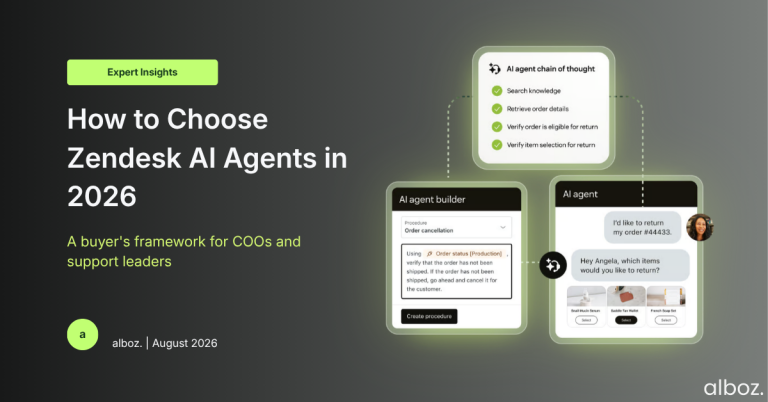
Zendesk AI agents are autonomous, customer-facing agents that read an incoming request, work out intent, and either resolve it or hand it to a human with context attached. In 2026 they ship inside Suite and Support plans, bill per verified resolution rather than per seat, and compete with a field of independent agents that run on top of Zendesk.
The question has changed. Two years ago, support leaders asked whether to deploy an AI agent at all. That question has largely been settled for you. The real one is narrower and considerably more commercial: which conversations should your AI agent own, which agent should own them, and what will it cost you when it succeeds?
That last clause catches teams out. Zendesk AI agents are billed by outcome, not by seat. The better your automation performs, the larger that line item grows. It is a sensible model, and it inverts every budgeting instinct a COO has built over a decade of per-agent licensing.
This guide is written for the person who has to sign the contract and answer for the numbers afterwards.
What this guide covers
- What Zendesk AI agents are, and what changed in 2026
- The best Zendesk AI agents compared
- What Zendesk AI agents cost, and how the meter works
- Seven criteria for the decision
- A 90-day implementation plan
- When the answer is “not yet”
- The decision checklist
- Frequently asked questions
What are Zendesk AI agents, and what changed in 2026?
A surprising number of failed evaluations start with two products being confused for one another.
AI agents are customer-facing. They read an incoming message across email, messaging, chat, social or voice, work out intent, and either resolve the request autonomously or escalate with context. This is the autonomous layer, and it is the thing that changes your headcount maths.
Copilot is agent-facing. It sits inside the agent workspace suggesting replies, summarising long ticket histories and recommending next steps. It makes your existing team faster. It is sold separately, per seat, at around $50 per agent per month. A predictable multiplier, not a variable meter.
They solve different problems and they are budgeted differently. Confusing them is the fastest route to a business case that does not survive contact with finance.
The mid-2026 packaging consolidation
Zendesk consolidated its AI agent packaging in a phased rollout between 11 May and 12 June 2026. The old split between “AI agents – Essential” and “AI agents – Advanced” was removed, and capabilities that previously sat behind the Advanced add-on, including agentic reasoning, multi-step procedures and external API integrations, became available across Suite and Support plans. Setup also moved to a guided, self-service flow for straightforward email and messaging use cases.
Two consequences matter for your evaluation.
- Capability is no longer the gating factor. You can no longer justify inaction on the grounds that the good features sit behind an add-on you have not bought. If you are on Suite or Support, the agentic tooling is in your account.
- Legacy tooling is on a clock. Zendesk has signalled that technical development on AI agents – Essential and legacy functionality, including the old bot builder, stops by 31 August 2026, with end-of-life to follow. If your current automation is a set of decision-tree flows built in the bot builder, that is technical debt with a deadline attached.
Anything you read that still describes a $50-per-agent “Advanced AI” SKU as the route to action-taking automation is describing the old world. Verify packaging against your own subscription page before you model anything.
The Forethought acquisition changed the shortlist
The other change reshaped the market rather than the pricing page. Zendesk announced its intent to acquire Forethought on 11 March 2026 and completed the deal later that month, its largest acquisition in two decades. Forethought is now sold as Forethought AI agents by Zendesk, and it runs both inside Zendesk and on other platforms.
For anyone building a shortlist of Zendesk AI agents, this matters in two directions. If Forethought was on your list as the independent alternative to native Zendesk, it no longer is. And if you already run Forethought on a non-Zendesk helpdesk, your renewal is now a strategic decision rather than an administrative one.
The best Zendesk AI agents compared for 2026
There are three genuine routes to autonomous resolution on Zendesk, and the choice between them is more consequential than the choice between individual vendors inside each route.
| Option | Billing unit | Typical time to first value | Best fit | Main trade-off |
|---|---|---|---|---|
| Zendesk AI agents (native) | Per verified automated resolution | Days to weeks for email and messaging | Teams already standardised on Zendesk with a usable help centre | Deep lock-in; your automation logic lives inside Zendesk |
| Forethought AI agents by Zendesk | Negotiated, historically hybrid | Weeks | Mid-market and enterprise wanting resolution, triage and QA in one stack | No longer independent; you are buying the Zendesk roadmap |
| Independent agents on top of Zendesk | Per resolution or per conversation, vendor-defined | Days (self-serve) to months (enterprise) | Multi-helpdesk estates, unusual workflows, teams reviewing their platform | Extra vendor, extra integration surface, shallower native reporting |
1. Zendesk AI agents, the native option
The default, and for most teams the right default. Native Zendesk AI agents are configured in the same admin centre as everything else, answer from your help centre and connected content, and report through the same dashboards your team already reads. One configuration serves email, web messaging, WhatsApp, social and in-app.
Since the mid-2026 consolidation this is also the most capable native option Zendesk has ever shipped, with agentic reasoning and external API actions available without an add-on. Choose it when Zendesk is your system of record and you want the shortest path from decision to live automation.
2. Forethought AI agents by Zendesk
Forethought brings a multi-agent stack covering resolution, triage, agent assist and quality scoring, with natural-language business logic rather than rigid decision trees and self-improving behaviour that adapts from live conversations. Zendesk began selling it to customers from June 2026.
It suits mid-market and enterprise teams who want more than resolution alone, and who are comfortable committing to Zendesk’s roadmap. If you were drawn to Forethought specifically because it was helpdesk-agnostic, treat that as a property it used to have.
3. Independent AI agents that run on top of Zendesk
A crowded and genuinely competitive field. Ada, Decagon, Sierra, Lorikeet, Maven AGI, IrisAgent and eesel all sit above your helpdesk and integrate with Zendesk rather than replacing it. They differ enormously in posture.
- Ada leads on breadth: many channels, strong multilingual coverage, chatbot heritage that shows on deep multi-step action chains.
- Decagon and Sierra target enterprise scale, with natural-language procedures for complex workflows and expert-led engagements to match.
- Lorikeet, Maven AGI and IrisAgent pitch at regulated and technically complex support, where accuracy and audit trails matter more than breadth.
- eesel and similar self-serve tools are the fastest way to get something working against your existing documentation, and the cheapest way to find out whether your content is good enough.
The strategic argument for this route is portability. Your intent taxonomy, procedures and action configuration stay with a vendor you can move between helpdesks. The argument against is that you have added a vendor, an integration surface and a second reporting model to an operation that already has enough of all three.
What about Intercom Fin?
Fin is worth naming because it comes up in every evaluation and because its pricing is published: around $0.99 per resolution, against Zendesk’s reported $1.50 to $2.00. Intercom positions Fin as able to work with certain existing helpdesks including Zendesk, rather than as an Intercom-only product.
At equal resolution volume the headline rate is lower. Total cost is not the headline rate, though, and running your resolution layer on a direct competitor’s platform is a governance conversation as much as a commercial one. Model it honestly, then decide with your eyes open.
How to read this comparison
Comparison tables tell you what a vendor sells. They do not tell you what will happen to your tickets. Every serious evaluation of Zendesk AI agents should end with the same test: run the candidate against a sample of your own historical conversations and count how many it would genuinely have resolved, not merely contained.
If a vendor will not let you do that before you sign, that is information too.
What do Zendesk AI agents cost in 2026?
Base plans are billed per agent per month, from entry-level Support up to the higher Suite tiers, with meaningful discounts for annual commitment. That part behaves the way software has always behaved.
The AI layer does not. Automated resolutions are billed per resolution, with a small monthly allowance included per agent and a per-resolution charge beyond it. Reported rates through 2026 converge on $1.50 per resolution on a committed pack and $2.00 pay-as-you-go. Zendesk publishes in US dollars, so a euro or sterling quote will differ, and the exact rate is negotiated. Your own quote is the only number that counts.
The three-tier resolution model
In May 2026 Zendesk restructured what actually draws down your allowance, and this is the single most useful thing to understand before you model anything.
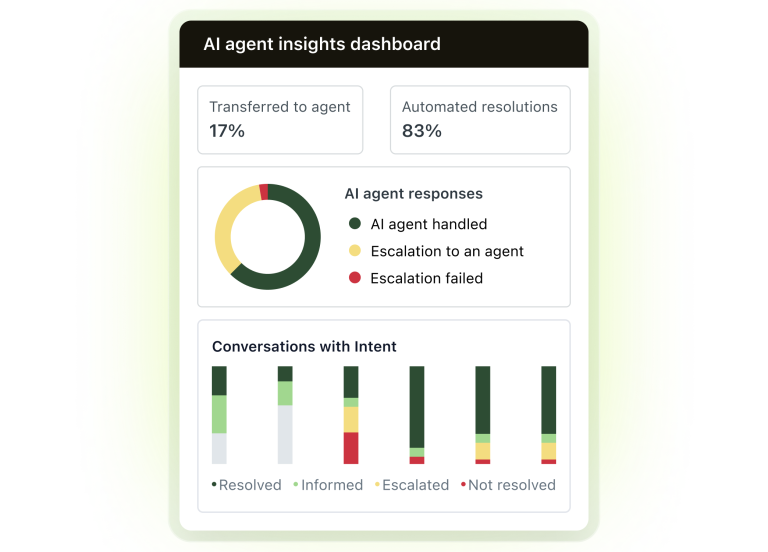
- Assisted escalation. The AI gathered information or routed the customer, but a human resolved it. Free.
- Contained resolution. The AI replied and the customer did not come back, but the verification step did not confirm the outcome as satisfactory. Free.
- Verified resolution. Confirmed as resolved. This is the billable unit.
Two further details catch teams out: the allowance is pooled and capped at roughly 10,000 allocated resolutions a year, and unused resolutions expire rather than banking.
A worked example
Take a 25-agent team handling 10,000 support conversations a month.
| Scenario | AI resolution rate | Verified resolutions | Indicative AI cost/month |
|---|---|---|---|
| Cautious pilot | 15% | 1,500 | ~$2,250–$3,000 |
| Steady state | 35% | 3,500 | ~$5,250–$7,000 |
| Aggressive deflection | 55% | 5,500 | ~$8,250–$11,000 |
Now put the human number next to it. If a fully loaded support agent costs you $50,000 a year and handles 900 conversations a month, that steady-state 3,500 resolutions is roughly 3.9 agents’ worth of throughput. Call it $195,000 a year of capacity against an AI bill in the region of $63,000 to $84,000. The economics work.
They just do not work automatically, and they stop working if your resolution definition is loose.
Three questions to put to your account manager, in writing
- What precisely counts as a verified resolution? You want the definition you are billed on, and what happens when a customer replies again two hours later.
- Is overage billed automatically, and is there a cap? Reporting through 2026 indicates overages above committed volume bill automatically. If finance needs a predictable invoice ceiling, negotiate it explicitly rather than assuming it.
- What is the committed-volume rate, and what happens if we miss the commitment? Committing buys a lower rate and exposes you to a floor. Model both directions.
A useful discipline: build your business case at your target deflection rate, then re-run it at 1.5× that rate. If the higher-performing scenario damages your margin, you have an outcome-based pricing problem, and you should be negotiating a volume tier rather than celebrating your pilot results.
Seven criteria for the decision
1. Ticket concentration
Pull your last 90 days of tickets and rank intents by volume. If your top ten intents account for 50% or more of volume, you have a strong automation candidate. If your distribution is flat, with hundreds of intents and none dominant, your resolution rate will disappoint and your per-resolution economics will not compensate for the build effort.
This single analysis predicts project success better than any vendor demo.
2. Knowledge readiness
Zendesk AI agents answer from your help centre and connected content. Thin, stale or contradictory articles produce confident wrong answers, which are worse than no answer at all. Before you evaluate anything, audit: what proportion of your top ten intents has an accurate, current, publicly available article behind it?
If the honest answer is under half, your first project is a knowledge base project. That is not a reason to delay the AI decision. It is a reason to sequence it correctly, and our guide to building an AI-ready Zendesk help centre is the place to start. If you would rather have someone else grade it, we run a free knowledge base analysis against Zendesk’s own criteria.
3. Action depth
There is a hard line between answering and doing. Answering “where is my order?” from an article is trivial. Retrieving the order status from your commerce platform and issuing the refund is a different class of work, and it is where the value sits.
With action-taking now available across plans, the constraint is no longer licensing. It is whether your backend systems expose clean, authenticated APIs and whether anyone owns them. Ask your CTO one question: can we expose a read-and-write endpoint for order status within a sprint? The answer tells you your realistic scope.
4. Multi-channel reality
Omnichannel ticket resolution is where automation either compounds or fragments. Zendesk’s advantage is that one agent configuration can serve email, web messaging, WhatsApp, social and in-app, with reporting unified across them.
But channels are not equal. Messaging tolerates a clarifying question; email does not, because a badly aimed auto-reply is a visible failure sitting in someone’s inbox. Voice is a different discipline again. Sequence your rollout by channel forgiveness: web messaging first, then social, then email, then voice. Channel economics shift too, as the changes to WhatsApp pricing demonstrated.
5. Language coverage
Zendesk AI agents handle a broad set of languages natively, with generative replies extending wider still. For any organisation operating across European markets this is often the single largest hidden saving. It removes the need for native-speaker coverage in low-volume languages, which is disproportionately expensive to staff and to roster.
If you run multilingual support, weight this criterion heavily. It rarely appears in business cases and it frequently dominates them.
6. The honest limits of no-code support tools
The no-code promise is real for configuration and misleading for design. Building the flow, writing the instructions, setting the guardrails, connecting a documented API: a capable support operations person can do all of this without a developer.
What no-code AI implementation does not remove:
- Deciding which intents to automate and where the handover thresholds sit
- Writing procedures unambiguous enough for an agentic system to follow reliably
- Backend work to expose the data the agent needs
- Ongoing review of transcripts, containment quality and failure modes
Budget for a named owner spending meaningful time on this every week, not a project that finishes. No-code shifts effort from engineering to operations; it does not eliminate it. Where a team has no one to spare, our Zendesk AI agent implementation service covers the design and tuning work that the configuration wizard does not.
7. Lock-in tolerance
Native Zendesk AI agents are tightly coupled to Zendesk. That is precisely why they are quick to deploy and why reporting is coherent. It also means your automation logic, intent taxonomy and action configuration live inside a platform you may one day want to leave.
An independent AI layer preserves portability and may price differently per resolution. It costs you integration depth and adds a vendor. For most teams already committed to Zendesk, native wins on time-to-value. For teams running multiple helpdesks or actively reviewing their platform, as in our Zendesk versus Jira Service Management comparison, the independent route deserves a serious look.
A 90-day implementation plan
Days 1–15, baseline. Export 90 days of tickets. Classify intents. Establish your current cost per contact, first-response time, resolution time and CSAT by channel. You cannot claim customer support cost reduction later without this baseline, and reconstructing it after the fact never convinces a CFO.
Days 16–30, knowledge. Rewrite or create articles for your top ten intents. Retire contradictory content. Unglamorous, and the highest-leverage fortnight in the project.
Days 31–45, narrow pilot. Two or three intents, one channel, web messaging. Set a deliberately conservative handover threshold. Instrument everything.
Days 46–60, read the transcripts. Not the dashboard, the transcripts. Sample at least 100 conversations by hand. You are looking for confident wrong answers, loops, and cases where the agent should have escalated and did not. Tune.
Days 61–75, add actions. Connect one backend system and automate one end-to-end task. This is where the business case moves from deflection to genuine resolution.
Days 76–90, expand and govern. Add channels in order of forgiveness. Establish a monthly review with a named owner, a standing agenda and four metrics. Promote changes through sandbox properly, using Zendesk AI versioning rather than editing production live.
The four metrics that matter
- Verified resolution rate, not containment. Containment counts conversations that ended; verified resolution counts problems that were solved. It is also the unit you are billed on.
- Escalation quality. When the agent hands over, does the human receive usable context, or start from scratch?
- CSAT delta between automated and human-handled conversations, on comparable intents.
- Cost per resolution, all-in. Per-resolution fees plus the operational time spent maintaining the system, divided by verified resolutions.
Report these to the executive team monthly. The fourth one keeps the programme honest.
When the answer is “not yet”
Be willing to say no. Zendesk AI agents are a poor fit when:
- Your ticket distribution is genuinely long-tail with no concentration to attack
- Your help centre is thin and nobody owns it
- Your volume is low enough that a modest deflection rate saves fractions of a person
- Your support is fundamentally consultative rather than transactional, where the interaction is the product
- Your backend systems cannot expose the data an agent would need to do anything beyond quoting articles
In several of these cases the right investment is Copilot rather than autonomous agents: make your existing people faster at a predictable per-seat cost, and revisit autonomy once your knowledge base and APIs can support it. If you operate in the EU, factor in the obligations set out in our EU AI Act compliance playbook before you deploy anything customer-facing.
The decision checklist
Before you sign, run through this list.
- Top ten intents identified, with volume percentages
- Help centre coverage confirmed for each
- Definition of a billable verified resolution obtained in writing
- Overage behaviour and any cap confirmed in writing
- Business case modelled at target deflection and at 1.5× target
- Candidate agents tested against a sample of your own historical tickets
- Backend API availability confirmed for at least one high-value action
- Named internal owner assigned, with allocated weekly time
- Baseline metrics captured before go-live
- Legacy bot builder flows inventoried and a migration date set
- Channel rollout sequenced by tolerance for error
Eleven boxes. If you can tick eight, proceed. If you can tick four, you have a preparation project first, and it is a far cheaper project than a failed automation programme.
Frequently asked questions
What are the best Zendesk AI agents in 2026?
For teams standardised on Zendesk with a usable help centre, native Zendesk AI agents are the strongest default on time-to-value and reporting coherence. Forethought AI agents by Zendesk suit mid-market and enterprise teams wanting resolution, triage and QA in one stack. Independent agents such as Ada, Decagon, Sierra and Lorikeet are the better fit for multi-helpdesk estates or unusual workflows.
Do we still need to buy an AI agents add-on?
No. Following the mid-2026 consolidation, the Essential and Advanced distinction was removed and agentic capabilities were folded into Suite and Support plans. Copilot remains a separate per-seat add-on at around $50 per agent per month. Confirm against your own subscription page, as packaging continues to evolve.
How much do Zendesk AI agents cost per resolution?
Reported rates through 2026 sit at roughly $1.50 per verified resolution on a committed pack and $2.00 pay-as-you-go, on top of your seat licences. Each plan includes a small monthly allowance per agent, pooled and capped at around 10,000 allocated resolutions a year. Unused resolutions expire rather than carrying over.
What happens to our existing bot builder flows?
Zendesk has indicated that development on legacy AI agent functionality, including the bot builder, stops by 31 August 2026, with end-of-life following. Inventory what you have and plan a migration rather than waiting for a forced one.
How long until we see savings?
Teams that prepare their knowledge base first and start with a narrow, well-instrumented pilot typically see a defensible return within two to three quarters. Teams that switch everything on at once usually spend the first quarter undoing damage.
Weighing up an AI agent rollout on Zendesk, or trying to work out whether your current setup is earning its keep?
alboz. is an Advanced Zendesk Partner working with support and operations leaders on AI agent implementation, Zendesk optimisation and CX consulting. Get in touch for an independent read on your numbers.