Zendesk is constantly evolving, with feature announcements landing in our inbox almost every day. Here’s our expert take on what’s new as of August 2026.
Our Take on the New Zendesk AI Builder: Finally, Custom Objects Without the Headache
What We Think: Zendesk’s new AI-powered object builder is a genuinely significant quality-of-life improvement for admins. It dramatically lowers the technical barrier to creating custom data models, allowing teams to translate business needs into a functional Zendesk structure faster than ever before. While it won’t replace a strategic data architect, it powerfully accelerates the initial build and reduces the potential for manual error. We see this as a game-changer, especially for teams who have been hesitant to dive into the complexities of custom objects.
The Reality Check: From Plain English to Deployed Schema
Let’s cut through the jargon. For a long time, building custom objects in Zendesk required a fair bit of technical know-how. You had to manually design a data schema, define fields, and meticulously link relationships between different objects. It was powerful, but it could also be slow and intimidating.
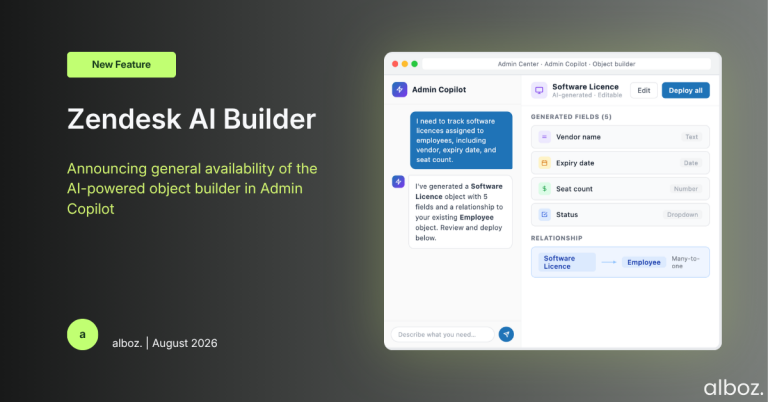
The new Zendesk AI builder, a feature within Admin Copilot, changes this entire workflow. Now, an admin can simply describe what they need in everyday language. For instance, you could tell it: “I need to track our rental properties, including address, number of bedrooms, and current tenant information.” The AI then analyses your request, considers any existing custom objects you already have, and generates a complete data model—the custom objects, the necessary fields (like text fields for an address or number fields for bedrooms), and the relationships between them.
The crucial part is that this isn’t a black box. The AI presents its proposed structure to you, and you retain complete control to refine, edit, and approve it before deploying the entire model with a single click. It’s about automation, not abdication of control.
Our Expert Opinion: Shifting Focus from Execution to Strategy
What excites us most about this update isn’t just the time saved; it’s the fundamental shift in where admins can focus their energy. The conversation moves from “How do I technically build this?” to “Is this the right data model to solve our business problem?”
By handling the heavy lifting of schema creation, the AI builder empowers less-technical admins to bring valuable business insights directly into Zendesk. They understand the operational needs, and now they have a tool that can translate those needs into a functional configuration without requiring them to become database architects. This democratises the power of the Zendesk platform.
For senior admins and Zendesk architects, this tool is a massive accelerator. The initial, often tedious, work of scaffolding a new data model is done in minutes. Their expertise can then be applied to refining the AI’s suggestions, ensuring the model is scalable, and integrating it perfectly with existing workflows and reporting needs. The AI’s ability to analyse your existing custom objects before making suggestions is a subtle but brilliant feature. It helps prevent data duplication and ensures new objects fit logically within your current environment.
This is a clear signal of where the platform is heading: a more intelligent, responsive, and accessible system where good ideas can be implemented rapidly. The Zendesk AI builder is no longer just about summarising tickets; it’s becoming a core partner in configuring the platform itself.
How We’d Handle the Rollout: A Strategic Checklist
While the tool is designed to be intuitive, a structured approach ensures you get the most value without creating a messy data environment. Here is what we’re advising our clients to do:
| Phase | Key Action | Our Expert Tip |
|---|---|---|
| 1. Ideation & Scoping | Identify a business process currently managed outside of Zendesk (e.g., in spreadsheets) that would benefit from being tracked with custom objects. | Start with a small, well-defined use case. Don’t try to model your entire business on day one. Think “order management” or “asset tracking,” not “everything.” |
| 2. AI Prompting & Generation | Write a clear, simple-language prompt describing the data you need to capture. For example: “Create objects to track customer hardware assets, including serial number, purchase date, and warranty expiration.” | Be descriptive but concise. Include the key entities and the information you need for each. The more specific your prompt, the better the AI’s first draft will be. |
| 3. Refinement & Validation | Carefully review the schema generated by the AI. Check the field types, object names, and relationships. Make any necessary edits directly in the builder. | This is where human expertise is critical. Involve the stakeholders who will actually use this data. Does the proposed structure match their real-world workflow? Is anything missing? |
| 4. Controlled Deployment | Deploy the new object model. Before building complex triggers or automations, manually create a few records to test the data structure. | We always recommend a soft launch. Use the new objects internally with a small group of agents first to catch any awkward usability issues before a full-scale rollout. |
In conclusion, this update is more than just a new button in the admin centre. It represents a significant step forward in making Zendesk’s powerful data customisation features accessible to a much broader audience. By automating the technical setup, it allows teams to focus on the strategic value of their data, which is where the real wins in customer experience are found.