Zendesk’s feature factory is always humming, with important updates landing at a rapid pace. Here’s our expert analysis of the latest platform enhancement announced on August 14, 2026.
Zendesk AI Versioning Has Landed: Why This is a Game-Changer for Enterprise CX
What We Think:
Zendesk has finally brought its powerful AI tools, Agent Copilot and Intelligent Triage, into the version management fold. This is a massive win for any organisation serious about safe, reliable change management. The ability to test, compare, and deploy AI configurations from a sandbox to production eliminates the risky, error-prone manual work that previously plagued these features. Our verdict? This is an essential step that elevates Zendesk’s AI suite to true enterprise-grade status, and we’re thrilled to see it.
The Reality Check: Cutting Through the Jargon
So, what does this announcement *actually* mean for your day-to-day operations? In simple terms, Zendesk is giving you a formal, controlled process for moving your AI settings from your testing environment (sandbox) to your live environment (production). Before this update, if you wanted to tweak how Intelligent Triage categorises tickets or how Agent Copilot suggests responses, you’d have to build it in your sandbox and then painstakingly recreate those same settings manually in production. This was a recipe for mistakes and inconsistencies.
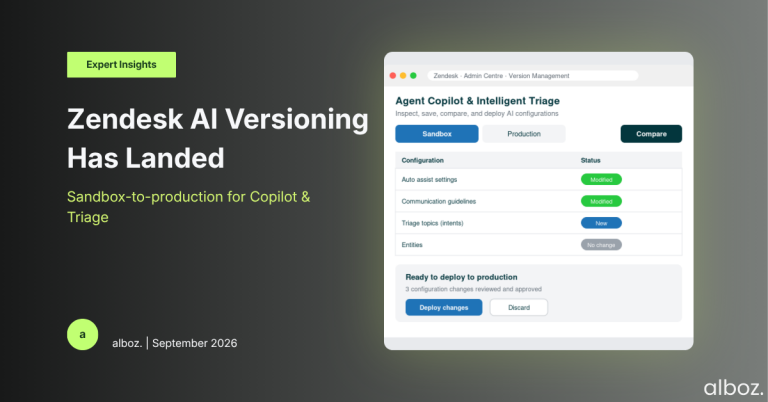
Now, with the expansion of Zendesk AI Versioning, you can manage specific AI configurations as a single “package” of changes. The newly covered settings include:
- For Agent Copilot: All the key levers, including auto assist settings, defined procedures, communication guidelines, macro/article suggestions, and writing tool settings.
- For Intelligent Triage: The core components, including general settings, topics (what Zendesk used to call intents), and entities.
The core workflow is now: Inspect, Save, Compare, and Deploy. You can see exactly what’s different between your sandbox and production, and push those changes live with a few clicks, confident that nothing was missed.
Our Expert Opinion: From Wild West to Fort Knox
Our team has been working with Zendesk’s AI tools since they were first released, and while their power is undeniable, managing their configuration has always been a weak point. The lack of a structured deployment path meant that any changes to AI models were high-stakes. A simple copy-paste error when updating an Intelligent Triage topic could misroute hundreds of tickets. Fine-tuning an Agent Copilot communication guideline required a developer-like discipline without any of the developer tools.
This is where the new version management capability is a true game-changer. It introduces the discipline and safety nets that were sorely missing. The ability to compare configurations between environments is the most critical piece of this update. It provides a “diff view,” allowing you to see a clear, line-by-line breakdown of what you’re about to change. This visibility is crucial for peer reviews and creating a documented audit trail of AI changes—something that is becoming increasingly important for compliance and governance.
What we think is most impactful is the confidence this gives administrators to innovate. You can now freely experiment in your sandbox, testing out new triage topics or refining agent procedures, knowing that you have a safe and reliable path to production. It lowers the barrier to continuous improvement for your AI-powered automations, which is exactly what you want.
How We’d Handle the Rollout: A Practical Checklist
This feature is being rolled out automatically, so there’s nothing you need to “turn on.” However, to leverage it effectively and safely, we advise our clients to adopt a structured process. This isn’t just about the tool; it’s about building a robust change management practice around your AI. For a deeper dive into sandbox strategy, our complete Zendesk Sandbox guide is a great resource.
Here is the checklist we use to manage the new Zendesk AI Versioning capabilities:
| Step | Action | Why It Matters |
|---|---|---|
| 1. Establish a Baseline | Perform a full refresh of your sandbox from production. This ensures your testing environment is an exact mirror of your live setup before you begin making changes. | Starting with a clean slate prevents you from accidentally deploying old, unwanted changes along with your new ones. |
| 2. Isolate & Document Your Change | In the sandbox, make one logical change at a time (e.g., add two new triage topics, or refine one agent procedure). Document the intended outcome in your change log. | This makes testing more focused and ensures your deployment packages are small and easy to verify. |
| 3. Inspect & Compare | Navigate to the Version Management tool in Admin Centre. Use the “Compare” function to review the exact differences your change introduced. Get a second pair of eyes to review it. | This is your critical safety check. It confirms you are only deploying what you intend to deploy and catches any accidental modifications. |
| 4. Save & Deploy | Save the configuration from your sandbox and deploy it to production during a low-traffic period. | Saving the configuration creates a snapshot. Deploying during off-peak hours minimises any potential disruption if an issue occurs. |
| 5. Verify in Production | Immediately after deployment, go into your production environment and confirm the new settings are active and functioning as expected. Monitor relevant reporting for any unexpected behaviour. | Trust, but verify. This final step closes the loop and confirms the success of your change management process. |
By bringing this structured process to your AI tools, you shift from making risky, one-off changes to building a reliable, scalable automation strategy. The introduction of Zendesk AI Versioning is a significant step forward, providing the control and visibility that modern support organisations require.
If you’re unsure how to best integrate this new functionality into your existing workflows or want to explore how Zendesk AI can be further customised for your needs, reach out to your alboz. Solution Consultant. We can help you build a best-practice change management process.
Zendesk’s feature factory is always humming, with important updates landing at a rapid pace. Here’s our expert analysis of the latest platform enhancement announced on August 14, 2026.
Zendesk AI Versioning Has Landed: Why This is a Game-Changer for Enterprise CX
What We Think:
Zendesk has finally brought its powerful AI tools, Agent Copilot and Intelligent Triage, into the version management fold. This is a massive win for any organisation serious about safe, reliable change management. The ability to test, compare, and deploy AI configurations from a sandbox to production eliminates the risky, error-prone manual work that previously plagued these features. Our verdict? This is an essential step that elevates Zendesk’s AI suite to true enterprise-grade status, and we’re thrilled to see it.
The Reality Check: Cutting Through the Jargon
So, what does this announcement *actually* mean for your day-to-day operations? In simple terms, Zendesk is giving you a formal, controlled process for moving your AI settings from your testing environment (sandbox) to your live environment (production). Before this update, if you wanted to tweak how Intelligent Triage categorises tickets or how Agent Copilot suggests responses, you’d have to build it in your sandbox and then painstakingly recreate those same settings manually in production. This was a recipe for mistakes and inconsistencies.
Now, with the expansion of Zendesk AI Versioning, you can manage specific AI configurations as a single “package” of changes. The newly covered settings include:
- For Agent Copilot: All the key levers, including auto assist settings, defined procedures, communication guidelines, macro/article suggestions, and writing tool settings.
- For Intelligent Triage: The core components, including general settings, topics (what Zendesk used to call intents), and entities.
The core workflow is now: Inspect, Save, Compare, and Deploy. You can see exactly what’s different between your sandbox and production, and push those changes live with a few clicks, confident that nothing was missed.
Our Expert Opinion: From Wild West to Fort Knox
Our team has been working with Zendesk’s AI tools since they were first released, and while their power is undeniable, managing their configuration has always been a weak point. The lack of a structured deployment path meant that any changes to AI models were high-stakes. A simple copy-paste error when updating an Intelligent Triage topic could misroute hundreds of tickets. Fine-tuning an Agent Copilot communication guideline required a developer-like discipline without any of the developer tools.
This is where the new version management capability is a true game-changer. It introduces the discipline and safety nets that were sorely missing. The ability to compare configurations between environments is the most critical piece of this update. It provides a “diff view,” allowing you to see a clear, line-by-line breakdown of what you’re about to change. This visibility is crucial for peer reviews and creating a documented audit trail of AI changes—something that is becoming increasingly important for compliance and governance.
What we think is most impactful is the confidence this gives administrators to innovate. You can now freely experiment in your sandbox, testing out new triage topics or refining agent procedures, knowing that you have a safe and reliable path to production. It lowers the barrier to continuous improvement for your AI-powered automations, which is exactly what you want.
How We’d Handle the Rollout: A Practical Checklist
This feature is being rolled out automatically, so there’s nothing you need to “turn on.” However, to leverage it effectively and safely, we advise our clients to adopt a structured process. This isn’t just about the tool; it’s about building a robust change management practice around your AI. For a deeper dive into sandbox strategy, our complete Zendesk Sandbox guide is a great resource.
Here is the checklist we use to manage the new Zendesk AI Versioning capabilities:
| Step | Action | Why It Matters |
|---|---|---|
| 1. Establish a Baseline | Perform a full refresh of your sandbox from production. This ensures your testing environment is an exact mirror of your live setup before you begin making changes. | Starting with a clean slate prevents you from accidentally deploying old, unwanted changes along with your new ones. |
| 2. Isolate & Document Your Change | In the sandbox, make one logical change at a time (e.g., add two new triage topics, or refine one agent procedure). Document the intended outcome in your change log. | This makes testing more focused and ensures your deployment packages are small and easy to verify. |
| 3. Inspect & Compare | Navigate to the Version Management tool in Admin Centre. Use the “Compare” function to review the exact differences your change introduced. Get a second pair of eyes to review it. | This is your critical safety check. It confirms you are only deploying what you intend to deploy and catches any accidental modifications. |
| 4. Save & Deploy | Save the configuration from your sandbox and deploy it to production during a low-traffic period. | Saving the configuration creates a snapshot. Deploying during off-peak hours minimises any potential disruption if an issue occurs. |
| 5. Verify in Production | Immediately after deployment, go into your production environment and confirm the new settings are active and functioning as expected. Monitor relevant reporting for any unexpected behaviour. | Trust, but verify. This final step closes the loop and confirms the success of your change management process. |
By bringing this structured process to your AI tools, you shift from making risky, one-off changes to building a reliable, scalable automation strategy. The introduction of Zendesk AI Versioning is a significant step forward, providing the control and visibility that modern support organisations require.
If you’re unsure how to best integrate this new functionality into your existing workflows or want to explore how Zendesk AI can be further customised for your needs, reach out to your alboz. Solution Consultant. We can help you build a best-practice change management process.