Zendesk never sleeps! They’re constantly rolling out new features and updates. We’re on hand to cut through the noise and give you our expert take on what these changes really mean for your CX operations.
Zendesk Auto-Accept Calls: A Welcome Efficiency Boost, But Handle With Care
What We Think: The new Zendesk auto-accept calls feature is a massive win for high-volume contact centres focused on hitting aggressive Service Level Agreements (SLAs). It promises to reduce abandoned calls and improve agent efficiency by instantly connecting them to the next customer. While we love the potential for performance gains, we also caution that a poorly managed rollout could lead to agent burnout. It’s a powerful, industry-standard tool, but one that requires a thoughtful, human-centric implementation strategy.
The Reality Check: What’s Actually Changing?
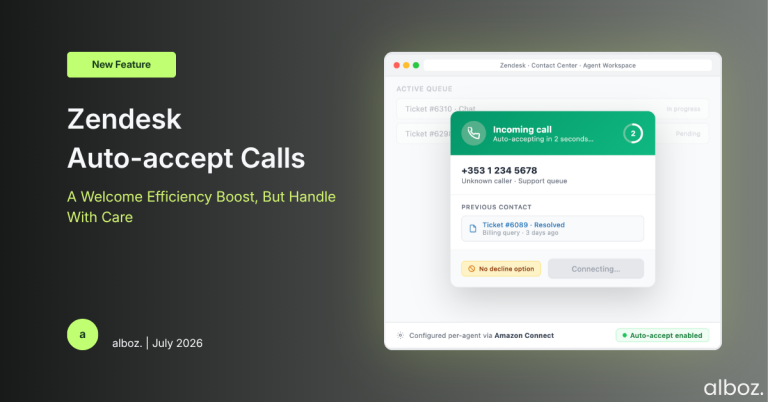
Let’s break this down. Zendesk is introducing a native auto-accept function for its Contact Center product. For agents where this is enabled, the experience will change significantly. When a call is routed to them, the ‘Decline’ button will be gone. After a brief, two-second pause, the call will automatically connect. The agent is instantly live with the customer.
Crucially, the incoming call notification, which contains valuable context about the caller, will remain on-screen even after the call is accepted. This ensures the agent doesn’t lose that initial burst of information. They can still view the caller’s details and history while starting the conversation, and can close the notification manually once they’re ready. In essence, it removes the agent’s ability to miss or decline a call, forcing an immediate connection.
Our Expert Opinion: A Necessary Feature for Matured Teams
Our take is that this is a sign of Zendesk’s voice product maturing. Zendesk themselves state that “up to 78% of large enterprise contact centers rely on auto-accept,” and they’re not wrong. For teams dealing with hundreds or thousands of similar, transactional calls per day, the seconds saved by eliminating the manual ‘Accept’ click add up dramatically. This feature directly targets metrics like Average Speed of Answer (ASA) and can significantly reduce the number of abandoned calls that occur when a customer hangs up during the ring time.
The real power, however, lies in the implementation detail. Zendesk clarifies that this isn’t a global, all-or-nothing switch. It is configured within Amazon Connect on a per-agent basis. This is fantastic news. It means you can be highly strategic about who gets this feature. You can enable it for your most experienced agents, a specific high-volume queue, or a team that handles less complex issues, while leaving it disabled for newer agents or teams that require more pre-call preparation time.
The “why” behind this feature is all about efficiency and preventing “costly missed customer calls.” While true, we also see the potential downside. Back-to-back calls with zero breathing room can be a recipe for agent fatigue and burnout. It removes the small moment of psychological preparation an agent has before clicking ‘Accept’. This is why a strategic rollout, coupled with clear communication to your team, is non-negotiable.
How We’d Handle the Rollout: A Phased Approach
Jumping into a feature like Zendesk auto-accept calls without a plan can cause more problems than it solves. Here is what we’re advising our clients to do. We recommend a structured, four-phase approach to ensure a smooth and successful implementation.
| Phase | Key Actions | Why It Matters |
|---|---|---|
| 1. Strategy & Identification |
| Not every agent or team is suited for auto-accept. Targeting the right groups maximises the benefits while minimising the risks of agent fatigue. |
| 2. Communication & Training |
| Proactive communication builds trust and prevents agents from feeling like a new, stressful process is being forced upon them. Preparation is key to adoption. |
| 3. Pilot & Technical Setup |
| A pilot phase allows you to test the feature in a controlled environment, measure its real-world impact, and make adjustments before a full-scale deployment. |
| 4. Review & Full Rollout |
| Data-driven decisions ensure the feature is actually delivering value. A phased rollout prevents system-wide disruption and allows you to support teams as they adapt. |
In conclusion, the introduction of auto-accept calls is a positive and necessary step for Zendesk Contact Center. It brings the platform in line with other enterprise-grade solutions and provides a powerful lever for optimising performance. By implementing it thoughtfully and strategically, you can harness its efficiency benefits while safeguarding the well-being and effectiveness of your agents.