
Zendesk continues to roll out new features and enhancements at a blistering pace. Keeping up can be a full-time job, but we’re here to give you our expert take on what matters. Here’s our analysis of the latest update from late June 2026.
Zendesk Call Monitoring is Finally Native: A Huge Win for Contact Centre QA
What We Think:
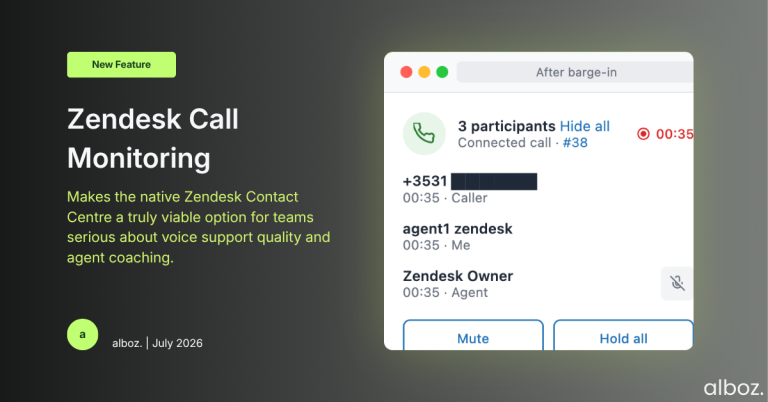
Zendesk has brought call monitoring and barge-in capabilities directly into the Contact Centre product, removing the need to juggle the separate Amazon Connect app. This is a massive step towards full feature parity and a more seamless, integrated experience. Our verdict: This is a long-overdue and critical enhancement that finally makes the native Zendesk Contact Centre a truly viable option for teams serious about voice support quality and agent coaching. It streamlines workflows, empowers supervisors, and solidifies Zendesk’s all-in-one vision.
The Reality Check: What’s Actually Changing?
For a long time, if you wanted to listen in on your agents’ calls in Zendesk, you were technically using a separate application—the Amazon Connect marketplace app—which felt clunky and disconnected. This announcement changes that. The functionality is now “native,” meaning it’s built directly into the Zendesk agent workspace you use every day. No more app-switching, no more disjointed user experience.
This new native Zendesk call monitoring feature gives supervisors two key powers, accessible right from their standard dashboard:
- Silent Monitoring: A supervisor can choose an active call and listen in without the agent or the customer knowing they are there. When they click to monitor, the relevant ticket automatically opens, and they’re in “listen mode.” This is perfect for quality assurance checks and passive coaching. A key detail is that up to two supervisors can monitor the same call, which is fantastic for co-coaching or training new team leads.
- Barge-In: This is the next level. If a supervisor is monitoring a call and decides an agent needs help, they can “barge” into the conversation. The moment they do, they become an active participant, and everyone on the call can hear them and see their profile. Once they’ve barged in, the supervisor has full control—they can mute others, manage recordings, and take over the call. Crucially, agents cannot mute, hold, or disconnect a supervisor who has barged in, ensuring the supervisor maintains control during a critical escalation.
Our Expert Opinion: Why This Is More Than Just a Feature
On the surface, this is about adding a tool. But from our perspective, this is a major milestone in Zendesk’s journey to build a fully native, all-in-one Contact Centre. By migrating core functionality like call monitoring out of a third-party app and into the main platform, Zendesk is removing friction for both agents and their managers.
The real operational impact here is on efficiency and effectiveness of coaching. The old workflow was disruptive. A supervisor would have to spot a call in the Amazon Connect dashboard, then manually find the corresponding ticket in Zendesk to get context. Now, it’s a one-click process. See the call, click monitor, and the ticket is right there. This seamlessness means supervisors are more likely to perform spot-checks and provide in-the-moment feedback because the barrier to doing so has been dramatically lowered.
We are particularly impressed by the small but vital detail that a supervisor who barges in cannot be muted or disconnected by other participants. This shows a deep understanding of contact centre dynamics. In a tense de-escalation scenario, the last thing a manager needs is to be accidentally put on hold or muted by a flustered agent. This preserves the chain of command and ensures the supervisor can effectively manage the situation until it’s resolved. This is the kind of thoughtful design that separates a good tool from a great one.
This update finally puts the native Zendesk call monitoring on par with the legacy integration, removing a key blocker for many clients who were hesitant to migrate. For any organisation that relies on voice support, this isn’t just a nice-to-have; it’s a foundational component of a robust quality assurance programme.
How We’d Handle the Rollout: An Action Plan
According to Zendesk, this feature will simply be enabled once the rollout is complete. There’s no technical switch for you to flip, but that doesn’t mean you shouldn’t prepare. A new tool is only as good as the process and training that support it. Here is what we’re advising our clients to do.
| Phase | Key Actions | Our Rationale |
|---|---|---|
| 1. Governance & Configuration |
| Before anyone uses the tool, you need clear rules of engagement. Who gets the power, and what are the acceptable use cases? This prevents misuse and ensures consistency. |
| 2. Supervisor Training |
| Don’t assume your supervisors will know how or when to use this. Proactive training ensures they are confident with the tool and use it to support agents, not just police them. |
| 3. Agent Communication |
| Agents need to understand why this is happening. Positioning it as a supportive tool for their development and success will foster trust and prevent the feeling of being “spied on.” |
| 4. Feedback & Refinement |
| The rollout isn’t finished when the feature is live. It’s finished when it’s working effectively for your team. A feedback loop is essential for long-term success. |
In summary, the introduction of native call monitoring is a significant and welcome evolution for the Zendesk Contact Centre. It streamlines a critical supervisory workflow, enhances coaching capabilities, and removes a major hurdle for teams looking to fully embrace Zendesk’s native voice solution. This is a practical, powerful update that will directly benefit any team focused on delivering high-quality phone support.


