Zendesk continues its relentless pace of platform enhancements, rolling out updates that can significantly impact your daily operations. We're here to cut through the noise and give you the expert take.
Zendesk Voice Restrictions: Finally, Granular Control for Outbound Calling
What We Think: Zendesk has finally delivered a long-requested feature for Voice customers: the ability to restrict outbound calling by agent group. This is a massive win for organisations with multiple teams, brands, or international phone lines. It moves beyond a simple on/off switch, providing the granular control needed to manage costs, prevent errors, and ensure agents only use the numbers they're supposed to. Our verdict: This is a foundational improvement that should have been there from the start, and we're thrilled it's finally arrived.
The Reality Check: What's Actually Changing?
Let's break this down. Previously, when you enabled outbound calling on a Zendesk Voice number, it was an all-or-nothing affair. Every single agent with Voice access could potentially select that number from the dropdown in the call console and make an outbound call. For a small, single-location team, that might be fine. But for any company with multiple departments or a global presence, it was an operational headache and a financial risk.
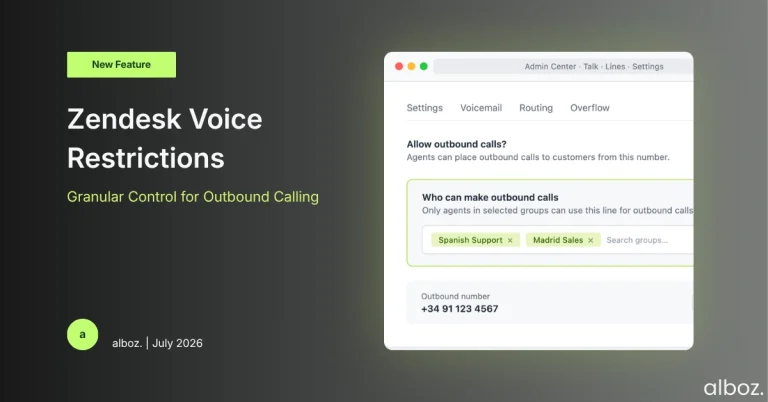
With this update, Zendesk introduces a new layer of control. Administrators can now go into a specific phone line's settings and define exactly which agent groups are permitted to use that number for making outbound calls.
If an agent isn't in an authorised group for a particular number, that number simply won't appear in their list of available outbound lines in the call console. It’s a clean and effective way to manage access. It's important to note that this doesn't affect callbacks, as those are system-initiated, not agent-initiated.
Our Expert Opinion: Why This Matters for Your Bottom Line
Our expert opinion is that this update is less about a flashy new feature and more about providing essential, common-sense governance. The most significant impact will be felt by organisations that have been struggling with the financial risk of misplaced calls. Think about a company with support teams in Dublin, Madrid, and New York. Before this change, an agent in Dublin could accidentally select a US number to call a local Irish customer, incurring unnecessary international calling charges.
These Zendesk Voice restrictions directly address this pain point. By creating specific groups like "Voice Agents - Spain" and assigning them *only* to your Spanish phone numbers, you eliminate the possibility of an agent in another country accidentally using that line. This is a huge step forward for cost control and operational discipline.
Zendesk’s announcement correctly points out that your existing groups, which you might have configured for ticket or incoming call routing, may not be suitable for this purpose. This is a critical insight. You'll likely need to think strategically about your group structure. Creating new groups specifically for outbound call permissions (e.g., "Outbound Sales - UK," "Outbound Support - France") is a clean approach that won't interfere with your existing ticket routing logic. This keeps your instance tidy and your permissions clear.
How We'd Handle the Rollout: A Practical Action Plan
Here is what we're advising our clients to do to implement this change smoothly and safely. Don't just rush in; a bit of planning will prevent confusion and ensure you get the full benefit of these new controls.
| Step | Action | Key Consideration |
|---|---|---|
| 1. Audit | Review all your active Zendesk Voice numbers. Identify which numbers are enabled for outbound calling and who is currently using them. | Don't assume. You might find numbers are being used in ways you didn't expect. This is your chance to clean house. |
| 2. Strategise | Map out which teams or groups of agents should have access to which specific outbound numbers. Think regionally, by department, or by language. | This is where you define your new policy. For example, "Only the 'Spanish Support' group can make outbound calls from our +34 number." |
| 3. Review Groups | Examine your existing Zendesk Groups. Can they be used for this new permission model, or do you need to create new, dedicated groups for outbound calling? | We strongly recommend creating new, purpose-built groups to avoid unintended consequences for your ticket routing. Keep it simple and clear. |
| 4. Configure | Go to Admin Center > Channels > Talk and email > Talk > Lines. Select each phone number and, in the settings, specify the groups allowed to make outbound calls. | If you do nothing, the default remains that all agents can use all lines. You must proactively configure these restrictions. |
| 5. Communicate | Inform your agents about the change. Let them know that their list of available outbound numbers in the call console might look different. | Clear communication prevents agents from thinking something is broken when they can no longer see a number they previously used. |
A Welcome and Necessary Change
Overall, this is a fantastic and much-needed update. Implementing proper Zendesk Voice restrictions on outbound calling provides better security, significant cost-saving potential, and a more streamlined experience for agents. It’s a sign of the platform's maturing Voice product, and we're happy to see Zendesk addressing these real-world administrative needs.