Zendesk continues its relentless pace of innovation, dropping new features and enhancements almost daily. Keeping up can be a full-time job, which is why we’re here to give you our expert take on the latest updates. Here’s what’s new for August 10, 2026.
Who Reviews the Reviewers? Zendesk’s New QA Feature Aims to Find Out
What We Think:
The new Zendesk Reviewer QA functionality is a significant step forward for any organisation serious about quality assurance. It directly addresses the age-old problem of “who watches the watchers?” by introducing a formal, data-driven process for evaluating the evaluators themselves. For large teams, BPOs, or anyone striving for objective, consistent quality scoring, this is a game-changer. It moves reviewer calibration from subjective team meetings to a structured, measurable workflow. While it might be overkill for very small teams, it provides the tools needed to build a truly robust and fair QA programme at scale.
The Reality Check
Let’s cut through the jargon. Zendesk has just added a new layer to its Quality Assurance (QA) product. In simple terms, you can now formally review the work of your QA reviewers. Previously, you could review an agent’s ticket. Now, you can set up automated rules to have a senior team member or manager review the *review itself*.
This isn’t just a manual process; it’s a fully-fledged feature with its own dashboard and automation capabilities. The core changes are:
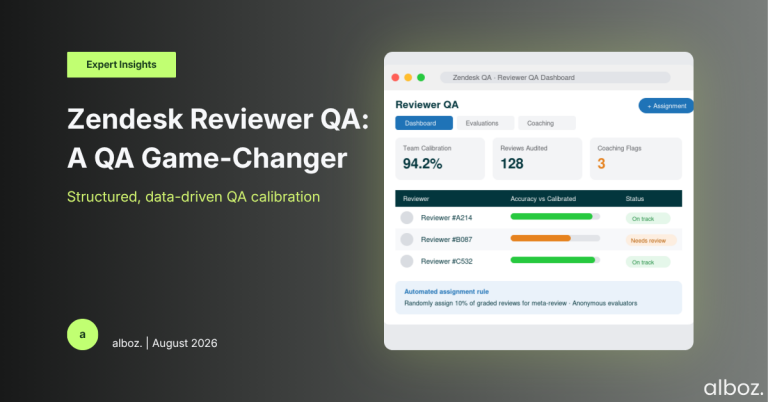
- Automated Assignments: You can create rules to automatically assign a graded ticket to another person for a “meta-review.” This ensures a random, unbiased selection of reviews are double-checked.
- A Dedicated Dashboard: A new “Reviewer QA” dashboard is now available. This is the central hub for tracking reviewer performance, spotting trends in scoring, and identifying coaching opportunities for your QA team.
- Controlled Anonymity: To promote fairness, reviewers who are being evaluated can see their own scores and history, but they cannot see who evaluated them. This helps remove personality from the equation and focuses purely on the quality of the review.
- Tiered Visibility: Agents won’t see any of this. Reviewers see their own scores. Leads can see all evaluations within their workspace, and managers get a high-level view across all their teams to analyse overall calibration quality.
Our Expert Opinion (Deep Dive)
The real power of this update lies in the ability to finally quantify and track reviewer accuracy. For years, QA calibration has often been a fuzzy process, reliant on group meetings where reviewers discuss their different scores on the same ticket. While useful, this approach doesn’t scale well and can be influenced by group dynamics. The new Zendesk Reviewer QA dashboard changes that.
By tracking reviewer accuracy as a metric, you can answer critical questions:
- Is a particular reviewer consistently scoring harsher or more leniently than their peers?
- Are there specific parts of our scorecard that cause the most disagreement among reviewers?
- Is our new hire on the QA team calibrated with our seasoned veterans?
This data is invaluable. It allows QA managers to provide targeted, evidence-based coaching to their team. Instead of saying, “I feel like you’re scoring a bit low,” you can say, “I’ve noticed on the last 15 reviews you evaluated, you were an average of 10% below the calibrated score on the ‘Tone’ metric. Let’s review some examples together.” This is how you build a world-class, consistent QA function. It professionalises the role of the reviewer and strengthens the integrity of your entire quality programme.
How We’d Handle the Rollout
Rolling out a feature that involves evaluating your evaluators requires a careful, considered approach. It’s crucial to frame this as a tool for consistency and professional development, not as a punitive “gotcha” system. Here is what we’re advising our clients to do:
| Phase | Action Items | Our Rationale |
|---|---|---|
| 1. Communicate the ‘Why’ | Hold a meeting with the entire QA team. Explain the new feature and its purpose. Emphasise that the goal is calibration and consistency, not punishment. Reassure the team that this is about improving the fairness of the entire QA process for agents. | Getting buy-in from the team is critical. If reviewers feel they are being micromanaged, they may become defensive. A positive and transparent introduction sets the stage for success. |
| 2. Configure Thoughtfully | Start small. Don’t set up rules to review 50% of all reviews on day one. Begin with a 5-10% random sample. Use the assignment conditions to target specific scenarios, like reviews with perfect scores or failing scores, to check for consistency at the extremes. | A gradual rollout allows you to test the process and gather initial data without overwhelming the team conducting the meta-reviews. It also minimises disruption. |
| 3. Train the Meta-Reviewers | Designate senior QA specialists or team leads as the initial “reviewer evaluators.” Train them on what they are looking for: adherence to the scorecard, consistent application of rules, and the quality of feedback left for the agent. | The person doing the second-level review needs to be your most calibrated, experienced QA expert. Their judgment sets the standard for the entire team. |
| 4. Analyse and Calibrate | Schedule a recurring weekly or bi-weekly meeting to analyse the Reviewer QA dashboard as a team. Discuss discrepancies openly. Use these insights to refine your scorecard definitions or provide group coaching. | The data is only useful if you act on it. Regular calibration sessions using the dashboard’s insights will continuously improve the quality and consistency of your entire Zendesk Reviewer QA programme. |
A Welcome Move Towards Mature QA
Ultimately, this update from Zendesk provides the tooling necessary to elevate a standard quality programme into a truly calibrated and data-driven centre of excellence. By providing a structured way to ensure reviewers are consistent and accurate, Zendesk is helping organisations build more trust in their QA scores and, by extension, deliver a more consistent customer experience. It’s a sophisticated feature that, when implemented thoughtfully, can have a profound impact on quality outcomes.