
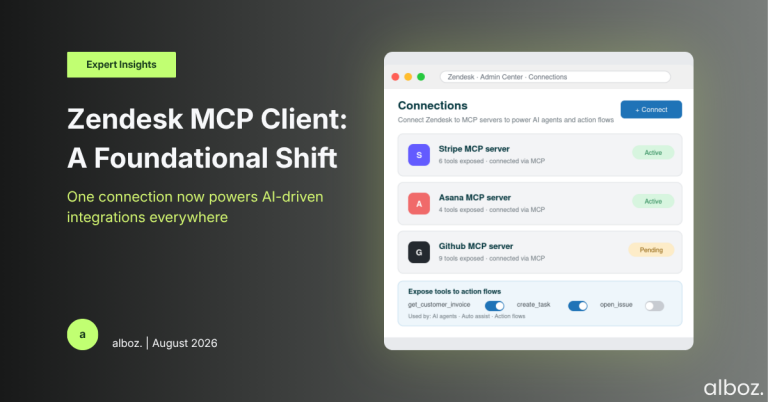
Zendesk is constantly rolling out new features and updates. Keeping up can be a full-time job, but we’re here to give you our expert opinion on what matters. Here’s our take on the latest announcement from August 10, 2026.
Simplifying Your Tech Stack: Our Expert Take on the New Zendesk MCP Client
What We Think:
The general availability of the Zendesk MCP client is a significant, foundational shift in how Zendesk handles integrations. This isn’t just another feature; it’s a new, more efficient architecture for connecting to external systems. By moving away from brittle, single-use API connections towards a reusable, “tool-based” model, Zendesk is drastically lowering the barrier to creating powerful, AI-driven workflows. Our verdict: This is a game-changer for organisations struggling with integration maintenance and a crucial enabler for Zendesk’s broader AI strategy.
The Reality Check: What’s Actually Changing?
Let’s cut through the jargon. Zendesk has introduced a new way to connect your help desk to other software, called the MCP (Model Context Protocol) client. Think of it like a universal adapter for your other business tools.
Instead of building a separate, custom API integration for every single task you want to perform in an external system (like fetching a Stripe payment or updating an Asana task), you now make a single connection to that system’s “MCP server”. This server essentially advertises all the “tools” or actions it has available. Once connected, you can simply pick and choose which of these tools you want to make available within Zendesk’s automation engine, which they call “action flows”.
This means you can connect to public servers from vendors like Stripe, Asana, and Github, or even your own company’s private, in-house systems. The key is that these tools can then be used by Zendesk’s AI features, like AI agents or auto-assist, to pull data and perform actions in real-time.
Our Expert Opinion: Why This Matters More Than You Think
The announcement highlights a major pain point we see with our clients every day: the “setup and maintenance overhead involved in using traditional integrations.” This is not an exaggeration. Managing dozens of API connections, each with its own authentication, endpoints, and “API wrappers,” is a constant drain on development and admin resources. When an external system updates its API, your custom integration can break, causing workflow disruptions.
The new Zendesk MCP client tackles this head-on. The genius of this approach is its reusability. You set up one connection to an MCP server, and you can reuse its tools across countless AI features and action flows. You no longer need to build a specific API wrapper for every single endpoint you want to use. The MCP server does the heavy lifting by describing its capabilities to Zendesk in a standardised way.
This is a foundational change that will unlock more sophisticated automations. Imagine an AI agent that can, within a single conversation, check a customer’s subscription status in Stripe, find their shipping details in your e-commerce platform, and create a follow-up task in Asana for the logistics team. With the old API model, this would be a complex, custom-coded project. With the MCP client, it becomes a matter of connecting to the right servers and configuring an action flow with the available tools. It democratises the ability to build incredibly powerful, context-aware support experiences.
How We’d Handle the Rollout: A Practical Checklist
This is a powerful new capability, but a planned approach is essential. Here is what we’re advising our clients to do to get started safely and effectively.
| Step | Action | Key Consideration |
|---|---|---|
| 1. Audit & Identify | Review your current agent workflows and identify the most frequent instances where they switch to another system to fetch data or perform an action. | Focus on high-frequency, high-impact tasks. Where do you lose the most time? What are the most common “let me check that for you” moments? |
| 2. Investigate MCP Servers | Check if your key external systems (e.g., Stripe, Asana, Github) offer public MCP servers. For your own internal tools, evaluate the business case for building a private MCP server. | Prioritise systems that are central to resolving customer issues. Don’t boil the ocean; start with one or two critical platforms. |
| 3. Start Small | Choose one simple, high-value use case for your first action flow. For example, creating a flow for an AI agent to fetch a customer’s order ID from your e-commerce system. | A quick win builds momentum and helps you understand the process without introducing too much complexity at once. |
| 4. Configure & Connect | Follow Zendesk’s guide on Connecting to MCP servers. Head to the ‘Connections’ page in Admin Center to set up your first connection and expose the tools you need. | If you were in the EAP, remember to update any bookmarks. The management page has moved to the main Admin Center. |
| 5. Test Rigorously | Build your action flow in a sandbox environment. Test all possible scenarios, including failures (e.g., what happens if the external system is down?). | Never test a new integration that can take action in an external system (like issuing a refund) in your live production environment. |
By releasing the MCP client, Zendesk is not just adding a feature; it’s laying down new plumbing for a more integrated and intelligent future. This streamlines the work of admins and developers today, while paving the way for the next generation of AI-powered customer service. It’s a strategic move, and one we’re excited to see our clients leverage to build more efficient and effective support operations.


