Zendesk is constantly evolving its platform, with new features and enhancements dropping almost daily. We’re here to cut through the noise and give you our expert take on what these changes really mean for your operations. Here’s our analysis of a critical security update rolling out in July 2026.
Zendesk’s New Session Hijacking Protection: A Quiet But Critical Upgrade
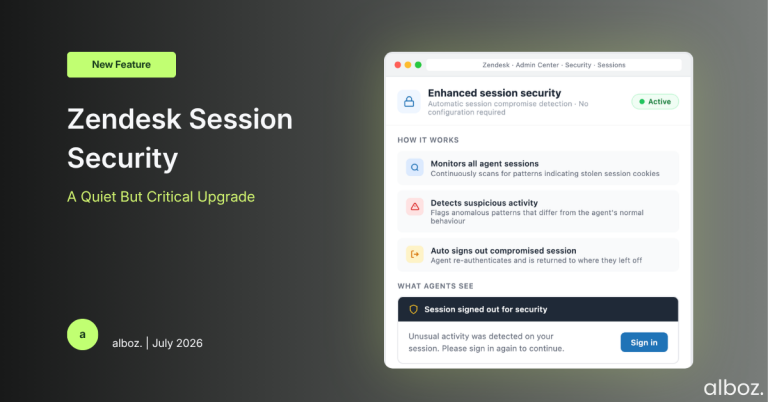
What We Think: Zendesk is introducing an automatic, behind-the-scenes security system to detect and shut down compromised user sessions. In simple terms, if the platform suspects an attacker has stolen an agent’s active login, it will immediately terminate that session. This is an excellent and necessary security enhancement that requires zero action from administrators. While most users will never even know it’s there, it provides a critical layer of defence against a growing threat. It’s a silent guardian for your Zendesk instance, and we’re fully on board.
The Reality Check: What’s Really Happening Here?
Let’s cut through the corporate-speak. The new enhancement to Zendesk session security is all about tackling a threat known as “session hijacking” or “cookie theft.” When one of your agents signs into Zendesk, their browser is given a “session cookie”—think of it like a temporary digital passport. This passport proves they are who they say they are for a set period, so they don’t have to enter their password for every single click.
The danger is that a sophisticated attacker, using methods like malware or phishing, can steal this passport. If they succeed, they can use it to impersonate your agent, access sensitive customer data, and cause all sorts of damage until that session naturally expires.
Zendesk’s change introduces a new, intelligent monitoring system. This system watches for “highly anomalous patterns” in how that session passport is being used. While Zendesk doesn’t specify the exact signals, this typically involves things like a session suddenly being used from a completely different geographical location or exhibiting behaviour inconsistent with a human user. If the system’s alarm bells go off, it will instantly revoke the passport by signing the user out. The legitimate user can simply sign back in, and crucially, will be returned to where they left off, minimising workflow disruption.
Our Expert Opinion: A Foundational Security Upgrade
Our take is that this isn’t just a minor tweak; it’s a foundational upgrade to the platform’s security posture. The announcement states, “Session compromise is an increasing threat across the industry,” and we couldn’t agree more. Customer support platforms are treasure troves of Personally Identifiable Information (PII), making them high-value targets for attackers. Proactively defending against these threats is no longer a “nice-to-have”—it’s an absolute necessity.
What we particularly appreciate is the implementation. By making this an automatic, background process, Zendesk is strengthening security without adding to the already heavy workload of system administrators. There are no toggles to flip or settings to configure. It just works. This is the best kind of security: effective, invisible, and effortless for the end-user.
The user experience consideration is also a key point. Being unexpectedly signed out can be jarring. However, Zendesk has confirmed that upon signing back in, users will be “returned to where you left off.” This small detail is hugely important. It shows a thoughtful approach that balances robust security with the practical realities of an agent’s day. A momentary interruption to sign in again is a tiny price to pay for preventing a potentially catastrophic data breach.
How We’d Handle the Rollout: A Preparedness Checklist
While Zendesk states that “no action is required,” we believe proactive communication is always the best policy. You don’t want your agents to be confused or alarmed if they are one of the rare cases where a session is terminated. Here is what we’re advising our clients to do ahead of the July 2026 rollout.
| Action Item | Our Recommendation |
|---|---|
| Inform Your Team | Send a brief internal communication explaining this new security feature. Let your agents know that if they are ever unexpectedly signed out, it’s a protective measure, not a system bug. Advise them to simply sign back in and, as a precaution, report the incident to their manager or IT department. |
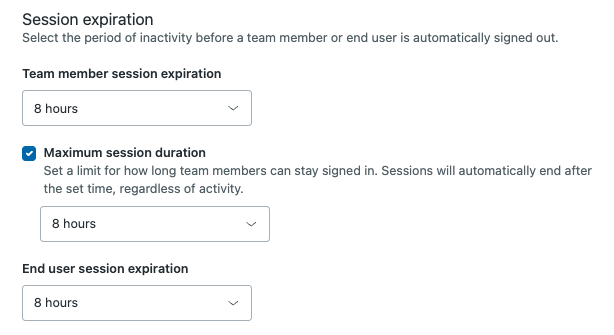
| Review Existing Session Policies | This announcement is a perfect trigger to review your current Zendesk session time settings. While unrelated to the new automatic detection, ensuring your idle session timeouts are set appropriately for your organisation’s risk profile is a core part of good Zendesk session security hygiene. |
| Prepare for (Unlikely) False Positives | No automated system is perfect. While Zendesk expects this to be rare, there’s a slim chance of a false positive, especially for users who may travel frequently or use complex VPN setups. Establish a clear internal channel for agents to report if they are being logged out repeatedly without a clear reason, so you can escalate to Zendesk Support if needed. |
| Update Security Stakeholders | Make sure your IT Security or Compliance teams are aware of this platform enhancement. It’s a positive development that demonstrates Zendesk is actively working to protect your data, which is always good news to share with those responsible for organisational security. |
In conclusion, this is a welcome and robust security upgrade from Zendesk. It addresses a modern threat vector with an intelligent, non-intrusive solution that protects customer data and agent accounts without requiring any administrative overhead. It’s a clear win for every organisation on the platform.