
Zendesk’s AI capabilities are evolving at a breakneck pace, with updates landing almost daily. Keeping up can be a challenge, so here’s our expert take on the latest announcement from August 2026.
Is Zendesk’s New Copilot Onboarding a Game-Changer? Here’s the Reality.
What We Think: Zendesk is finally tackling a major AI adoption barrier—complexity. This new guided Zendesk Copilot Onboarding for auto assist is a welcome step towards making powerful automation more accessible. However, it’s not a ‘set and forget’ solution. The real value still lies in carefully curating your knowledge sources and critically reviewing the AI-generated procedures. It simplifies the first step, but the ongoing strategic work of AI management remains firmly in your court.
The Reality Check: What’s Actually Changing?
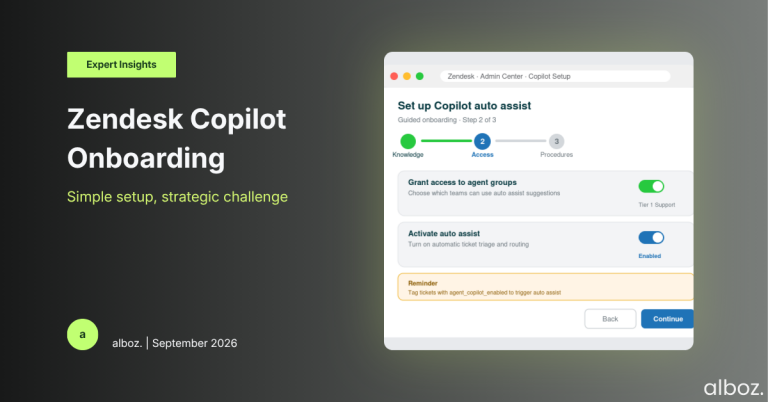
Let’s cut through the jargon. Zendesk has introduced a simple, three-step setup wizard within the Admin Centre for its Copilot auto assist feature. For those unfamiliar, auto assist is the part of Copilot that can automatically triage tickets, route them, and even apply macros without an agent lifting a finger. Previously, configuring this could feel a bit disjointed. This new guided flow aims to fix that.
It’s designed for both new and existing users, but with a catch: it’s a one-time process. Once the first administrator in your account runs through the guided setup, it disappears. So, it’s crucial to get it right the first time.
The three steps are quite logical:
- Select knowledge sources: You tell the AI where to look for information. This includes your Help Centre articles and any external content you’ve integrated. This is the ‘brain’ of your auto assist.
- Grant access and activate: You decide which groups of agents will have access to the feature and then you flick the switch to turn it on.
- Review and publish procedures: This is the most critical step. The AI analyses your existing macros and generates its own “procedures” or step-by-step instructions. You must review and approve these before they go live.
A massive “gotcha” to be aware of: for auto assist to actually work on a ticket, you generally still need to add the agent_copilot_enabled tag to it. The only exception is if you are part of a specific Early Access Programme (EAP) for the updated auto assist experience. For most, forgetting this tag means the feature simply won’t trigger.
Our Expert Opinion: The Devil is in the “Procedures”
Our take is that while the simplified setup is great, the real operational impact lies in that third step: “Review and publish AI-generated procedures.” This is where the magic—and the potential for mishaps—happens. The AI is essentially trying to learn your business logic by reading your macros. This is a powerful concept, but it hinges entirely on the quality of the macros you already have.
Think of it this way: if your macros are outdated, inconsistent, or poorly described, the AI will learn flawed processes. You’ll end up with an automated system that confidently and efficiently does the wrong thing. The principle of “garbage in, garbage out” has never been more relevant. This feature forces a long-overdue audit of your existing macro hygiene, which is a good thing in the long run.
This is why a holistic Zendesk AI strategy is so important. You can’t just switch on a feature and expect it to work miracles. The success of this new Zendesk Copilot Onboarding experience is directly proportional to the quality of the data and processes you feed into it. We believe this step of reviewing AI-generated procedures is where most of the human oversight and expertise will be required, turning a simple setup into a deeply strategic exercise.
How We’d Handle the Rollout: A Phased Approach
Here is what we’re advising our clients to do. Don’t just jump into the Admin Centre and start clicking. A successful rollout requires preparation and careful execution. We recommend a three-phase approach to ensure you get value without disrupting your operations.
| Phase | Key Actions | Our Rationale |
|---|---|---|
| Phase 1: Pre-Onboarding Preparation |
| This ensures the AI learns from high-quality, relevant information and minimises the blast radius of any initial teething problems. |
| Phase 2: The Guided Setup |
| Since the wizard is a one-time tool, it’s vital to be meticulous. Scrutinising the procedures prevents the automation of bad habits. |
| Phase 3: Activation & Monitoring |
| Activation is not the end goal. Continuous monitoring and refinement are essential to maximising the ROI of your AI tools. |
Ultimately, the new guided Zendesk Copilot Onboarding is a significant improvement that lowers the technical barrier to using advanced AI automation. It smartly shifts the focus from complex configuration to strategic oversight—curating knowledge and validating business logic. It’s a powerful assistant, but it still needs a smart manager. If you need help defining that strategy or ensuring your foundations are ready for AI, reach out to your alboz. Solution Consultant.


