
Zendesk continues to roll out enhancements to its platform, and our team is here to break down what these changes mean for your day-to-day operations. Here’s our expert opinion on the latest update from August 19, 2026.
Zendesk Custom Tasks: Finally, the Flexibility Your Agents Have Been Asking For
What We Think:
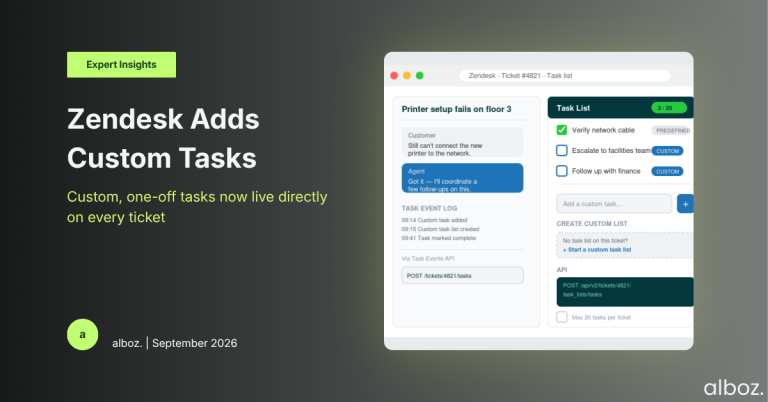
This is a fantastic quality-of-life update that directly addresses a long-standing operational gap. The introduction of Zendesk custom tasks and task lists empowers agents to manage unique, one-off ticket requirements without resorting to messy workarounds. By moving ad-hoc to-do items from internal notes or external apps directly into a trackable ticket component, Zendesk is improving both agent efficiency and process transparency. Our verdict: A simple, powerful, and overdue enhancement that every team should adopt immediately.
The Reality Check: What’s Actually Changing?
Let’s cut through the jargon. Previously, “Task Lists” in Zendesk were rigid templates created by an administrator. They were great for standardised, repeatable processes, but they fell short when a customer ticket had a unique requirement that didn’t fit the mould. Your agents were likely using internal notes, their own notepads, or other tools to keep track of these one-off actions, creating visibility gaps and potential for error.
With this change, that’s no longer necessary. Agents can now:
- Add custom, one-off tasks to an existing task list on a ticket.
- Create an entire custom task list from scratch directly within a ticket that doesn’t have one.
Crucially, all this activity is recorded in the ticket’s event log, ensuring a complete audit trail. It’s a small change on the surface, but it fundamentally alters how agents can manage non-standard workflows within the Zendesk Agent Workspace.
Our Expert Opinion: The Real-World Impact
Our take is that this is more than just a convenience feature; it’s a significant step towards empowering agents and cleaning up your data. For years, we’ve seen teams struggle with “exception handling.” A standard process might cover 80% of tickets, but the remaining 20%—the complex, multi-step, unique ones—cause the most headaches and are often where service quality falters.
The biggest win here is the formalisation of ad-hoc work. When an agent adds a custom task like “Follow up with the finance department on invoice #12345,” that action is no longer an invisible thought bubble. It becomes a concrete, visible, and trackable part of the ticket’s history. This enhances accountability and makes handovers between agents or shifts seamless, as the next agent can see exactly what unique steps have been taken or are still pending.
We’re also particularly interested in the API capabilities mentioned in the announcement. While agents can create tasks manually, the ability to create Zendesk custom tasks via the API opens up a new level of sophisticated automation. Imagine a workflow where a specific tag or custom field value on a ticket triggers an API call that automatically populates a unique task list tailored to that exact, complex scenario. This bridges the gap perfectly between fully manual work and rigid, predefined templates.
However, be mindful of the stated limitation: a maximum of 20 tasks per ticket (counting both predefined and custom tasks). For the vast majority of tickets, this is more than enough. But for extremely long-running, complex project tickets, it’s a ceiling your team needs to be aware of to avoid hitting a roadblock.
How We’d Handle the Rollout: An Action Plan
Here is what we’re advising our clients to do to implement this change effectively. This isn’t just a feature to turn on; it’s a process to be adopted. A structured rollout will ensure your team gets the maximum benefit.
| Step | Action Item | Why It Matters |
|---|---|---|
| 1. Audit & Identify | Speak with your agents to identify where and how they currently track one-off ticket actions. (e.g., internal notes, Slack reminders, sticky notes). | This helps you understand the pain points the new feature solves and provides a clear “before and after” to measure success. |
| 2. Communicate & Train | Hold a short training session to demonstrate how to add a custom task and create a custom task list. Clearly define when to use this feature versus a standard template. | Proper training prevents misuse and ensures agents are confident in using the new tool, replacing old, inefficient habits. |
| 3. Update Documentation | Revise your internal knowledge base or process guides to officially make Zendesk custom tasks the standard procedure for handling non-standard ticket actions. | Formalising the process in writing solidifies it as the new standard operating procedure and serves as a reference for new hires. |
| 4. Explore Automation (Phase 2) | Task your Zendesk admin or our team at alboz. to identify 1-2 scenarios where creating custom tasks via the API could automate a complex but recurring workflow. | This unlocks the feature’s full potential, moving beyond manual entry to intelligent, automated workflow management. |
In summary, this update is a significant enhancement to agent workflow flexibility. By giving agents the tools to properly manage and track unique ticket requirements directly within Zendesk, it reduces errors, improves transparency, and ultimately empowers your team to provide better, more organised support. If you need guidance on how to best integrate this into your existing processes, reach out to your alboz. Solution Consultant.
## PREVIEW ##
Zendesk continues to roll out enhancements to its platform, and our team is here to break down what these changes mean for your day-to-day operations. Here’s our expert opinion on the latest update from August 19, 2026.
Zendesk Custom Tasks: Finally, the Flexibility Your Agents Have Been Asking For
What We Think:
This is a fantastic quality-of-life update that directly addresses a long-standing operational gap. The introduction of Zendesk custom tasks and task lists empowers agents to manage unique, one-off ticket requirements without resorting to messy workarounds. By moving ad-hoc to-do items from internal notes or external apps directly into a trackable ticket component, Zendesk is improving both agent efficiency and process transparency. Our verdict: A simple, powerful, and overdue enhancement that every team should adopt immediately.
The Reality Check: What’s Actually Changing?
Let’s cut through the jargon. Previously, “Task Lists” in Zendesk were rigid templates created by an administrator. They were great for standardised, repeatable processes, but they fell short when a customer ticket had a unique requirement that didn’t fit the mould. Your agents were likely using internal notes, their own notepads, or other tools to keep track of these one-off actions, creating visibility gaps and potential for error.
With this change, that’s no longer necessary. Agents can now:
- Add custom, one-off tasks to an existing task list on a ticket.
- Create an entire custom task list from scratch directly within a ticket that doesn’t have one.
Crucially, all this activity is recorded in the ticket’s event log, ensuring a complete audit trail. It’s a small change on the surface, but it fundamentally alters how agents can manage non-standard workflows within the Zendesk Agent Workspace.
Our Expert Opinion: The Real-World Impact
Our take is that this is more than just a convenience feature; it’s a significant step towards empowering agents and cleaning up your data. For years, we’ve seen teams struggle with “exception handling.” A standard process might cover 80% of tickets, but the remaining 20%—the complex, multi-step, unique ones—cause the most headaches and are often where service quality falters.
The biggest win here is the formalisation of ad-hoc work. When an agent adds a custom task like “Follow up with the finance department on invoice #12345,” that action is no longer an invisible thought bubble. It becomes a concrete, visible, and trackable part of the ticket’s history. This enhances accountability and makes handovers between agents or shifts seamless, as the next agent can see exactly what unique steps have been taken or are still pending.
We’re also particularly interested in the API capabilities mentioned in the announcement. While agents can create tasks manually, the ability to create Zendesk custom tasks via the API opens up a new level of sophisticated automation. Imagine a workflow where a specific tag or custom field value on a ticket triggers an API call that automatically populates a unique task list tailored to that exact, complex scenario. This bridges the gap perfectly between fully manual work and rigid, predefined templates.
However, be mindful of the stated limitation: a maximum of 20 tasks per ticket (counting both predefined and custom tasks). For the vast majority of tickets, this is more than enough. But for extremely long-running, complex project tickets, it’s a ceiling your team needs to be aware of to avoid hitting a roadblock.
How We’d Handle the Rollout: An Action Plan
Here is what we’re advising our clients to do to implement this change effectively. This isn’t just a feature to turn on; it’s a process to be adopted. A structured rollout will ensure your team gets the maximum benefit.
| Step | Action Item | Why It Matters |
|---|---|---|
| 1. Audit & Identify | Speak with your agents to identify where and how they currently track one-off ticket actions. (e.g., internal notes, Slack reminders, sticky notes). | This helps you understand the pain points the new feature solves and provides a clear “before and after” to measure success. |
| 2. Communicate & Train | Hold a short training session to demonstrate how to add a custom task and create a custom task list. Clearly define when to use this feature versus a standard template. | Proper training prevents misuse and ensures agents are confident in using the new tool, replacing old, inefficient habits. |
| 3. Update Documentation | Revise your internal knowledge base or process guides to officially make Zendesk custom tasks the standard procedure for handling non-standard ticket actions. | Formalising the process in writing solidifies it as the new standard operating procedure and serves as a reference for new hires. |
| 4. Explore Automation (Phase 2) | Task your Zendesk admin or our team at alboz. to identify 1-2 scenarios where creating custom tasks via the API could automate a complex but recurring workflow. | This unlocks the feature’s full potential, moving beyond manual entry to intelligent, automated workflow management. |
In summary, this update is a significant enhancement to agent workflow flexibility. By giving agents the tools to properly manage and track unique ticket requirements directly within Zendesk, it reduces errors, improves transparency, and ultimately empowers your team to provide better, more organised support. If you need guidance on how to best integrate this into your existing processes, reach out to your alboz. Solution Consultant.


