
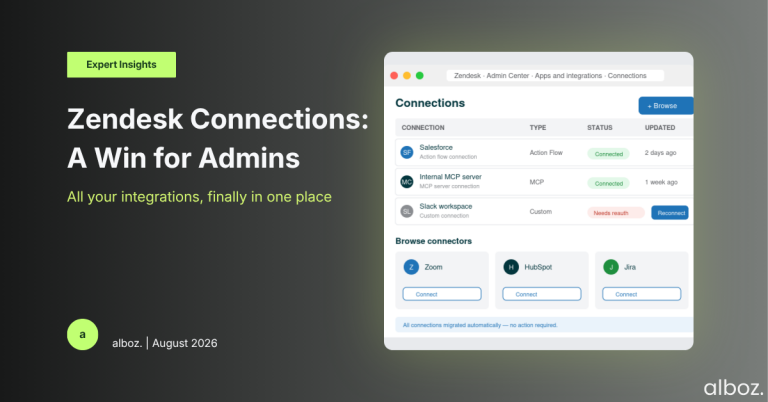
Zendesk is constantly evolving, rolling out updates and new features that can reshape how your team works. Keeping up can be a full-time job, but we’re here to give you the expert take on what actually matters. Here’s our analysis of the latest announcement from August 2026.
At Last, A Single Source of Truth: Our Take on Zendesk Connections
What We Think:
Zendesk Connections is a long-overdue and brilliant centralisation effort that finally brings sanity to managing third-party integrations. By consolidating every external connection into a single page in the Admin Center, Zendesk is drastically reducing administrative overhead and paving the way for more powerful, cross-functional automations. This isn’t just a cosmetic tidy-up; it’s a foundational change that will make building and maintaining a connected CX ecosystem significantly easier and more reliable. Our verdict: A massive quality-of-life win for every Zendesk admin.
The Reality Check: What’s Actually Changing?
Let’s cut through the jargon. For years, managing connections in Zendesk felt a bit like a treasure hunt. If you wanted to see the connection for an action flow, you had to go into the action builder. MCP server connections had their own separate page, and custom connections lived elsewhere. It was fragmented and inefficient, especially for complex accounts with numerous integrations.
The new Zendesk Connections page changes all of that. You’ll now find it in Admin Center under Apps and integrations > Connections. This new hub does a few key things:
- A Unified View: It brings every single connection—whether for action flows, MCP servers, or custom setups—into one single, sortable table. You can see what the connection is, who built it, and when it was last modified at a glance.
- A Connector Library: There’s a new “Browse connectors” section that acts like an app store for your integrations. You can see every available connector, read a description, and initiate a new connection with a single click.
- Simplified Management: You can now view detailed information for each connection, including authorisation details and OAuth scopes. Crucially, you can also re-authorise or reconnect a service directly from this page without it breaking the automations that rely on it.
The best part? This is a seamless transition. Zendesk has automatically migrated all your existing connections to the new page. No action is required on your part, other than updating your internal bookmarks and getting familiar with the new location.
Our Expert Opinion: Why This is a Bigger Deal Than it Looks
On the surface, this is an administrative tidy-up. But we believe the principle behind it—”connect a system once, then use it wherever you need it”—is a strategic game-changer. For too long, connections were tied to the specific feature that created them. This new model decouples the connection from the function.
Think about it. You authorise a connection to Salesforce once. That single, managed connection can then be leveraged by action flows, AI agents, data exports, and any future Zendesk product that needs to talk to Salesforce. This is a far more scalable and robust architecture. It reduces redundant configuration and minimises points of failure.
The most impactful feature here, in our opinion, is the ability to “Reconnect without breaking your flows.” Any admin who has ever had an API token expire knows the heart-stopping moment when you realise a critical workflow has been down for hours. The process of re-authorising often involved carefully rebuilding steps or hoping the reconnection didn’t have unintended consequences. By allowing admins to simply refresh an authorisation from a central management page while keeping the underlying configurations intact, Zendesk is removing a massive amount of risk and stress from the maintenance process.
How We’d Handle the Rollout: A 4-Step Action Plan
While Zendesk is handling the technical migration for you, a smooth transition still requires a bit of planning. Here is what we’re advising our clients to do to get the most out of the new Zendesk Connections hub.
| Step | Action | Why It’s Important |
|---|---|---|
| 1. Audit and Familiarise | Navigate to the new Connections page in your Admin Center. Review the list of all migrated connections. Check the “Last updated” and “Connected by” fields. | This gives you a complete, instant inventory of every external system your Zendesk instance is talking to. It’s a perfect opportunity to spot old, unused, or unauthorised connections that can be cleaned up. |
| 2. Update Internal Documentation | Search your internal knowledge base, Confluence, SharePoint, or any other documentation for old links pointing to the previous connections pages (like the MCP connections page). Update them to the new location. | Prevents confusion for your team and ensures everyone knows where to go to manage integrations. It keeps your operational runbooks current. |
| 3. Delegate and Define Roles | Consider if “connection management” should be a specific responsibility for a senior admin. The new centralised page makes it easy to hand over this task. | Centralising the feature allows you to centralise the responsibility. This improves security and governance by ensuring only specific, trained individuals are authorising new third-party systems. |
| 4. Explore and Strategise | Use the new “Browse connectors” library to see what’s available. Start a discussion with your team about which new integrations could solve existing business problems. | This isn’t just about managing what you have; it’s about discovering what’s possible. The growing library will be a key source of innovation for your CX operations. |
A Foundation for the Future
Ultimately, the new Connections hub is more than just a new page in Admin Center. It’s a statement of intent from Zendesk. By building a scalable, centralised foundation for integrations, they are preparing for a future where AI agents, proactive workflows, and deep data analysis will rely on a web of interconnected services. This change makes that future far more manageable, secure, and powerful for all of us. It’s a welcome and necessary evolution.


