
Zendesk continues its relentless pace of innovation, dropping new features that can significantly reshape customer interactions. Keeping up is a full-time job, but we’re here to give you the expert take. Here’s our analysis of the latest from July 2026.
Zendesk Live Transcripts for Voice: A Game-Changer for Accuracy and Agent Sanity
What We Think:
The introduction of Zendesk live transcripts for voice calls within the Agent Workspace is a genuinely transformative feature, not just a minor tweak. For any team handling complex voice support, this is a massive win for accuracy, efficiency, and even accessibility. It directly tackles the age-old problem of agents trying to listen, type, and solve problems simultaneously. Our verdict? This is a must-have for Zendesk Contact Center users, provided you have the required Amazon Contact Lens integration. It moves voice support from a memory game to a data-driven interaction, which is exactly where it needs to be.
The Reality Check: What’s Actually Changing?
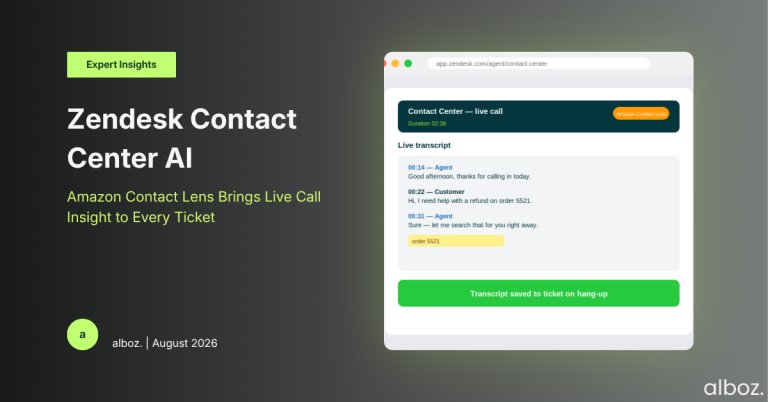
Let’s cut through the marketing fluff. Zendesk is adding a new panel to the Agent Workspace that displays a real-time, running transcript of an active voice call. Think of it like live captions for your support calls. This isn’t just a wall of text; it’s an interactive tool.
Here’s what your agents get with the new Zendesk live transcripts feature:
- Speaker Labels: The transcript clearly identifies who is speaking, whether it’s the agent or the customer. This is crucial for clarity when reviewing the conversation later.
- Searchable Text: This is the most powerful part. An agent can quickly search the transcript for a key piece of information—like an account number, email address, or specific detail mentioned earlier in the call—without having to ask the customer to repeat themselves.
- Timestamps: Every part of the conversation is time-stamped, making it easy to track the flow of the call and pinpoint when specific information was discussed.
- Dynamic UI: Agents can expand, collapse, or hide the transcript panel to suit their workflow, ensuring it doesn’t clutter their screen. The full transcript is automatically saved to the ticket at the end of the call.
The critical thing to note is the dependency: this functionality is only available for customers using the native Zendesk Contact Center with Amazon Contact Lens. It’s not a standard feature for all voice users, so a technical prerequisite must be met.
Our Expert Opinion: The Real-World Impact
Zendesk lists improved accuracy, increased productivity, and better accessibility as the key benefits. We agree, and we think the operational impact is even bigger than it sounds. For years, we’ve seen agents struggle with the cognitive load of active listening while simultaneously navigating systems and taking notes. This feature directly alleviates that pressure.
The end of “Could you spell that for me again?” The most immediate benefit is the boost in data accuracy. How often does a typo in an email address or an incorrect order number derail a resolution? By having a visual reference, agents can confirm critical information without interrupting the customer’s flow. This not only reduces errors and repeat contacts but also makes the agent appear more competent and attentive, which is a huge win for the customer experience.
Productivity is more than just speed. While searchable transcripts will certainly help reduce Average Handle Time (AHT) by cutting out moments of hesitation or requests for repeated information, the real productivity gain is in agent confidence. When agents aren’t worried about missing a key detail, they can focus more on problem-solving and building rapport. This leads to better, more empathetic conversations and higher First Contact Resolution (FCR) rates. We believe this will also have a positive downstream effect on reducing agent burnout.
A quiet revolution in accessibility. Zendesk’s mention of accessibility is important. By providing a real-time text version of a voice call, this feature makes the voice channel viable for agents with hearing impairments. This is a fantastic step toward building more diverse and inclusive support teams, and we applaud Zendesk for recognising and enabling this.
How We’d Handle the Rollout
Turning on a feature like this requires more than just flipping a switch. A thoughtful rollout is key to maximising its benefits and ensuring agent adoption. Here is what we’re advising our clients to do.
| Phase | Key Action | Our Rationale |
|---|---|---|
| 1. Prerequisite Audit | Confirm you have a native Zendesk Contact Center licence and have Amazon Contact Lens enabled and configured. | This feature is entirely dependent on this specific tech stack. Don’t waste time planning if you don’t have the foundation in place. |
| 2. Technical Configuration | Follow Zendesk’s guide, “Turning on Contact Center live voice call transcription,” to configure your Amazon Connect instance. | This is a technical step that requires admin rights. It involves setting up the data stream from Amazon to Zendesk. Engage your Zendesk or AWS admin for this. |
| 3. Agent Training & Workflow Design | Conduct a mandatory training session. Demonstrate how to use the panel, especially the search function. Discuss best practices for using it without being distracted. | Adoption is everything. Agents need to see this as a tool to help them, not another screen to watch. Show them *how* it makes their job easier. |
| 4. Pilot Program | Roll out the feature to a small, select group of experienced voice agents for one to two weeks. | Use this group to gather real-world feedback. Does it impact AHT? Is it accurate? Are there any bugs? Use their insights to refine your training for the wider team. |
| 5. Full Launch & Monitoring | Enable the feature for all voice agents. Closely monitor KPIs like FCR, CSAT, and AHT. | Keep a close eye on the data. You should expect to see improvements in accuracy-related metrics and CSAT. AHT might fluctuate initially as agents adapt their workflow. |
In summary, the new Zendesk live transcripts feature is a powerful addition for any support organisation that relies on the voice channel. It promises to enhance agent performance, improve data quality, and create a more seamless experience for customers. While it requires a specific technical setup, the potential return on investment in terms of efficiency and satisfaction is substantial.


