
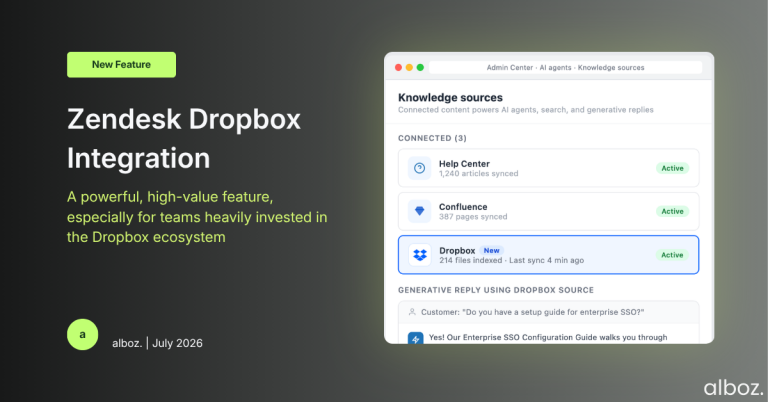
Zendesk continues to roll out new features and integrations at a breakneck pace. Here’s our expert analysis of the latest updates for July 2026.
The Zendesk Dropbox Integration: A Smart Move for Unified Knowledge, But Is It a Silver Bullet?
What We Think:
The new Zendesk Dropbox Integration is a significant and welcome step towards creating a true single source of truth for support knowledge. By allowing your Zendesk instance to tap directly into your existing Dropbox content, it drastically reduces administrative overhead and the risk of outdated information. Our verdict is that this is a powerful, high-value feature, especially for teams heavily invested in the Dropbox ecosystem. The primary benefit isn’t just file access; it’s about feeding richer, more accurate data to your AI agents and generative search, which is where the real ROI lies. However, a successful rollout requires careful planning and content curation.
The Reality Check: What’s Actually Changing?
Let’s cut through the jargon. Zendesk has announced that you can now connect your Dropbox account as an “external content source.” In simple terms, this means you can authorise Zendesk to access, index, and use the files stored in your Dropbox folders. This content then becomes available across your Zendesk knowledge experiences, including the help centre search, AI-powered bots (like generative replies), and agent-facing tools.
Previously, if you had crucial support documentation like product manuals, technical specifications, or policy documents in Dropbox, you had to manually copy that information into a Zendesk Guide article. When the original document was updated in Dropbox, you had to remember to update the Zendesk article too. This new integration aims to eliminate that painful, error-prone duplication of effort. Your Dropbox becomes an extension of your knowledge base, directly feeding information into Zendesk’s ecosystem.
Our Expert Opinion: It’s All About Fueling the AI
Zendesk’s announcement states the goal is to “make it easier to reuse existing knowledge from different sources.” While true, we believe the core driver here is much more specific and strategic: powering Zendesk’s AI capabilities.
The real game-changer isn’t just letting a customer search for a PDF. It’s about what the AI can do with that content. When you connect Dropbox, you’re not just linking files; you’re providing a rich new dataset for your AI agents and generative search to learn from. This has massive operational implications:
- More Accurate AI Agents: Your bots can now answer complex questions by drawing information directly from detailed technical documents or policy PDFs stored in Dropbox. This means they can handle a wider range of queries with higher accuracy, leading to better deflection rates and more satisfied customers.
- Smarter Generative Search: Instead of just pointing a user to a 200-page manual, generative search can analyse the document and provide a direct, synthesised answer to the user’s specific question. This is a far superior customer experience.
- A True Single Source of Truth: This is the holy grail of knowledge management. Your product team can update a technical specification in a shared Dropbox folder, and your support AI will immediately have access to the new information. This closes the loop between engineering/product and support, ensuring the information your customers and agents receive is always current.
The Zendesk Dropbox Integration is a critical piece of infrastructure for anyone serious about leveraging AI in their support operations. It acknowledges that valuable knowledge doesn’t just live in the help centre; it’s scattered across the organisation. By tapping into Dropbox, Zendesk is making its AI platform significantly more powerful and context-aware.
How We’d Handle the Rollout: A Phased Approach
Connecting your entire Dropbox account to Zendesk without a plan is a recipe for disaster. You risk exposing internal, irrelevant, or confusing information to customers and your AI. Here is what we’re advising our clients to do:
We recommend a careful, structured approach to ensure you’re sharing the right content effectively. A simple checklist can help you organise the rollout and avoid common pitfalls.
| Phase | Action Item | Our Expert Tip |
|---|---|---|
| 1. Content Audit & Curation | Identify and gather all customer-facing documentation currently in Dropbox. | Create a specific, top-level folder in Dropbox named something like “Zendesk Knowledge Sync”. Move only approved, curated content into this folder. Do not connect your entire Dropbox. |
| 2. Connection & Configuration | Follow Zendesk’s guide to connect your Dropbox account. You must be an admin in both Zendesk and Dropbox to authorise the connection. | During setup, you will be asked to select which folders to sync. Select only the curated folder you created in Phase 1. This gives you granular control over what Zendesk can see. |
| 3. Enable for AI & Search | In the Admin Center, navigate to the knowledge source settings for your bots and generative search. Enable the new Dropbox source. | Start by enabling it for an internal-only brand or a specific bot that handles a limited scope of queries. This allows for safe testing. |
| 4. Test & Validate | Perform a series of test searches and ask your AI bot questions that should be answered by the Dropbox content. | Check both the accuracy of the answers and the sourcing. Ensure the AI is correctly referencing the Dropbox documents. Refine the content in Dropbox if answers are poor. |
| 5. Go Live & Monitor | Once you are confident in the results, enable the integration for your customer-facing help centre and bots. | Keep a close eye on your search analytics and bot resolution rates. Look for trends that indicate whether the new content source is helping or hindering users. |
In conclusion, the Zendesk Dropbox Integration is a strategic enhancement that strengthens the entire Zendesk AI ecosystem. It’s a practical solution for a common knowledge management problem, enabling organisations to leverage content they already have to build smarter, more efficient support experiences. By following a structured implementation plan, you can unlock significant value from this new capability.


