Zendesk continues to roll out new features and refinements. Keeping up can be a full-time job, but our team is here to give you the expert take on what actually matters for your CX operations.
Zendesk Finally Unlocks Brand Management: A Long-Awaited Win for Enterprise Teams
What We Think:
This is a fantastic and long-overdue update for any organisation running a multi-brand Zendesk instance. The introduction of granular Zendesk brand permissions moves brand management from a centralised admin-only task to a delegated, role-based responsibility. It’s a huge win for operational efficiency, autonomy, and security, effectively eliminating a significant bottleneck for department managers and team leads. Our verdict: A powerful and necessary feature for Enterprise customers that allows for safer, more scalable brand administration.
The Reality Check: What’s Really Changing?
Let’s cut through the jargon. For years, if a department manager wanted to update their brand’s logo, signature, or subdomain, they had to file a request with a full Zendesk administrator. This created delays and added to the admin’s workload. Zendesk is now fixing this by adding new permissions to Custom Roles (available on Enterprise plans).
Essentially, you can now grant specific users the ability to manage brand settings without making them full-blown admins. Here’s the breakdown:
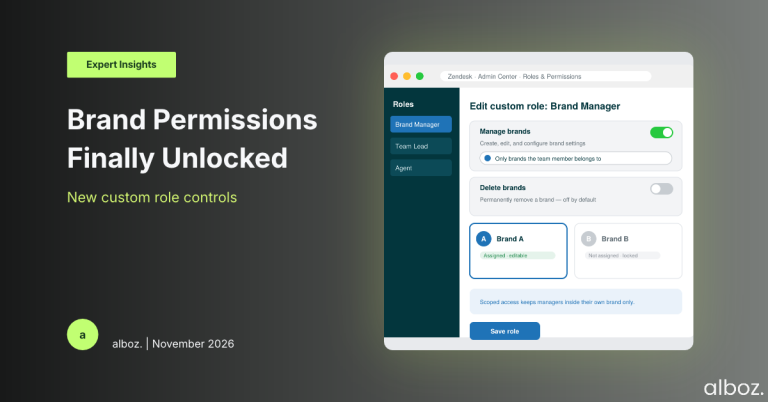
- New “Manage brands” Permission: This is the core of the update. When creating or editing a custom role, you can now grant the ability to manage brands.
- Scoped Access: Crucially, you can limit this power. You can either grant permission to manage all brands in your Zendesk instance or, more usefully, only the brands the team member belongs to. This means the manager for “Brand A” can’t accidentally meddle with the settings for “Brand B”.
- What They Can Do: A user with this permission can create, edit, configure, set a brand as default, and deactivate brands. This includes changing the name, logo, signature, host mapping, and other key settings.
- A Separate “Delete brands” Permission: Recognising that deletion is a major, irreversible action, Zendesk has wisely made this a separate permission. You have to explicitly grant someone the right to permanently delete a brand.
These new Zendesk brand permissions are not enabled by default, so your existing custom roles will remain unchanged until you decide to modify them.
Our Expert Opinion: The End of the Admin Bottleneck
Our take is that this is more than just a quality-of-life improvement; it’s a fundamental shift towards better governance and operational maturity for large-scale Zendesk users. The primary benefit is the decentralisation of routine tasks. Your central IT or Zendesk admin team no longer needs to be involved in day-to-day brand tweaks. This empowers regional or product-line managers to be more agile and responsive.
The real genius here is the scoping. Allowing a team lead to only manage the brands they are directly responsible for is a critical security and control feature. It minimises the “blast radius” of any potential mistakes. We’ve seen clients give managers full admin rights just so they could manage their brand signature, which is a massive security risk. This update completely solves that problem.
The separation of the “Delete” permission is also a standout feature. Deleting a brand is a destructive act with significant consequences, especially if there are open tickets associated with it. By making it a distinct, opt-in permission, Zendesk adds a vital layer of protection against accidents. This shows a deep understanding of enterprise-level operational needs. Implementing these kinds of granular controls across a complex multi-brand setup can be challenging, which is why many of our clients rely on our expert Zendesk services to ensure their architecture is both flexible and secure.
How We’d Handle the Rollout: A Strategic Checklist
Here is what we’re advising our clients to do to prepare for and implement this change safely. Don’t just flip the switch; a little planning will ensure a smooth transition.
| Step | Action | Key Consideration |
|---|---|---|
| 1. Audit & Identify | Identify all team leads, regional heads, or department managers who are currently responsible for a specific brand’s CX. Who is regularly asking your admin to make brand changes? | This is your list of potential candidates for the new permissions. |
| 2. Define the “Brand Manager” Role | Create a new custom role (or modify an existing one) specifically for brand management. Give it a clear name like “Brand Manager – [Department Name]”. | Avoid adding these permissions to a generic “Team Lead” role if not all leads need it. Be specific. |
| 3. Set the Scope | For each new role, enable the “Manage brands” permission. For 99% of use cases, you should select “Only brands the team member belongs to”. | Only use the “All brands” scope for a very trusted, senior-level global brand manager. |
| 4. Be Cautious with Deletion | Do not enable the “Delete brands” permission unless there is an explicit and documented business need. This permission should be reserved for top-level administrators only. | Treat this permission with the same caution as you would full admin rights. |
| 5. Communicate & Train | Inform the newly empowered managers of their new capabilities. Provide a brief training session or a simple guide on what they can now do directly in Zendesk. | Clear communication prevents confusion and ensures the new feature is actually used. |
In conclusion, the rollout of dedicated Zendesk brand permissions is a significant step forward, offering the flexibility and control that enterprise customers have been asking for. By enabling a more distributed model of administration, Zendesk is empowering businesses to scale their support operations more efficiently and securely. This is a well-designed feature that directly addresses a common operational pain point.