Zendesk is constantly evolving, with new features and updates rolling out on a near-daily basis. Keeping track of what matters for your CX operations can feel like a full-time job. Here’s our expert breakdown of the latest announcements to help you cut through the noise.
From Prompt to Process: Our Take on the New Zendesk AI Action Flows
What We Think: Zendesk AI action flows represents a significant leap forward in democratising complex automation. By translating natural language descriptions into functional, visual workflows, Zendesk is drastically lowering the technical barrier for creating powerful, cross-system integrations. While it won’t entirely replace the need for strategic oversight and careful testing, it promises to slash the development time for both simple and complex processes, especially those involving custom API calls. We see this as an incredibly powerful new tool in the modern admin’s arsenal.
The Reality Check: What Are AI-Built Action Flows, Really?
Let’s cut through the marketing language. For a while now, Zendesk’s Action Builder has allowed admins to create sophisticated, no-code automations that connect different systems. You could drag and drop triggers, add conditions, and configure actions to, for example, update a Salesforce record when a Zendesk ticket is solved. It’s powerful, but it requires you to manually build every step of the logic.
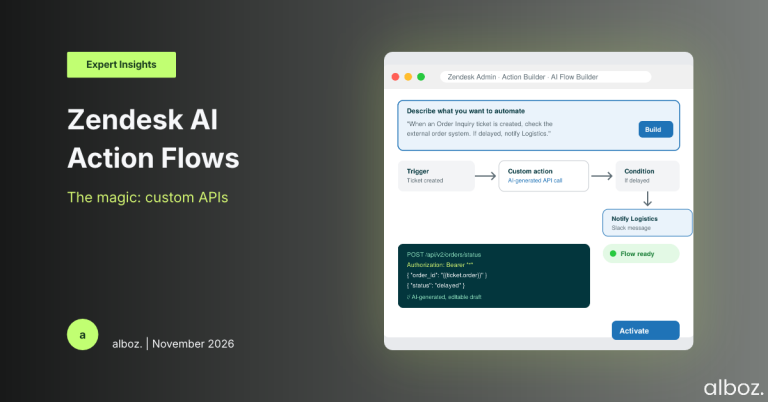
The new Zendesk AI action flows feature is a generative AI layer built on top of this. Instead of manually building the workflow step-by-step, you can now simply describe the process you want to automate in plain English. You write a prompt like, “When a ticket with the form ‘Order Inquiry’ is created, get the order status from our external order system. If the status is ‘delayed’, add an internal note to the ticket and notify the ‘Logistics’ Slack channel.”
The AI then takes this description and automatically generates a complete visual workflow in Action Builder, complete with the necessary triggers, conditional branches, and actions. It’s crucial to understand that this generated flow is an editable first draft, not a final, ready-to-go automation. You still need to review it, configure the specific connections to your other systems, and test it thoroughly.
Our Expert Opinion: The Custom Action Generator is the Real Star
While the overall concept is impressive, our team believes the most impactful part of this announcement is the AI’s ability to generate custom actions for external APIs. This is a genuine game-changer.
Previously, if you wanted your workflow to interact with an internal system or a third-party application that didn’t have a pre-built connector in Zendesk, you were in for some technical work. Someone on your team needed to be comfortable reading API documentation, structuring JSON payloads, and manually configuring HTTP requests with the correct headers and authentication methods. This often created a bottleneck, forcing CX teams to wait for developer resources to build even simple integrations.
With Zendesk AI action flows, you can include a step in your prompt like “…retrieve an order status from an external order system…” and the AI will attempt to generate the necessary custom API action for you. It builds the scaffold of the API call, which you can then review and refine. This transforms a potential development project into a much simpler configuration task. It empowers skilled Zendesk admins to build integrations that were previously out of reach, dramatically increasing their autonomy and the speed at which they can deliver value.
This is where we see the most significant operational win. It enables teams to be more agile, connecting Zendesk to proprietary databases or niche applications without a lengthy development cycle. Of course, this capability is dependent on having the right licence (Suite Professional and above) and access to both Admin Copilot and the base Action Flows feature.
How We’d Handle the Rollout: An Implementation Checklist
Here is what we’re advising our clients to do to prepare for and safely adopt Zendesk AI action flows. Rushing into this without a plan can create messy, unreliable automations. A structured approach is key.
| Phase | Action Items | Key Considerations |
|---|---|---|
| 1. Validate & Prepare |
| Don’t roll this out to all admins at once. Start with a small, controlled group who can learn its nuances and establish best practices. |
| 2. Identify Use Cases |
| Choosing the right first project is critical for building momentum. Identifying the best opportunities is where our experience as a Zendesk Consultant provides immense value to our clients. |
| 3. Build Your First Flow |
| Analyse the AI’s logic. Does it match your business process exactly? Look for potential edge cases the AI might have missed. |
| 4. Configure, Test, & Deploy |
| Never activate a new, complex workflow without thorough testing. The “review and edit” step is the most important part of this entire process. |
In conclusion, the introduction of Zendesk AI action flows is more than just a convenience feature; it’s a strategic tool that lowers the barrier to sophisticated automation. By empowering admins to translate business needs directly into functional workflows, Zendesk is accelerating the journey toward a more integrated and efficient customer service operation. It encourages teams to think in terms of outcomes and processes, leaving the more tedious parts of the technical implementation to the AI. This is a powerful step forward, and we’re excited to see how our clients leverage it to innovate.