Zendesk is constantly evolving, with new features dropping almost every day. Our experts are here to cut through the noise and tell you what really matters. Here’s our take on a recent update from October 20th.
Finally! Zendesk Unique Custom Fields for Custom Objects are Here
What We Think: This is a fantastic, if overdue, enhancement for anyone serious about data integrity in Zendesk. The ability to enforce Zendesk unique custom fields on custom objects is a game-changer for data hygiene and, more importantly, for creating robust integrations with external systems like CRMs and ERPs. It moves custom objects from being simple data containers to behaving more like a proper database, which is exactly what advanced use cases demand. It’s a small toggle with a massive impact on data reliability.
The Reality Check: What’s Actually Changing?
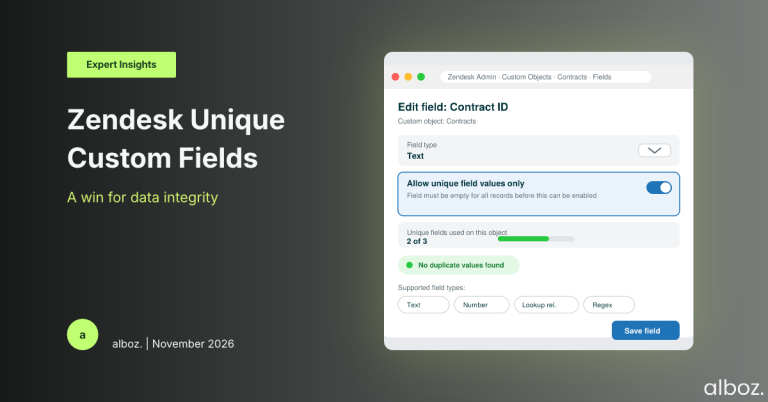
Let’s cut through the jargon. Zendesk now allows you to set a custom field on a custom object to accept only unique values. When you create or edit a custom field, you’ll see a new option: “Allow unique field values only.”
Here’s the breakdown:
- Supported Fields: This feature works for Text, Number, Lookup Relationship, and Regex field types.
- Limit: You can set up to three unique fields per custom object. This gives you a good amount of flexibility.
- The Big Catch: If you want to make an existing field unique, it must be completely empty across all of your existing records. This is a critical point to remember and requires careful planning if you’re retrofitting this to a live object.
Essentially, this stops you or your systems from accidentally creating duplicate records based on a key identifier, like an Order Number or a Contract ID.
Our Expert Opinion: Why This Matters More Than You Think
On the surface, this seems like a minor tweak. But for anyone managing complex workflows or syncing data between Zendesk and other platforms, this is a huge win. Previously, your only truly unique identifiers on a custom object were the record’s `name` or its `external_id`. This created a common, frustrating problem.
Imagine you have a “Contracts” custom object. Your agents know the contract by a human-friendly name like “Enterprise Support Plan – Acme Corp.” But your billing system knows it by a strict, non-negotiable ID: “CT-10482.” Before this update, you had to make a choice:
- Use the system ID “CT-10482” as the record `name`. This is great for integrations but confusing for agents.
- Use the friendly name and rely on the `external_id` for system syncing, which works but adds a layer of abstraction.
With the new Zendesk unique custom fields, you get the best of both worlds. You can keep the friendly, descriptive record name that agents understand, while creating a separate “Contract ID” custom field. By marking this new field as unique, you’ve created a rock-solid, reliable key for your integrations to use for lookups, updates, and deletes via the API. This dramatically reduces the risk of data drift or duplicate entries, which is a constant headache for administrators. It elevates the utility of Zendesk Custom Objects to a new level of professionalism, making them far more powerful for building custom solutions.
This is a fundamental feature for any organisation that views Zendesk not just as a ticketing system, but as a central hub for customer data. Enforcing uniqueness is a cornerstone of good database design, and it’s great to see Zendesk bringing this capability to custom objects.
How We’d Handle the Rollout: An Action Plan
Here is what we’re advising our clients to do. The approach depends on whether you’re working with a new or an existing custom object.
For new custom objects, the process is simple: during field creation, just tick the “Allow unique field values only” box for the field you want to use as your external key. Easy.
For existing custom objects with data, it’s much trickier due to the “field must be empty” rule. You’ll need to perform some data surgery. We’ve put together a strategic checklist for this scenario:
| Step | Action | Our Advice |
|---|---|---|
| 1. Audit & Identify | Review your custom objects. Which ones are synced with external systems? Identify the field that should be unique (e.g., `order_id`, `contract_number`). | Don’t skip this. Choose a field that is guaranteed to be unique in your source system of record. This is your foundation. |
| 2. Data Export & Cleanup | Export all records from the custom object. Open the data in a spreadsheet and check the chosen field for duplicates. Merge or correct any you find. | This is the most critical and time-consuming step. Your unique field logic is only as good as your data. Get it clean before you proceed. |
| 3. Create a Temporary Field | In your Zendesk custom object, create a new temporary text field (e.g., “Contract ID – Temp”). | This is your holding pen for the data while you make the change. |
| 4. Data Migration (Part 1) | Using the Zendesk API, move all the values from your original field (e.g., `contract_id`) to the new temporary field (`contract_id_temp`). | Your original field must be completely empty across all records before you can make it unique. Verify this carefully. |
| 5. Enable Uniqueness | Go to the settings for your original field and enable the “Allow unique field values only” option. Save the changes. | This is the point of no return. Once enabled, the field will reject any duplicate values. |
| 6. Data Migration (Part 2) | Using the API again, move the data back from the temporary field to your original, now-unique field. | Because you cleaned the data in Step 2, this migration should succeed without errors. |
| 7. Finalise & Update | Delete the temporary field. Update your integration logic to use the new Zendesk unique custom fields for API lookups and updates. | Your integration will now be faster and more reliable. This is a big payoff for the effort involved. |
In conclusion, while the rollout for existing objects requires careful planning, the long-term benefits of implementing Zendesk unique custom fields are immense. This update provides a much-needed layer of data governance, ensuring that your custom object data remains clean, reliable, and perfectly in sync with your other business-critical systems. If you’re using custom objects, we highly recommend you evaluate and implement this feature.