
Zendesk’s platform never sleeps, and neither do their feature releases. Get the expert opinion on the latest updates right here, as they happen.
Zendesk Finally Brings Action Flows into the Audit Log: A Huge Win for Governance
What We Think:
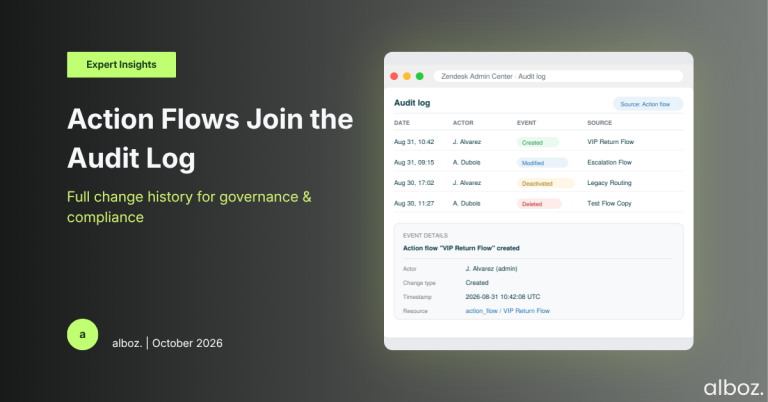
Zendesk has announced that all changes to Action Flows—creations, modifications, activations, deactivations, and deletions—will now be captured in the main Zendesk Audit Log. This is a significant and long-overdue improvement. Previously, you could only see performance data in a temporary 7-day Integration Log, leaving a massive gap in change management and accountability. Our verdict: This is a crucial update for any team that relies on automation, especially those in regulated industries or with multiple administrators. It elevates Action Flows from a useful tool to a governable, enterprise-ready feature.
The Reality Check: Cutting Through the Jargon
So, what’s actually changing here? Let’s break it down. Before this update, if you wanted to see what an Action Flow was doing, you’d look at the Integration Logs. This was fine for troubleshooting a live flow that was misbehaving, but it had two major drawbacks: the logs only lasted for seven days, and more importantly, they didn’t tell you *who changed the flow’s configuration*. If an admin accidentally broke a critical automation, figuring out who made the change and when was a painful process of elimination.
Now, that’s all changed. Zendesk is bringing Action Flows into the fold of the central Zendesk Audit Log. This is the same place you go to see who changed a trigger, updated a user’s permissions, or modified a business rule. It provides a permanent, searchable record of every configuration change made to your Action Flows. You’ll be able to see:
- Who made the change (the specific admin or agent).
- What the change was (created, updated, deleted, etc.).
- Which specific Action Flow was affected.
- When the change occurred.
The one critical thing to remember is that this is not retroactive. The log will only start capturing changes from the moment the feature is rolled out to your account. It won’t magically show you the history of changes made last month.
Our Expert Opinion: Why This Is a Bigger Deal Than You Think
Zendesk’s announcement highlights two key benefits: accountability and compliance. From our perspective, they are spot on, and the real-world impact is massive. For years, the lack of proper auditing for powerful automation tools like Action Flows has been a significant operational risk for many of our clients.
On the accountability front, this update eliminates the “who broke the automation?” mystery. In any team with more than one admin, it’s easy for someone to make a small, well-intentioned change to a flow that has unforeseen consequences. Without a proper audit trail, this leads to finger-pointing, wasted time investigating, and a general reluctance to improve or innovate on existing automations for fear of breaking them. The Zendesk Audit Log now provides a clear, indisputable record, fostering a culture of ownership and more careful change management.
From a compliance standpoint, this is a game-changer. Many of our clients in finance, healthcare, and other regulated sectors are required to maintain strict records of all system changes. The previous lack of logging for Action Flows made it difficult to prove compliance for processes automated through them. Now, you can easily export logs to satisfy auditors and demonstrate a robust internal control framework. This moves Action Flows from a “grey area” to a fully compliant part of your CX toolkit.
How We’d Handle the Rollout: An Action Plan
Just because a feature is released doesn’t mean you automatically get the full benefit. A little process goes a long way. Here is what we’re advising our clients to do to maximise the value of this new logging capability.
| Step | Action Item | Why It’s Important |
|---|---|---|
| 1. Communicate the Change | Inform all of your Zendesk administrators and anyone with permission to create or edit Action Flows that their changes are now being formally logged. | This isn’t about scaring people; it’s about raising awareness and reinforcing the importance of careful, deliberate changes to your automations. |
| 2. Review Permissions | Use this update as an opportunity to review who has the rights to manage Action Flows. Is the list of admins appropriate? Should some users have their permissions scaled back? | The principle of least privilege is key to security and stability. Not everyone who needs to see a flow needs to be able to edit it. |
| 3. Establish a Change Protocol | Create a simple, lightweight process for making changes to critical flows. This could be as simple as requiring a note in a shared channel before modifying a live, customer-facing automation. | The audit log is a record of what happened, but a good protocol prevents bad things from happening in the first place. This is a core part of the governance strategy we build for clients via our Zendesk consulting services. |
| 4. Create a Baseline | Since the logging isn’t retroactive, take 30 minutes to document the current state and purpose of your most important Action Flows. A simple screenshot and a one-line description can be invaluable. | This gives you a manual “version 1.0” snapshot of your key automations before the new, detailed change history begins to accumulate. |
| 5. Integrate into Reviews | Make a point to periodically review the Zendesk Audit Log for Action Flow changes as part of your regular system health checks or security reviews. | Regularly checking the logs ensures you catch unexpected or unauthorised changes quickly, turning data into actionable intelligence. |
In summary, while this announcement might seem like a minor technical update, it represents a significant step forward in the maturity of Zendesk’s automation capabilities. By providing a clear and permanent record of changes, it enhances security, simplifies compliance, and fosters a more accountable and professional administrative culture. If you have any questions about how this impacts your specific setup, don’t hesitate to reach out to your alboz. Solution Consultant.


