
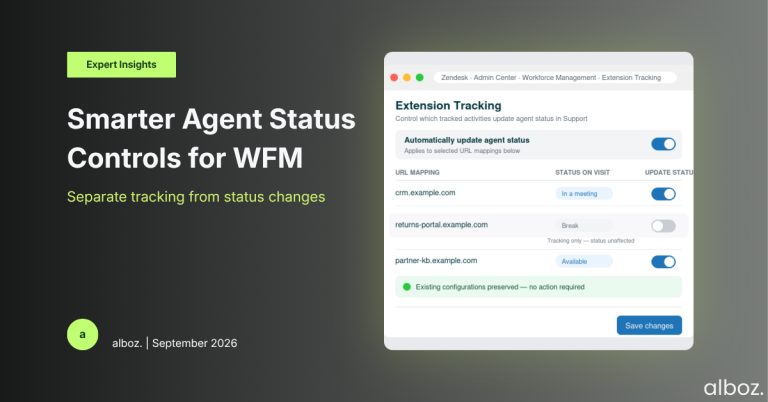
Zendesk is constantly evolving, with new features and updates rolling out almost every week. Keeping up can be a full-time job, but that’s where we come in. Here’s our expert take on the latest change from August 2026.
Zendesk WFM Just Got Smarter: Your Guide to the New Agent Status Controls
What We Think: This is a small but mighty update that we’re genuinely excited about. Zendesk is finally giving administrators granular control over how the Workforce Management (WFM) Chrome extension handles automatic Zendesk Agent Status Updates when agents visit external sites. Previously, it was an all-or-nothing affair. Now, you can choose precisely which tracked activities should trigger a status change and which should be for tracking purposes only. Our verdict: This is a massive win for operational flexibility, accurate reporting, and reducing agent frustration. It’s a simple change that solves a significant real-world problem for complex support teams.
The Reality Check: What’s Actually Changing?
Let’s cut through the jargon. If you use Zendesk Workforce Management and its accompanying Chrome extension, you know the deal. You set up URL mappings to track how long your agents spend on other websites, like your CRM or an external knowledge base. In the past, whenever an agent visited one of those tracked URLs, the extension would automatically change their Zendesk status to whatever you’d configured.
While useful, this was rigid. It assumed every tracked activity was a “break” or a specific “task” that warranted a status change, which isn’t always the case. An agent might be referencing a partner portal while actively working on a ticket, but the system could incorrectly mark them as unavailable for other work.
With this new update, Zendesk has introduced a simple toggle. Admins can now decide on a per-mapping basis whether a tracked URL should only be tracked for time, or if it should also trigger a status update. The best part? The default behaviour is preserved, so nothing will break when this rolls out. Your existing configurations will continue to work as they always have until you decide to change them.
Our Expert Opinion: Why This Matters More Than You Think
The key takeaway here is the separation of activity tracking from status management. This has been a long-standing request from operations managers, and for good reason. The old system forced a false choice: either track an activity and accept a potentially inaccurate status change, or don’t track it at all and lose valuable data.
We believe the most significant benefit lies in creating “tracking-only workflows.” Imagine your team uses an external, specialised tool for handling complex returns. You want to know how much time they spend in that tool for performance and coaching analysis, but you don’t want them to be marked as “In a meeting” or “Unavailable” in Zendesk, as they are still actively working on customer issues. Now, you can do exactly that. The WFM extension will log the time spent on the returns portal without disrupting their omnichannel availability.
This update builds on the powerful foundation Zendesk has been creating for workforce management, similar to other major enhancements we’ve seen, such as their move toward AI-powered WFM solutions. It empowers WFM teams to gather comprehensive data on agent activity without negatively impacting real-time operations. This finer control over Zendesk Agent Status Updates allows for a much more nuanced and accurate picture of an agent’s day, leading to better reporting, fairer evaluations, and more efficient routing.
This is a clear signal that Zendesk is listening to feedback on the operational realities of running a contact centre. It’s a move away from rigid automation towards flexible, intelligent configuration, and we’re all for it.
How We’d Handle the Rollout: A Practical Action Plan
While Zendesk has ensured nothing will break, simply ignoring this update would be a missed opportunity. To implement this change safely and effectively, we are advising our clients to follow a structured approach. Here is the checklist we’ve developed:
| Phase | Action Item | Key Consideration |
|---|---|---|
| 1. Audit & Identify | Review all your current URL mappings in the WFM Extension Tracking configuration. Have your team leads identify which mappings are causing frustration or inaccurate statuses. | Which activities are productive work but are being flagged as “unavailable” time? These are your primary candidates for becoming “tracking-only” mappings. |
| 2. Communicate Clearly | Inform your team leads and agents about this new capability. Explain that you’ll be refining the system to more accurately reflect their work state. | This prevents confusion when agents notice their status no longer changes automatically for certain sites. Frame it as an improvement to make their lives easier. |
| 3. Implement in Phases | Start small. Choose one or two of the most problematic URL mappings you identified. In the settings, change them to be tracking-only by deselecting “Update agent status.” | Monitor the impact over a day or two. Are the WFM reports still capturing the time correctly? Is agent availability in Support behaving as expected? |
| 4. Full Rollout & Monitor | Once you’re confident with the pilot group, apply the changes to all other identified mappings. Continue to monitor agent feedback and WFM reports for a week. | A successful rollout of new Zendesk Agent Status Updates controls will result in more accurate reporting and a better agent experience. Confirm this is the case before considering the project complete. |
Ultimately, this update is a powerful new lever for optimising your contact centre operations. It provides the flexibility to match your tracking and status rules to the way your team actually works. By moving from blunt automation to precise configuration, you can gain deeper insights without disrupting productivity. If you’re unsure how to best leverage these new controls or want to perform a full audit of your WFM setup, please reach out to your alboz. Solution Consultant.


