
Zendesk continues to roll out enhancements at a rapid pace. Keeping up can be a full-time job, but that’s what we’re here for. Here’s our expert breakdown of the latest feature drop.
Zendesk Action Scheduling: Set It, Forget It, and Let Automation Do the Rest
What We Think: The new Zendesk Action Scheduling is a small but mighty addition to Action Builder. For years, automation in Zendesk has been primarily reactive, kicking off when a ticket changes. This update finally allows for proactive, time-based automation. It’s a game-changer for automating routine operational tasks, reporting, and data maintenance that aren’t tied to a specific ticket event. We think this is a fantastic step toward making Zendesk a more powerful operational hub, not just a reactive support tool.
The Reality Check: What’s Actually Changing?
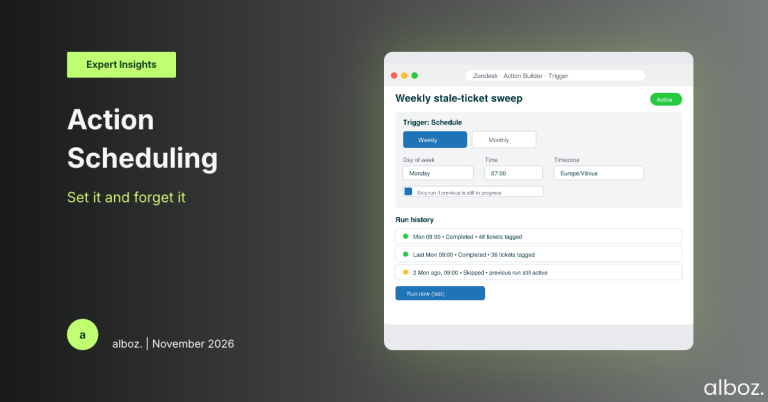
Let’s cut through the jargon. At its core, this announcement introduces a new way to trigger an “Action Flow” inside Zendesk’s Action Builder. Previously, these flows could only be initiated by an event, like a ticket being created or updated. Now, you have a new option: “Schedule.”
This means you can build a workflow and configure it to run automatically on a recurring basis, specifically:
- Weekly on a specific day and time.
- Monthly on a specific day of the month and time.
Once you set the schedule and activate the flow, Zendesk takes care of the rest, running the workflow like clockwork. You don’t need a ticket, a trigger, or any manual intervention to get it started. Each scheduled execution is logged in the run history, so you can still monitor and troubleshoot it just like any other action flow.
Our Expert Opinion: The Real-World Impact
Our take is that the true power of Zendesk Action Scheduling lies in its ability to automate the mundane but necessary tasks that keep a support organisation running smoothly. Many crucial processes don’t start with a customer email. They are administrative, preventative, or analytical. This is where scheduling shines.
The announcement gives a few examples, but let’s dive into what they really mean for your operations:
- Automated Operational Checks: Imagine a flow that runs every Monday morning. It could search for tickets that have been ‘On-hold’ for more than 7 days, add an internal note tagging the team lead, and apply a special tag for review. Or it could find all tickets from your VIP customers that are still open and post a summary to a dedicated Slack channel for the account management team. This moves you from manually chasing stale tickets to having an automated system do the nagging for you.
- Recurring Reports and Notifications: This is a big one for us. Instead of a manager having to manually pull a report on agent performance or ticket backlog every Friday, you can schedule an action flow to do it. The flow could gather the relevant data via API calls and then send a formatted summary email or a Slack message to stakeholders. While Zendesk Explore is powerful, getting key metrics delivered proactively can be a huge time-saver. If you’re looking to build more sophisticated reports to power these automations, you might find some inspiration in our Zendesk Explore recipes.
- Scheduled Data Updates: Data hygiene is a constant battle. You could now schedule a monthly flow to search for user profiles with missing data fields and apply a tag, or check for organisations that haven’t had a ticket in over a year and mark them for archival. This keeps your Zendesk instance clean and your data reliable without requiring manual clean-up projects.
This new scheduler transforms Action Builder from a purely reactive tool into a proactive one, which is a significant strategic shift. It allows you to build workflows that manage the system itself, not just the tickets within it.
How We’d Handle the Rollout: An Action Plan
Here is what we’re advising our clients to do to take advantage of this new capability safely and effectively. Don’t just turn it on; plan your automation strategy first.
| Phase | Key Actions | Our Advice |
|---|---|---|
| 1. Identify Opportunities | Brainstorm all the manual tasks your team performs on a weekly or monthly basis. Think reporting, ticket clean-up, escalations, and data checks. | Start with low-risk, high-impact tasks. A weekly reporting notification is much safer than a flow that automatically closes tickets. |
| 2. Map the Logic | For each identified task, outline the exact steps required. What conditions need to be met? What actions should be taken? | Whiteboard the flow first. Ensure every step and condition is crystal clear before you even open Action Builder. This will save you hours of troubleshooting. |
| 3. Build & Test (in Sandbox!) | Create your action flow in your Zendesk Sandbox. Configure the logic and actions you mapped out in the previous step. | Never build automation in production. Use the “Run now” test feature within Action Builder to validate the logic against test data before setting any schedule. |
| 4. Deploy & Monitor | Once you’re confident it works, recreate the flow in your production environment, set the desired weekly or monthly schedule, and activate it. | For the first few scheduled runs, check the ‘Run history’ to ensure the flow executed successfully and did exactly what you intended. Keep an eye on it to prevent unintended consequences. |
In closing, the introduction of Zendesk Action Scheduling is a welcome and powerful enhancement. It addresses a long-standing need for time-based automation, enabling teams to build more proactive and efficient operational workflows directly within the platform. If you need help identifying the best use cases or building out these flows, don’t hesitate to contact your alboz. Solution Consultant. We’re excited to see the creative solutions our clients build with this new tool.


