
Zendesk continues its relentless pace of innovation, dropping new features and enhancements on an almost daily basis. Keeping up can be a full-time job, so we’re here to give you our expert opinion on the latest updates from June 2026.
Zendesk Action Builder Gets a Major Power-Up: Our Take on the 5 New Connectors
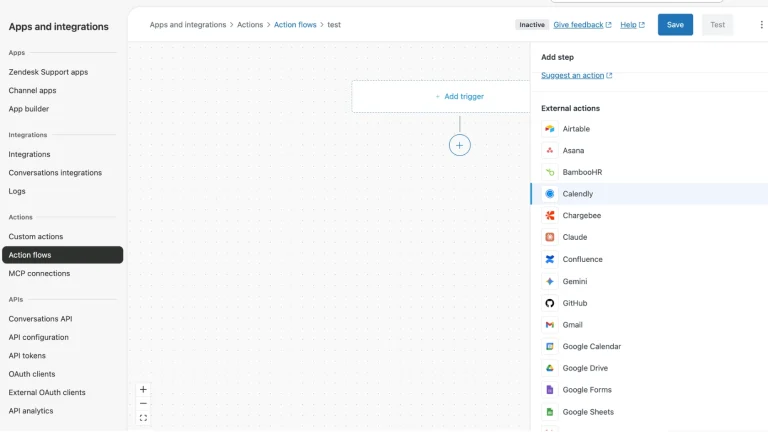
What We Think: Zendesk has just rolled out five critically important new connectors for the Zendesk Action Builder: HubSpot, Chargebee, Stripe, Calendly, and GitHub. This is a game-changing update. It moves Zendesk further away from being a siloed support tool and closer to becoming a true command centre for your entire customer lifecycle. By directly integrating with core sales, billing, and engineering platforms, Zendesk is empowering agents to resolve complex issues faster and without ever leaving the ticket interface. This is a huge win for agent efficiency and overall customer experience.
The Reality Check: What’s Actually Changing?
Let’s cut through the jargon. Zendesk has added five new native integrations to its automation engine, the Zendesk Action Builder. This means you can now create automated workflows that perform actions in external systems directly from a Zendesk trigger, like a ticket update. Previously, this often required complex, custom-built solutions or third-party middleware.
These new connectors are designed to bridge the gap between your support team and other key business functions:
- HubSpot: This connects your support conversations to your CRM. Agents can create and update contacts, companies, deals, and even HubSpot tickets, ensuring your sales and support data are always in sync.
- Chargebee & Stripe: These are your billing powerhouses. Agents can now handle subscription management (pausing, cancelling, issuing credit notes in Chargebee) and payment tasks (processing refunds, creating invoices in Stripe) without needing to switch tabs or ask the finance team for help.
- Calendly: A simple but powerful addition for streamlining operations. This allows agents to generate booking links, send invitations, and search for events, eliminating the tedious back-and-forth of scheduling follow-up calls.
- GitHub: This creates a direct pipeline between your support desk and your engineering team. Agents can escalate bugs, create or update feature requests as GitHub issues, and track progress without leaving Zendesk.
According to the announcement, these connectors are being rolled out to all accounts with access to action flows, so there’s no action required on your part to get access.
Our Expert Opinion: Breaking Down the Silos
Our expert opinion is that the real story here isn’t just about the five individual connectors; it’s about the combined power they represent. The single biggest drag on agent productivity and a major source of customer frustration is context switching and internal escalations. An agent has to put a customer on hold while they log into a separate billing system or send a message to the engineering team and wait for a response.
The new Zendesk Action Builder connectors directly attack this problem. Imagine a workflow: a customer reports a bug that’s also causing a billing error. With this update, a single agent, working within a single ticket, can:
- Use the Stripe connector to issue a partial refund for the billing error.
- Use the HubSpot connector to update a note on the customer’s company record about the issue.
- Use the GitHub connector to create a new, detailed bug report, linking it directly to the Zendesk ticket.
- Use the Calendly connector to send the customer a link to book a follow-up call once the bug is resolved.
This entire process, which once might have involved three different teams and taken hours or days, can now be handled by one agent in minutes. This is a massive leap forward in operational efficiency. It empowers your support team to take true ownership of customer issues from start to finish, which is the cornerstone of exceptional service.
How We’d Handle the Rollout: A Phased Approach
Here is what we’re advising our clients to do. Don’t try to boil the ocean. The power of these new tools can be overwhelming. We recommend a phased approach, starting with simple, high-impact automations and building complexity over time. Identify your team’s most common, repetitive cross-platform tasks and start there.
We’ve put together a strategic checklist to help you prioritise your implementation:
| Connector | Initial Use Case (Low-Hanging Fruit) | Advanced Use Case | Team(s) to Involve |
|---|---|---|---|
| HubSpot | Automatically create or update a HubSpot contact when a new Zendesk user is created. | When a ticket is tagged “sales-lead,” create a new Deal in HubSpot and assign it to the correct sales rep. | Support, Sales, Marketing |
| Stripe | Allow agents to search for a customer’s payment history or latest invoice from within the ticket. | Build a one-click macro that triggers an action flow to process a standard refund for a specific amount. | Support, Finance |
| Chargebee | Display a customer’s current subscription status directly in the Zendesk user profile. | Create an automation to pause a customer’s subscription for 30 days when a specific ticket form is submitted. | Support, Billing, Customer Success |
| GitHub | Create a new GitHub issue from a ticket with a single click, automatically including the ticket link and description. | Two-way sync: When a linked GitHub issue is closed, automatically update the Zendesk ticket status to “Solved.” | Support, Engineering |
| Calendly | Create a macro that inserts a generic support team booking link into a ticket comment. | Based on a “Product Area” ticket field, trigger an action flow to send a specific specialist’s Calendly link. | Support, Onboarding, Success |
This is a genuinely exciting evolution for the Zendesk platform. By integrating these key business tools directly into the agent workspace, Zendesk is providing the foundation for a more unified, efficient, and ultimately more satisfying customer experience. We strongly encourage you to explore these new connectors and identify the quick wins that can immediately reduce friction for your agents and your customers.


