Zendesk is constantly refining its platform, and this month is no different. We’re here to cut through the noise, break down the latest updates, and give you our expert take on what they mean for your daily operations.
Our Take on the New Zendesk QA Spotlights: More Control, Less Clutter
What We Think:
Zendesk’s upcoming enhancements to its Quality Assurance spotlights are a welcome and practical quality-of-life update. While not a revolutionary new feature, the ability to toggle system spotlights and the cleaner user interface directly address common user feedback about noise and relevance. Our verdict is that this is a solid improvement that gives QA managers more control to tailor the tool to their specific needs, allowing reviewers to focus on what truly matters. It’s a move towards a more refined and efficient QA workflow.
The Reality Check: What’s Really Changing?
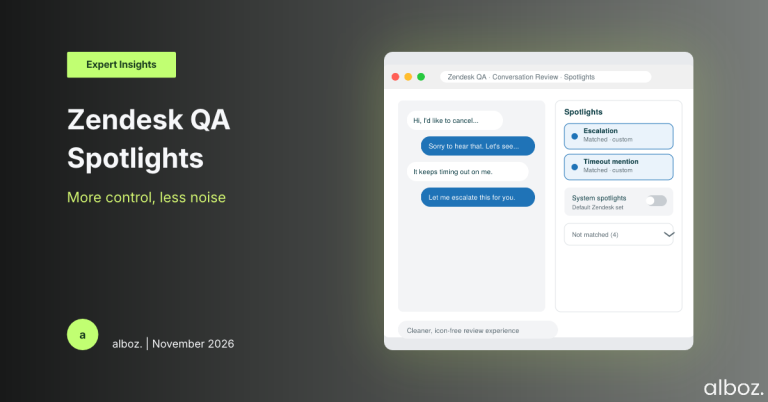
On October 21, 2026, Zendesk is rolling out a few key changes to how Zendesk QA Spotlights work within the conversation view. For those unfamiliar, Spotlights are essentially automated flags that use keywords or phrases to highlight conversations for quality review. This update is all about customisation and cleaning up the interface. Let’s break down what’s happening without the marketing fluff.
- The System Spotlight Switch: Previously, you were stuck with Zendesk’s default, system-defined spotlights. Now, administrators will have a simple toggle to turn them on or off. This is the most significant part of the announcement.
- A Cleaner, Icon-Free Look: The UI is getting a tidy-up. Zendesk is removing the icons from the spotlights interface to reduce visual clutter.
- A “Not Matched” Drawer: To help reviewers focus, any spotlights that are checked but don’t find a match in the conversation will be tucked away neatly into a separate “Not matched” drawer. This separates the signal from the noise.
- On-Demand Evaluation: You’ll be able to trigger a “Deep evaluation and verification” simply by clicking on a spotlight, making the process more interactive and direct.
Essentially, Zendesk is giving you the tools to filter out irrelevant information and make the QA interface a more focused workspace for your team.
Our Expert Opinion: The Deep Dive
The headline feature here, in our expert opinion, is the system spotlight toggle. It might sound like a small change, but its operational impact is significant. Every organisation has a unique language and set of priorities. Zendesk’s default spotlights, while a good starting point, can often be irrelevant to a specific team’s workflow.
For example, a default spotlight for the word “cancel” is useful for a B2C subscription company, but it’s just noise for a B2B technical support team that doesn’t handle account closures. Previously, QA reviewers had to mentally ignore these irrelevant flags, adding to their cognitive load and slowing them down. Now, an admin can simply switch them off.
This empowers organisations to curate the QA experience to match their own quality rubrics and business context. By removing what isn’t important, you inherently increase the visibility and weight of what *is* important—your own custom-built spotlights. The new “Not matched” drawer complements this perfectly. It acknowledges that you might want to check for certain keywords, but if they aren’t there, it doesn’t need to clutter the primary view. It’s a smart piece of user-centric design that respects the reviewer’s time and attention.
These changes collectively shift Zendesk QA Spotlights from a one-size-fits-all tool to a more flexible framework that you can build upon. It’s a clear signal that Zendesk is listening to users who want more control over their workspace.
How We’d Handle the Rollout: An Action Plan
While Zendesk will automatically roll this update out to all QA customers, “no action required” doesn’t mean “no opportunity to improve.” To get the most out of these new features, you need a plan. Here is what we’re advising our clients to do in preparation for the October 21st update.
If you need guidance on optimising your quality assurance programme, our Zendesk Services team can help you build a strategy that aligns with your business goals.
| Step | Action Item | Why It Matters |
|---|---|---|
| 1. Audit Your Current Spotlights | Before the change, create a list of all active System Spotlights in your instance. Review them against your internal quality scorecard and business goals. | This gives you a clear baseline. You can’t decide what to turn off if you don’t know what’s currently active and whether it’s providing any value. |
| 2. Consult Your QA Team | Speak with the managers and agents who perform the quality reviews. Ask them which spotlights they find useful and which ones they consistently ignore. | Your team on the ground knows the workflow best. Their feedback is crucial for making informed decisions and ensuring the changes are genuinely helpful. |
| 3. Plan Your Configuration | Based on your audit and team feedback, decide which System Spotlights you will disable on day one. Document this decision. | Having a plan prevents haphazard changes. It ensures you’re customising the tool with a clear purpose: to improve reviewer focus and efficiency. |
| 4. Communicate the UI Changes | Prepare a brief communication for your QA team explaining the upcoming interface changes (the new drawer, no icons) and the cleanup of system spotlights. | Preventing confusion is key. A heads-up ensures the team understands why the interface looks different and how it benefits them, leading to faster adoption. |
| 5. Review & Refine | A month after the changes go live, check in with the QA team to see how the new, cleaner workflow is performing. Be prepared to re-enable a spotlight if you find it’s needed. | Optimisation is an ongoing process. This follow-up ensures your initial configuration is working as intended and allows for further refinement. |
In conclusion, this update to Zendesk QA Spotlights is a fantastic step towards a more intelligent and user-friendly quality assurance process. By giving admins the power to declutter and customise the environment, Zendesk is helping QA teams focus their valuable time on the conversations and insights that will truly drive performance improvements.