Zendesk is constantly evolving, rolling out updates and new features on a near-daily basis. Keeping up can be a challenge, but we’re here to provide our expert take on what’s new. Here’s our analysis of an update from July 2026.
Finally! Personalised Zendesk Voice Ringtones Are Here, and It’s a Bigger Deal Than You Think
What We Think: At first glance, customisable Zendesk Voice Ringtones might seem like a trivial update. However, we see it as a significant, if small, quality-of-life improvement that directly addresses agent experience (AX). It’s a classic example of a “small hinge that swings a big door.” Giving agents control over their auditory environment can reduce stress, improve focus, and boost morale in a high-pressure contact centre. We’re fully on board with this one.
The Reality Check: What’s Actually Changing?
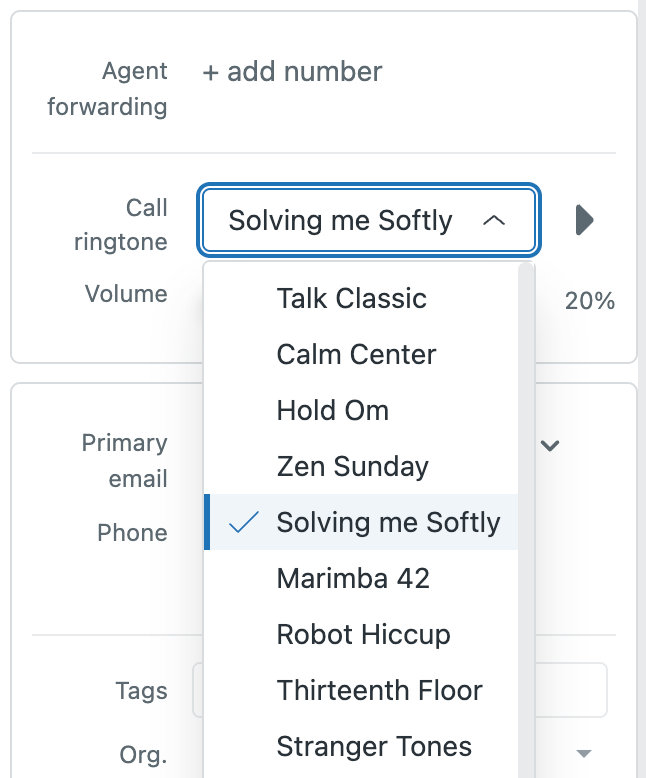
Let’s cut through the jargon. Zendesk is rolling out a feature that has been highly requested by voice agents for a long time. Effective mid-July 2026, every agent using Zendesk Voice will be able to personalise their incoming call alert. This isn’t a system-wide setting controlled by an admin; it’s a personal preference that each agent manages from their own user profile.
Specifically, two new options are appearing in the user profile settings:
- Call ringtone: Agents can choose from a library of 20 different ringtones.
- Volume: The volume of the ringtone can be turned up or down.
There are a couple of important operational details to note. First, the ringtone volume cannot be completely muted. This is a smart move by Zendesk to prevent agents from accidentally missing calls. The volume control only impacts the incoming ringtone, not the outbound dialling tone. Second, and this is critical, agents must be in an ‘Away’ or ‘Offline’ status to change their ringtone or volume. Attempting to change these settings while on a call could lead to disconnection.
Our Expert Opinion: The Surprising Impact of Auditory Choice
Zendesk themselves call this a “small but highly requested feature,” and they’re right on both counts. But we think the “small” part undersells the daily impact. For an agent handling dozens or even hundreds of calls a day, the constant, repetitive sound of a single, unchangeable ringtone can become a significant source of stress and irritation—a phenomenon often called ‘alarm fatigue’ or ‘ringtone fatigue’.
What we’re advising our clients to appreciate is the psychological benefit of this change. Providing agents with a choice, even a seemingly minor one like picking from 20 Zendesk Voice Ringtones, gives them a sense of control and autonomy over their workspace. It allows them to customise their environment in a way that best suits their focus and personality. An agent who finds the default tone jarring can switch to something calmer. Another might prefer a more upbeat tone to keep their energy levels high.
This isn’t just about making agents happier; it’s about performance. The right auditory cue can help an agent mentally prepare for the next interaction. A less grating sound can reduce cognitive load, freeing up mental energy to focus on the customer’s issue. In a busy, open-plan office, allowing agents to choose distinct ringtones can also help them more easily distinguish their own incoming calls from their colleagues’, reducing confusion and speeding up response times.
How We’d Handle the Rollout: A Simple Plan for a Smooth Transition
While this feature is straightforward, a little proactive communication goes a long way. You don’t want agents disconnecting their own calls because they weren’t aware of the ‘Away/Offline’ status requirement. Here is what we’re advising our clients to do to ensure a seamless adoption of the new Zendesk Voice Ringtones.
| Step | Action | Key Consideration |
|---|---|---|
| 1. Announce the Change | Send a clear, concise internal communication (email, Slack/Teams message) to all voice agents before the feature goes live. | Frame it as a positive agent-focused update. Highlight the benefit: “You can now choose a ringtone that works for you!” |
| 2. Provide Clear Instructions | Include simple, step-by-step instructions on how to access the settings (Avatar > Manage profile). | Crucially, bold and underline the requirement to be in ‘Away’ or ‘Offline’ status before making changes. Explain that this prevents accidental call drops. |
| 3. Encourage Exploration | Suggest that agents take a few minutes at the beginning of their shift, while in an offline status, to explore the 20 ringtone options and find one they like. | This turns a simple feature update into a small, positive team moment and encourages immediate adoption. |
| 4. Gather Informal Feedback | Ask team leaders to check in with agents after a week to see what they think of the new options. | This reinforces that you care about their work environment and can provide valuable anecdotal feedback on agent morale. |
In summary, while the introduction of customisable ringtones won’t revolutionise your contact centre, it’s a thoughtful enhancement that demonstrates a focus on the agent experience. By empowering agents with more control over their digital workspace, Zendesk is helping to create a more positive and less stressful environment, which invariably leads to better customer conversations. It’s a small update, but one we’re genuinely pleased to see.