Zendesk never sleeps, rolling out updates and new features on an almost daily basis. Keeping up can be a full-time job. That’s where we come in—here’s our expert analysis to help you understand what matters.
Beyond the Dashboard: Our Take on the New Zendesk Monitoring Assistant
What We Think:
The new Zendesk monitoring assistant is a significant and practical upgrade for any team lead or supervisor. It bridges the critical gap between observing a problem in the real-time dashboard and actually solving it. By allowing supervisors to take immediate action on agent status, skills, and ticket assignments using natural language commands, Zendesk is removing friction and reducing context-switching. Our verdict is that this is a fantastic quality-of-life improvement that empowers supervisors to be more agile and responsive. However, its effectiveness is entirely dependent on having a solid foundation, specifically with omnichannel routing enabled.
The Reality Check
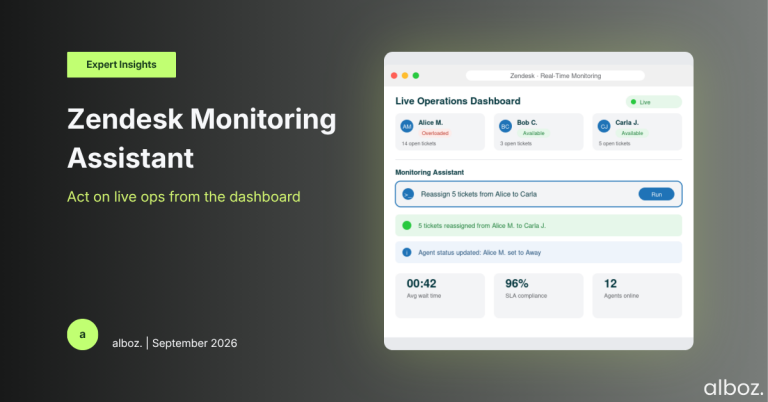
Let’s cut through the marketing language. Zendesk has embedded a command-line interface, powered by natural language processing, directly into the real-time monitoring dashboards. In simple terms, instead of seeing a problem (like an agent with too many tickets) and having to navigate to different menus to fix it, a supervisor can now just type a command into an assistant right there on the dashboard.
Think of it like this: rather than a multi-click process to change an agent’s status, you can now simply type “Update agent Alice’s status to away.” Need to rebalance workload? Type “Reassign 5 tickets from Bob to Carol.” It’s designed to turn insights from the dashboard into instant actions, saving precious seconds that add up significantly during a busy day.
Our Expert Opinion: The Power of “In-the-Moment” Management
The real story here isn’t just about saving a few clicks; it’s about enabling supervisors to manage their teams “in the moment.” In a dynamic contact centre environment, situations change rapidly. An agent might need to step away unexpectedly, a particular queue might see a sudden surge, or an AI bot may need to escalate a complex issue. The traditional workflow—spot the issue on a dashboard, switch tabs or screens to the admin panel, find the right agent or ticket, make the change, and then switch back—is inefficient and disruptive.
This is where the Zendesk monitoring assistant truly shines. It keeps the supervisor’s focus exactly where it needs to be: on live operations. By allowing for commands like updating agent capacity, adding skills, or reassigning tickets directly, the tool empowers a more fluid and proactive management style. This has a direct operational impact:
- Reduced Customer Wait Times: Tickets are less likely to be routed to or sit with an unavailable agent.
- Improved Agent Utilisation: Supervisors can rebalance workloads on the fly, preventing agent burnout and ensuring work is distributed evenly.
- Maintained Reporting Accuracy: Agent statuses can be updated instantly, ensuring that reports on availability and productivity are always accurate.
This is a clever and practical application of AI that goes beyond simple analytics. It’s about command and control, which is a crucial component of effective workforce management. For teams leveraging a mix of human and AI agents, the ability to escalate tickets from a bot to a human with a simple command is another huge efficiency gain. It’s a great example of how features from the broader Zendesk AI offering are being thoughtfully embedded to improve core workflows.
How We’d Handle the Rollout
Here is what we’re advising our clients to do. Turning on a new feature is easy; ensuring it’s adopted and used effectively takes a plan. We recommend a phased approach to implementing the Zendesk monitoring assistant.
| Phase | Action Item | Our Key Consideration |
|---|---|---|
| 1. Foundational Check | Confirm prerequisites are met: Access to real-time dashboards, Explore admin/editor permissions, and most importantly, that Omnichannel Routing is enabled. | This is non-negotiable. If you haven’t enabled Omnichannel Routing, this feature won’t work. It’s a major step, so if you need guidance on its impact, contact your alboz. Solution Consultant. |
| 2. Supervisor Training | Hold a dedicated session with supervisors. Don’t just show them the feature; demonstrate its value with real-world scenarios like a sudden agent absence or a queue spike. Provide a “cheat sheet” of common commands. | Focus on the “why” not just the “how.” Adoption will skyrocket if supervisors see it as a tool that makes their job easier and less stressful. |
| 3. Pilot Programme | Roll out the feature to one or two of your most experienced supervisors first. Let them test it for a week and gather their feedback. | This helps you understand how the natural language processing interprets your team’s specific ways of speaking and identifies any commands they wish were available. It also creates internal champions for the wider rollout. |
| 4. Full Launch & Review | Enable the monitoring assistant for all supervisors. After a month, review its usage. Are they using it? If not, investigate why. | Low adoption often points to a gap in training or a misunderstanding of the benefits. Follow up to ensure everyone is comfortable and confident using the new tool. |
In closing, the new Zendesk monitoring assistant is a powerful addition for team leaders. It effectively transforms the real-time dashboard from a passive reporting tool into an active command centre. By enabling supervisors to react instantly to operational changes without leaving their core workspace, Zendesk is delivering a tangible improvement that can lead to better efficiency, more accurate reporting, and a more responsive customer experience.