Zendesk is constantly evolving, with new features and enhancements dropping almost daily. Keeping up can be a challenge, but we’re here to cut through the noise. Here’s our expert take on the latest update from September 2nd, 2026.
Zendesk’s Google Sheets Actions Just Got a Two-Way Superpower: Our Expert Breakdown
What We Think:
This is a fantastic, practical enhancement that transforms the Google Sheets integration from a simple data-dumping tool into a genuinely interactive part of your automated workflows. The ability to not just add rows, but to search, read, and update existing data in Google Sheets directly from a Zendesk workflow is a huge win for operational efficiency. It directly tackles the tedious “swivel-chair” problem where agents have to manually look up or update information in spreadsheets. We see this as a high-impact, low-effort feature that many of our clients will be able to leverage immediately.
The Reality Check: What’s Actually Changing?
Let’s cut through the jargon. Zendesk has an automation tool called “action flows” which allows you to connect Zendesk to other systems. One of those systems is Google Sheets. Previously, this connection was mostly a one-way street: you could automatically add a new row to a sheet when something happened in Zendesk (like a ticket being created).
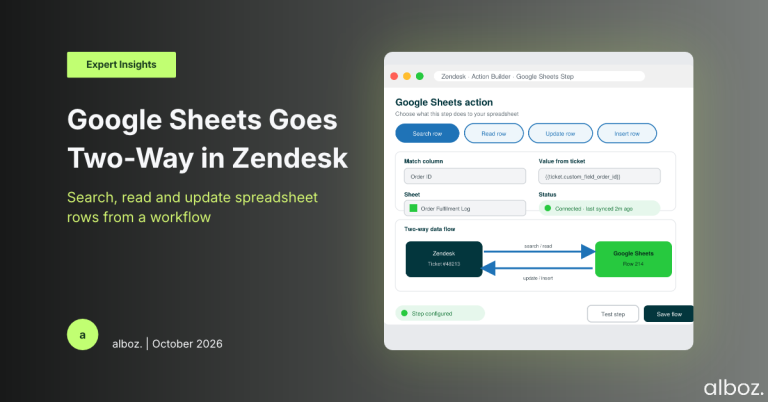
As of September 2nd, 2026, Zendesk has significantly upgraded this connection. The new Zendesk Google Sheets Actions now allow you to perform more complex tasks within your spreadsheets as part of an automated workflow. Specifically, you can now:
- Search for matching data: Find a specific row in your sheet based on a piece of information from the ticket, like a customer ID or order number.
- Read the contents of a specific row: Once you find the row, you can pull data from it to use in your Zendesk workflow.
- Update an existing row: Change the data in a cell or an entire row that you’ve found.
- Insert a row: The original functionality of adding a new row remains.
In short, your workflows can now have a proper conversation with your spreadsheets, instead of just shouting new information at them.
Our Expert Opinion: The End of the VLOOKUP Scramble
The real value here is the reduction of manual data entry and context switching. So many support teams rely on Google Sheets as a supplementary database, a makeshift CRM, or a shared log for tracking orders, returns, or feature requests. The problem has always been bridging the gap between the Zendesk ticket and the relevant row in the spreadsheet. This update builds that bridge.
Let’s analyse the operational impact of these new actions. The ability to Search and Read a row is a game-changer. Imagine a workflow where a new ticket comes in with an order number. Instead of the agent having to copy that number, switch to a Google Sheet, and manually search for the order status, an action flow can do it automatically. The flow can search the sheet for the order number, read the “Status” column, and post the result as an internal note on the ticket. The agent gets the context they need instantly, without ever leaving Zendesk.
The Update an existing row action is just as powerful. Think about a return merchandise authorisation (RMA) process. When an agent processes a return and closes the ticket, a workflow can now automatically find the corresponding order in a logistics sheet and update its status from “Shipped” to “Return Initiated”. This eliminates the risk of human error and ensures that a shared resource like a spreadsheet is always up-to-date. This kind of seamless integration is crucial for building robust business processes, and for more complex needs that go beyond this connector, exploring custom solutions through our Zendesk API and integrations service is the next logical step.
How We’d Handle the Rollout: A Phased Approach
While the new Zendesk Google Sheets Actions are powerful, we advise a measured rollout to ensure stability and get the most value. Here is what we’re advising our clients to do.
| Phase | Key Actions | Our Rationale |
|---|---|---|
| 1. Discovery & Identification |
| Start with the biggest pain points. Don’t try to automate everything at once. Focusing on high-volume, repetitive tasks will deliver the biggest initial impact and prove the value of the new feature. |
| 2. Sandbox Testing |
| Never test in production. Using a sandbox environment and a copy of your data ensures that you can experiment and iron out any kinks without disrupting live operations or corrupting your master data source. |
| 3. Phased Deployment |
| A controlled rollout minimises risk. By monitoring a small-scale deployment, you can catch any unexpected behaviour before it affects the entire team or your entire dataset. |
| 4. Documentation & Expansion |
| Clear communication and documentation are key to successful change management. Ensure agents understand what is now automated so they don’t continue doing it manually, which could cause conflicts. |
In summary, the new Zendesk Google Sheets Actions are a significant step forward for no-code automation within the Zendesk ecosystem. By enabling two-way communication between your helpdesk and your spreadsheets, Zendesk is empowering teams to build smarter, more efficient workflows that reduce manual effort and minimise human error. If your team uses Google Sheets for anything related to your support process, we highly recommend you explore these new capabilities. If you need a hand mapping out your use cases or building your first action flow, you can always contact your alboz. Solution Consultant for guidance.