Zendesk is constantly evolving its platform, releasing updates that can sometimes fly under the radar. Here’s our expert take on the latest changes announced this September.
Zendesk’s New Usage Notifications: Finally, Granular Control Over Your AI Spend
What We Think:
Zendesk is introducing new, highly configurable Zendesk usage notifications for automated resolutions and resolution allowances, starting September 1, 2026. This is a significant and welcome upgrade. It moves beyond simple, reactive alerts to provide proactive forecasting and, crucially, allows you to control exactly who receives these notifications. For any organisation leveraging Zendesk’s AI capabilities, this is a massive win for managing costs and preventing surprise overage invoices. Our verdict: This is a must-configure feature that empowers admins to be proactive, not reactive, about their AI consumption and budget.
The Reality Check: What’s Really Changing?
Let’s cut through the jargon. At its core, this update is all about giving you better visibility and control over how much you’re using (and spending on) Zendesk’s automated resolution features. Previously, managing this could feel like a bit of a black box, with the potential for unexpected bills at the end of the month.
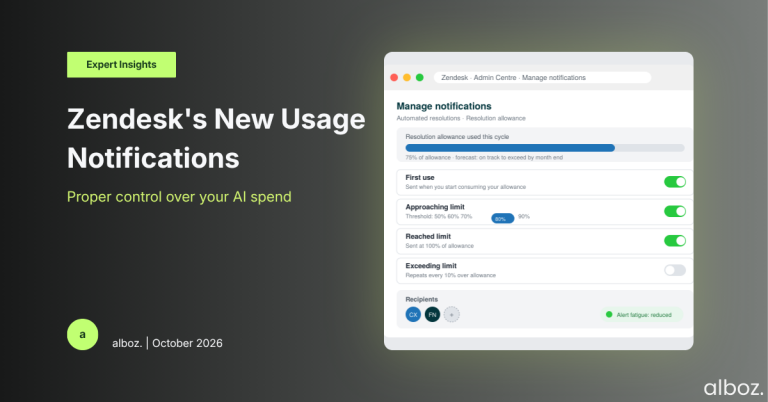
Starting from September 2026, you will automatically start seeing new in-product banners and receiving emails about your usage. The key change is the introduction of a new “Manage notifications” page within Admin Centre. This dashboard is your new command centre for everything related to these alerts.
The new notification types are designed to give you a full picture of your consumption journey:
- First Use Notification: An alert when you start consuming your allowance.
- Forecasted Possible Overage: A predictive alert that your current usage trend may exceed your allowance.
- Approaching Limit: A notification when you hit a specific percentage of your allowance (you can set this from 50% to 90%).
- Reached Limit: An alert when you’ve used 100% of your allowance.
- Exceeding Limit: Notifications that are sent for every 10% you go over your allowance.
Our Expert Opinion: Why This Is a Game-Changer
The real power here isn’t just the new alerts, but the deep level of configurability. The days of “alert fatigue,” where every admin gets spammed with every single notification, are over. Zendesk’s announcement highlights that you can control which admins are notified for each usage event. This is a subtle but incredibly important feature for operational efficiency.
The “Forecast” notification is the undisputed star of this update. For years, teams have had to manage usage by looking in the rearview mirror. This proactive alert allows you to look ahead. If you receive a forecast that you’re on track to exceed your limit, you have time to react. You can analyse the source of the automated resolutions, tweak your bot flows, or make an informed decision to approve the overage, knowing the cost implications in advance.
This transforms budget management from a reactive exercise into a strategic one. You can now align your notification strategy with your team’s structure. For example, your Head of CX might only want the forecast and the 90% threshold alerts, while your finance partner might need to be on the distribution list for any “Exceeding Limit” notifications. This granular control ensures the right information gets to the right people at the right time, without creating unnecessary noise. These enhanced Zendesk usage notifications provide the clarity that has been missing.
How We’d Handle the Rollout: A 4-Step Action Plan
Here is what we’re advising our clients to do. The most important thing to know is that by default, all your admins will be opted-in to receive these notifications. To avoid overwhelming your team, you need a plan to customise these settings as soon as they become available.
| Step | Action | Our Rationale |
|---|---|---|
| 1. Identify Stakeholders | List out everyone who has a vested interest in automated resolution usage. This typically includes the primary Zendesk Admin, the CX/Support Manager, and potentially a contact in your Finance or Operations department. | Different roles require different information. The person managing the budget has different needs from the person building the bot flows. |
| 2. Map Roles to Alerts | Decide which notification types each stakeholder should receive. For example, the CX Manager gets “Approaching Limit” and “Forecast,” while the Finance contact gets “Exceeding Limit” alerts. | This ensures relevant, actionable information is sent to the right people, preventing alert fatigue and ensuring accountability. |
| 3. Configure in Admin Centre | Once the feature rolls out, navigate to the “Manage notifications” page and configure your rules based on the map from Step 2. Actively remove admins from alerts they don’t need. | An out-of-the-box configuration rarely fits a specific business need. A periodic review of these settings is a core part of our Zendesk Health Check, as it ensures your instance is optimised for your unique operational workflow. |
| 4. Communicate & Document | Inform the selected stakeholders about which alerts they will now receive and what the expected action or response is for each one. Document this configuration internally. | Clear communication prevents confusion and ensures that when an alert is received, the recipient knows exactly what it means and what they need to do next. |
In conclusion, this is a robust and well-thought-out enhancement from Zendesk. By providing proactive alerts and deep customisation, these new Zendesk usage notifications give organisations the tools they need to responsibly manage their investment in AI-powered support. We strongly advise all our clients to review and configure these settings to align with their budget and operational strategy, turning a potential cost centre into a predictable and manageable tool.