Zendesk consistently rolls out new features, sometimes multiple times a week. Our team of experts is here to cut through the noise and tell you what really matters for your CX operations. Here’s our take on the latest update for August 2026.
Tidier Tickets or a Redaction Headache? Our Take on Zendesk Collapsible Transcripts
What We Think: The new Zendesk collapsible transcripts feature is a welcome user interface improvement for teams overwhelmed by long call notes in Zendesk Voice. It promises a cleaner, more scannable ticket interface, which is a clear win for agent efficiency. However, the trade-off is significant: you lose the ability to manually redact information from these transcripts. Our verdict? It’s a great feature for teams who rely solely on automatic redaction, but a potential compliance risk for those who need granular, manual control. Proceed with caution.
The Reality Check: What’s Actually Changing?
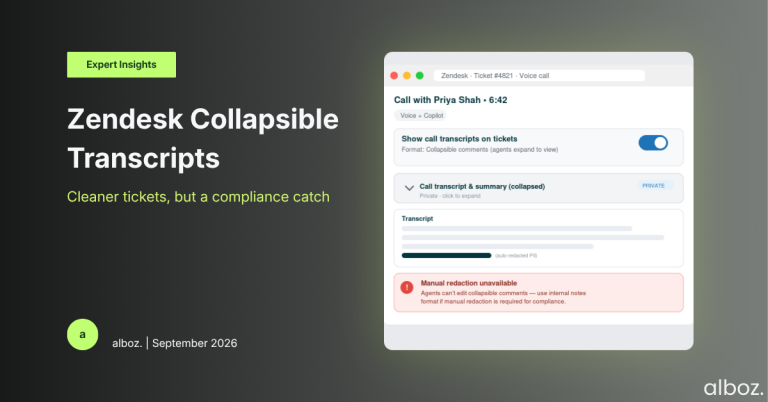
Let’s cut through the jargon. If you use Zendesk Voice and have the Copilot add-on, you’re familiar with how call transcripts and AI-generated summaries are added to tickets. By default, they appear as long internal notes, which can make for a lot of scrolling, especially after a lengthy customer conversation. This new feature introduces a simple choice for administrators.
You can now decide how these transcripts and summaries appear:
- As Internal Notes (The Default): This is the way it has always worked. The full text is visible in the ticket conversation thread as an internal note.
- As Collapsible Comments (The New Option): This displays the transcript and summary as a tidy, collapsed comment. An agent must click to expand it and read the full text.
The goal is straightforward: to reduce ticket clutter and help agents get to the important information faster without wading through pages of text. Importantly, this setting only affects calls that happen *after* you change it; all your existing tickets will remain as they are. This update to Zendesk collapsible transcripts aims to streamline the agent’s view, but as we’ll see, it comes with a critical caveat.
Our Expert Opinion: The Devil is in the Redaction Details
On the surface, this is a fantastic quality-of-life improvement. We’ve heard from many clients that agent tickets can become unwieldy, and any feature that improves scannability is a win. Zendesk’s reasoning is sound: improve agent efficiency and maintain ticket readability while preserving the value of the transcript for things like QA and compliance.
However, our expert opinion is that the most important sentence in this entire announcement is this one: “Manual redaction is not available for collapsible comments.”
This is a major operational consideration. While Zendesk’s automatic redaction for PII (Personally Identifiable Information) and PCI (Payment Card Industry) data is good, it’s not foolproof. Machines can miss things, especially if a customer spells out sensitive information in an unusual way or provides data that doesn’t fit a standard pattern. Many of our clients, particularly those in finance, healthcare, or other highly regulated sectors, rely on their agents or QA teams to perform a final manual review and redact any sensitive data the automated system might have missed.
By switching to the new collapsible format, you completely remove this safety net. Once the transcript is in the ticket as a collapsible comment, it cannot be edited by an agent. This could turn a simple UI preference into a significant compliance risk. For teams where every piece of sensitive data must be scrubbed, the efficiency gain from a cleaner ticket view may not be worth the risk of un-redacted data being permanently logged.
How We’d Handle the Rollout: A Strategic Checklist
Here is what we’re advising our clients to do before enabling this new feature. It’s not a simple “on” or “off” decision; it requires careful thought about your specific workflows and risk tolerance.
| Action Item | Key Consideration | Our Recommendation |
|---|---|---|
| Review Your Redaction Workflow | Do your agents or QA specialists ever need to manually edit or remove information from call transcripts or summaries? How strict are your industry’s data privacy regulations? | If the answer is ‘yes’ to manual redaction, do not enable this feature. Stick with the “internal notes” format to retain full editing and control. The risk is simply too high. |
| Assess Your Primary Pain Point | Is the main complaint from your agents about “ticket clutter” and excessive scrolling? Is it impacting their ability to quickly find customer context? | If manual redaction is not a part of your workflow and agent efficiency is a key goal, then enabling collapsible comments is a smart move. |
| Communicate the Change Clearly | Agents need to understand what this change means for their day-to-day work. | Before making the change, send out a clear communication. Explain what the new format looks like and, most importantly, highlight that the content of these comments is un-editable. |
| Update Internal Documentation | Does your agent training or QA process documentation refer to reviewing or editing transcripts? | Ensure all relevant guides and knowledge base articles are updated to reflect the new workflow and its limitations. This is a crucial step in any successful Zendesk optimisation project. |
In summary, the introduction of Zendesk collapsible transcripts is a positive development for improving the agent experience within the ticket interface. It directly addresses a common complaint about information overload. However, the loss of manual redaction capability is a critical trade-off that cannot be ignored. We advise a cautious approach: evaluate your compliance and operational needs thoroughly before embracing this new, cleaner view. If you are unsure how this might impact your specific setup, please reach out to your alboz. Solution Consultant for guidance.