Zendesk continues to roll out platform enhancements at a rapid pace. Here’s our expert opinion on the latest update announced on October 13, 2026.
Zendesk Finally Unlocks True Workflow Power: AND/OR Conditions Have Arrived
What We Think:
This is a game-changer for workflow administration. The introduction of Zendesk AND/OR conditions and grouping in Action Builder is one of the most significant quality-of-life updates for admins in a long time. It moves beyond a simple feature enhancement and fundamentally improves how we can design and maintain clean, efficient, and scalable business logic. Our verdict: This is a massive win that will reduce complexity and save admins countless hours.
The Reality Check
So, what’s actually changing? For years, building complex routing in Zendesk often meant creating convoluted workflows with multiple, nearly identical branches. If you wanted to perform the same action for “Brand A” and “Brand B,” you’d often need two separate branches to check for each condition. It was clunky, difficult to maintain, and prone to error.
Zendesk is fixing this. You can now use sophisticated logic directly within a single trigger or branch step in Action Builder. Specifically, you get:
- Combine with AND: This means all specified conditions must be true for the action to fire. (e.g., Priority is Urgent AND Channel is Email).
- Combine with OR: This means any of the specified conditions can be true. (e.g., Brand is “A” OR Brand is “B”).
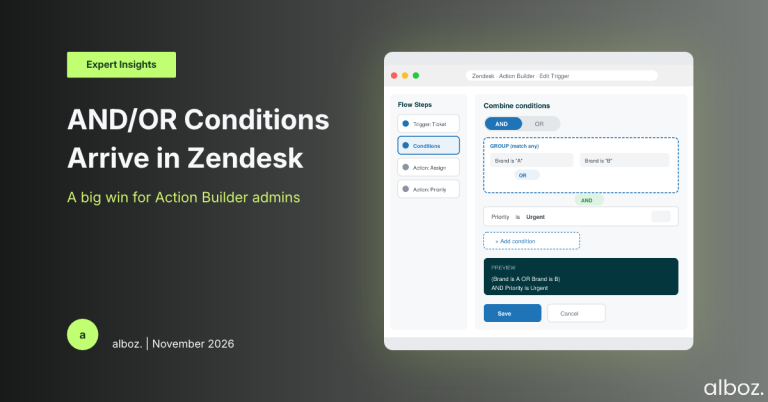
- Group Conditions: This is where the real power lies. You can now nest conditions to create highly specific rules, up to two levels deep. For example, you can now easily build a condition like (Brand is A OR Brand is B) AND Priority is Urgent.
In short, Zendesk is giving admins the logical tools they’ve been asking for, allowing for the creation of workflows that are both more powerful and dramatically simpler to manage.
Our Expert Opinion: The Deep Dive
The core benefit here isn’t just about adding new buttons; it’s about reducing administrative overhead and technical debt within your Zendesk instance. Every time an admin had to duplicate a branch just to change one minor condition, the workflow became a little more fragile and harder to troubleshoot. A simple change request could require updating five different branches instead of one.
The ability to use Zendesk AND/OR conditions directly addresses this pain point. Think about a common scenario: routing VIP customer requests. Previously, you might have a workflow that branches based on an organisation tag (“VIP”), a user tag (“vip_customer”), or if the ticket is from a specific email domain. This would require three separate branches, all leading to the same outcome: assigning to a Tier 2 group and raising the priority.
Now, you can accomplish this with a single, elegant condition: `(Organisation Tag contains ‘VIP’) OR (User Tag contains ‘vip_customer’) OR (Requester email ends with ‘@vipcorp.com’)`. It’s immediately clear what the rule is doing, it’s contained in one step, and if you need to add another VIP identifier later, you edit one condition, not build a whole new branch. This is how modern automation should work. This kind of workflow simplification is a key part of our Zendesk consulting practice, as it directly impacts an organisation’s operational efficiency.
How We’d Handle the Rollout
This is a powerful new tool, and we advise a strategic approach to implementation rather than a complete, immediate overhaul. The goal is to refactor thoughtfully to improve maintainability. Here is what we’re advising our clients to do:
| Step | Action | Why It’s Important |
|---|---|---|
| 1. Audit & Identify | Review your most critical and complex workflows in Action Builder. Specifically look for duplicated branches where the logic is 90% the same. | This helps you target the areas that will benefit most from simplification, ensuring you get the biggest return on your time investment. |
| 2. Prioritise for Impact | Start with 1-2 high-volume workflows that are notoriously difficult to manage. Don’t try to refactor everything at once. | Focusing on key flows proves the value of the new Zendesk AND/OR conditions and provides a clear “before and after” to showcase the efficiency gains. |
| 3. Test in Sandbox | Rebuild the logic for your chosen workflows in your sandbox environment. Test thoroughly with various ticket conditions to ensure it behaves exactly as expected. | Never experiment with routing logic in your production environment. The sandbox is your safety net to prevent any misrouted tickets or broken processes. |
| 4. Document the ‘Why’ | When you deploy the simplified workflow to production, update your internal documentation. Note that the workflow has been refactored using the new condition grouping feature. | This prevents future confusion and helps other admins on your team understand the new, cleaner structure at a glance. |
Our Closing Thoughts
The introduction of Zendesk AND/OR conditions and grouping is a fantastic enhancement. It empowers admins to build the sophisticated logic their businesses require without the unnecessary complexity that plagued older versions of the workflow builder. By cleaning up convoluted flows, teams can become more agile, respond faster to change requests, and spend less time untangling legacy routing rules. We’re thrilled to see this functionality and are already planning how to leverage it to streamline our clients’ operations.