Zendesk is constantly evolving its platform, and the latest update for September 2026 is a significant one for organisations using two of the biggest names in the industry. We’re here to give you our expert analysis.
Finally! Your Salesforce Knowledge Can Natively Power Zendesk AI
What We Think: This is a massive win for operational efficiency. The new native Zendesk Salesforce integration for knowledge bases directly addresses a long-standing pain point for businesses: siloed information. By allowing Zendesk’s AI tools, Copilot, and search to tap directly into your Salesforce Knowledge content, Zendesk is eliminating the need for cumbersome content migration or duplication. Our verdict? This is a genuinely useful feature that will immediately benefit companies invested in both platforms by creating a single, unified source of truth for support and sales knowledge.
The Reality Check: What’s Actually Changing?
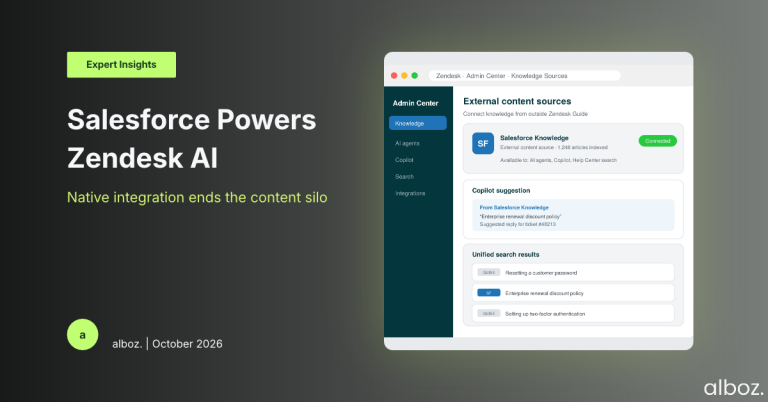
Let’s cut through the jargon. Zendesk has announced that you can now connect your Salesforce instance as an “external content source.” In simple terms, this means that any articles, guides, or FAQs you have stored in your Salesforce Knowledge Base can now be directly searched and utilised within the Zendesk ecosystem.
This isn’t just about showing a link. This content becomes a first-class citizen within Zendesk. It means:
- Your AI agents (bots) can be trained on and provide answers from your Salesforce articles.
- Copilot, the AI assistant for your human agents, can suggest relevant Salesforce articles to help resolve tickets faster.
- Your standard Help Center search and generative AI search can now return results from your Salesforce knowledge base alongside your native Zendesk Guide articles.
The key takeaway is that you no longer need to maintain two separate, and often conflicting, knowledge bases. You can manage your content where it makes the most sense for your business—in this case, Salesforce—and leverage it seamlessly within your Zendesk support environment.
Our Expert Opinion: The End of the Content Silo
For years, we’ve seen clients struggle with knowledge management across different platforms. Sales and success teams often live in Salesforce, building out a rich repository of product information, troubleshooting steps, and customer best practices. Meanwhile, the support team is doing the exact same thing in Zendesk Guide. This creates duplicate work, version control nightmares, and an inconsistent experience for both agents and customers.
This announcement is a direct solution to that problem. The most powerful impact, in our view, is on the AI capabilities. An AI model is only as intelligent as the data it has access to. By unlocking your entire Salesforce Knowledge library, you are giving Zendesk AI a treasure trove of high-quality, structured content to work with from day one. This dramatically reduces the time-to-value for implementing an AI agent, as you’re not starting from a blank slate.
This update significantly deepens the existing landscape of Zendesk Integrations. While the classic **Zendesk Salesforce integration** has always been great for syncing ticket, user, and organisation data, this adds a crucial knowledge layer. It transforms the connection from a simple data-passing tool into a cohesive, intelligent platform for unified customer engagement. It’s a strategic move by Zendesk to make its platform the central hub for all customer interactions, regardless of where the underlying knowledge is stored.
How We’d Handle the Rollout: A Phased Approach
Here is what we’re advising our clients to do. A successful implementation isn’t just about flicking a switch. It requires a thoughtful approach to ensure the right content is surfaced at the right time. Rushing this could lead to outdated or irrelevant information confusing your agents and customers.
Our take on a strategic rollout plan for this new Zendesk Salesforce integration capability:
| Phase | Key Actions | Our Advice |
|---|---|---|
| 1. Audit & Prepare |
| Don’t sync everything blindly. Some Salesforce content might be sales-specific or internal-facing. Curate what you want to expose to Zendesk to avoid noise. |
| 2. Configure & Connect |
| Start with a limited scope. Perhaps enable it for agent-facing tools like Copilot first, before making it available in your public-facing Help Center search. |
| 3. Test & Train |
| Your agents are your best resource for feedback. Empower them to report when search results are irrelevant or when Copilot suggestions miss the mark. |
| 4. Go Live & Monitor |
| Continuously refine. Use the data to understand which Salesforce articles are most helpful and which may need to be updated or excluded from the sync. |
In summary, this is a fantastic and long-awaited enhancement to the Zendesk Salesforce integration. By breaking down the walls between these two critical systems, you can create a more efficient workflow for your agents and a more intelligent self-service experience for your customers. If your organisation uses both platforms, we strongly recommend exploring this new capability. If you have any questions on how to best approach this for your specific setup, please reach out to your alboz. Solution Consultant.