
Twenty CRM for Zendesk
Stop wasting time switching tabs.
Bring requester context, company details and deals directly into your Zendesk sidebar.
Support teams shouldn't have to hunt through CRM tabs.
When a customer reaches out, every second spent searching Twenty is a second they wait for an answer.
✕
Is this requester linked to a company in Twenty?
✕
Which deals are open, and what stage are they in?
✕
Who owns this account right now?
Twenty for Zendesk surfaces the CRM context agents need,
the moment the ticket opens.
Everything agents need, without leaving Zendesk
Twenty for Zendesk brings essential CRM context into the ticket sidebar — contact details, company insight, open deals, and account ownership — so agents can respond faster with confidence. No tab switching. No CRM digging. Just the right context at the right time.
Instant Contact Snapshot
As soon as a ticket opens, agents see the matched Twenty contact with the details they actually need — name, email, phone, job title, LinkedIn, and city — all in one place.
Company & Ownership Context
When available, agents also see the requester’s primary company, including domain, ARR, employee count, and the current account owner, so conversations stay aligned with account reality.
Open Deal Visibility
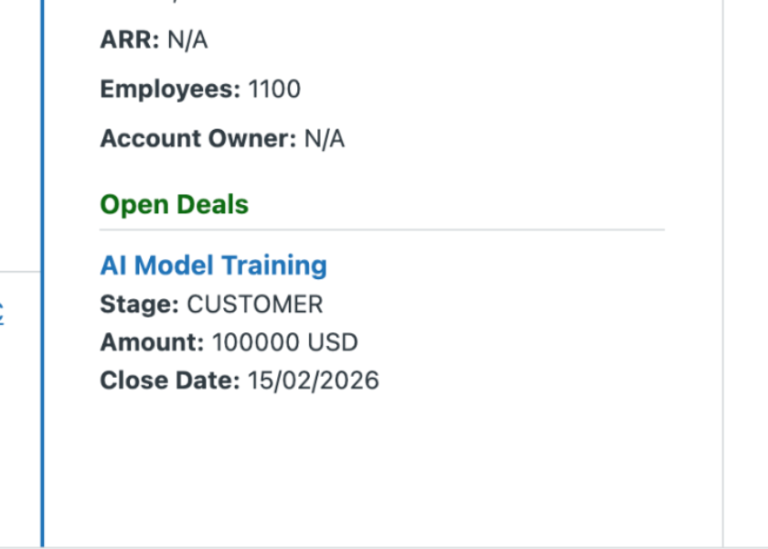
Open opportunities are shown directly in the sidebar with stage, amount, and close date, plus deep links to Twenty records when agents need full CRM detail.
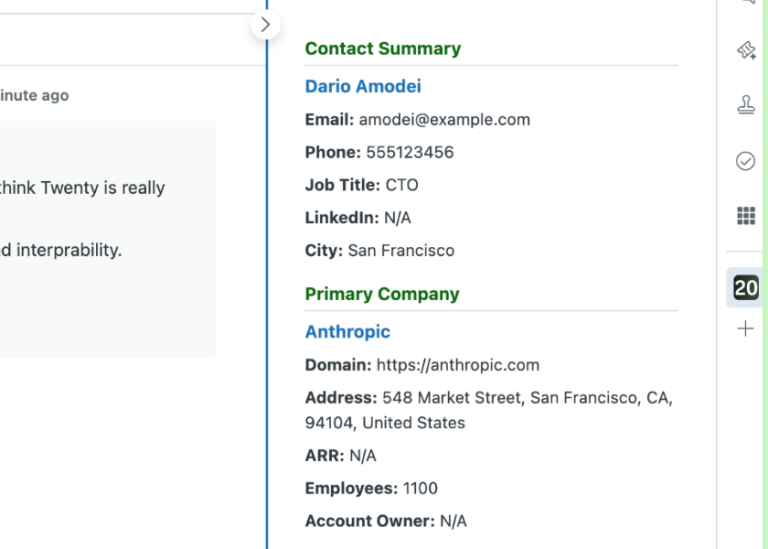
Instant context from your source of truth.
- Stop making agents cross-reference tabs. Automatic email matching resolves the Zendesk requester to the right person in Twenty.
- See key contact and company details at a glance: name, email, phone, title, company, ARR, employee count, and account owner.
- Give agents immediate confidence before they reply, with clear CRM context directly inside the ticket sidebar.
Open deal visibility at your fingertips.
- Support conversations often relate to commercial activity. The sidebar surfaces open opportunities tied to the requester.
- View deal essentials instantly: opportunity name, stage, amount, and close date.
- Use direct links to jump from Zendesk to Twenty when full deal detail is needed.
- Stay current as requester context changes, without forcing agents to manually refresh.
Ready to go in under 60 seconds.
Install: Add Twenty CRM Data Viewer to your Zendesk instance from the Marketplace.
Connect: In Twenty, create an API key in Settings → APIs & Webhooks, then paste it into api_token and set your workspace URL in app_base_url.
Verify: Open any ticket with a requester email that exists in Twenty. Contact, company, and open deal context now load automatically in the sidebar.
Frequently Asked Questions
How is data kept secure?
Your Twenty API key is stored as a secure Zendesk app setting. The app reads only the data needed to render sidebar context and calls Twenty’s hosted REST API at https://api.twenty.com/rest.
How does matching work?
The app matches the Zendesk requester to a person in Twenty using email. For best results, requester emails should be unique and maintained in Twenty.
What data does the app show?
The sidebar can show contact details, primary company context, account owner, and open opportunities (including stage, amount, and close date) when available in Twenty.
Does it update automatically when the requester changes?
Yes. The app refreshes automatically when the ticket requester changes, so agents see current context without manual reloads.
Does it create or update Zendesk Organizations?
No. This version is read-focused in the sidebar and does not create/update Zendesk organizations or organization memberships.
Do agents need direct access to Twenty?
No for core workflow. Agents can work from context in Zendesk, and only use deep links when they need full CRM detail.
Can I restrict what agents can use the app in Zendesk?
Yes. App availability is managed through Zendesk roles, groups, and app placement settings in your Zendesk admin configuration.